
Online identity explained: Protecting and managing your digital identity



Your online identity is the information about you that exists on the internet. This can include searches, accounts, purchases, and social media posts. It exists across multiple platforms, apps, and websites rather than in a single location.
Managing that identity means understanding what information exists online, who can access it, and how it might be misused. This article explains what makes up an online identity, the common risks associated with it, and how you can protect and take control over your online information.
What makes up your online identity?
Your online identity is made up of the information and signals that can be used to recognize you across the internet, including elements of a digital identity such as account credentials, identifiers, and online activity.
- Account identifiers: Usernames, email addresses, phone numbers, and account IDs linked to online services.
- Personal details: Names, profile photos, dates of birth, education history, workplaces, addresses, and contact information shared online.
- Behavioral data: Search history, browsing activity, purchases, video watch history, clicks, likes, shares, and app usage patterns.
- Device and network data: IP addresses, browser types, operating systems, device IDs, cookies, and browser fingerprinting data that help services recognize users or devices.
- Public activity and reputation signals: Comments, reviews, forum posts, tags, professional profiles, public portfolios, and mentions across websites or platforms.
Why your online identity matters
Your online identity matters because it affects your reputation, your privacy, and your security.
How online identity affects trust
People and organizations increasingly rely on online information when making decisions. Employers review social media and public profiles during hiring. Landlords may check online presence as part of screening. Financial institutions may also take publicly available information into account when assessing risk. What appears online under a person’s name can therefore shape real-world outcomes, regardless of whether it is complete or up to date.
The value of your digital footprint
A digital footprint has value because it reveals patterns, such as what someone does online, how often, and over time. Platforms use those patterns to personalize recommendations, detect unusual behavior, reduce spam, and decide which content appears most relevant.
Beyond that, this data also has commercial value. Data brokers often pull from public records, social media, and activity trackers to build detailed consumer profiles, which may then be used for advertising, market research, risk assessment, or background screening purposes.
Risks of an unmanaged online identity
An unmanaged or incomplete online identity can lead to:
- Misleading first impressions: Missing or uneven information can make an identity seem less clear, active, or credible than it actually is.
- Reputation damage: Old comments, low-quality posts, or negative mentions can carry more weight when there’s little accurate, updated information to balance them, which is why some people use reputation management services.
- Missed opportunities: Uncertainty can make people hesitate before hiring, buying, collaborating, or continuing an interaction.
- Confusion around real accounts: When several sources appear to represent the same identity, people may not know which one deserves trust.
- Loss of control over public context: If unmanaged information becomes the main reference point, others may draw conclusions from material the person doesn’t control.
Common online identity threats
If an online identity contains enough personal information, it can be exploited in one or more of the following ways: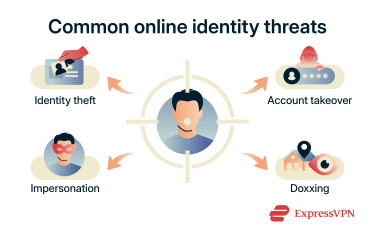
Identity theft
Identity theft happens when someone uses another person’s personal information as their own, usually for financial fraud or access to official services. Bad actors may use stolen IDs, breached databases, leaked personal data, or public records to apply for loans, bypass identity verification systems, file tax claims, or open accounts under someone else’s name.
Signs of identity theft
- Unexpected credit inquiries or new accounts on a credit report.
- Bills or collection notices for accounts that were never opened.
- Internal Revenue Service (IRS) notices about a duplicate tax return in the U.S.
- Medical claims for services never received.
- A sudden, unexplained drop in credit score.
Account takeover
Account takeover occurs when an attacker gains unauthorized access to a legitimate account, such as an email, banking, or social media account. Once inside, an attacker can drain funds, lock out the legitimate owner by changing recovery details, harvest contacts for phishing, or use the account to launch further attacks.
Signs of account takeover
- Login alerts from unfamiliar devices or locations.
- Password reset emails that weren't requested.
- Changes to account settings, recovery email, or phone number.
- Sent messages or posts that the account holder didn't write.
- Contacts reporting suspicious messages from the account.
Impersonation
Online impersonation is when someone creates a fake profile or presence using another person or organization’s name, photos, or identifying details without accessing their actual accounts. The goal can be financial, such as contacting friends and family to request money, or reputational, such as posting damaging content under someone else's identity.
Signs of impersonation
- Contacts receiving messages from an account that isn't yours.
- A duplicate profile appearing under your name and photo.
- Replies or mentions referencing content you never posted.
- Unexplained reputational damage linked to activity you didn't carry out.
Doxxing
Doxxing is the act of publicly publishing someone's private information online without their consent, typically a home address, phone number, workplace, or details about family members.
It often relies on combining individually harmless pieces of information, like a name, employer, and neighborhood, into a detailed enough profile to locate or target someone.
Signs of doxxing
- Unexpected contact from strangers who know personal details.
- A sudden influx of harassing messages across multiple platforms.
- Personal information appearing in public forums or social media posts.
- Unwanted deliveries to a home or workplace address.
- Friends or family being contacted by unknown people asking about the target.
How to protect your online identity
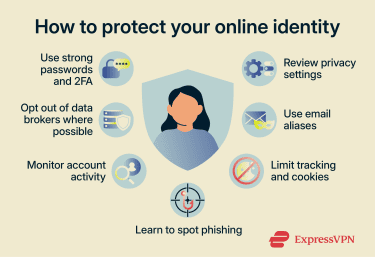
Protecting an online identity means reducing avoidable exposure, making accounts harder to misuse, and applying online privacy and security controls that help catch problems sooner.
Password and authentication security
Accounts hold a significant part of an online identity, as they often include personal information, communications, and transaction history. Credentials are what control access to them.
Weak or reused passwords create one of the fastest paths into connected accounts. Weak passwords can be cracked through automated tools, and reusing the same password across services means a single breach can expose multiple accounts at once.
A password manager, like ExpressKeys, can help generate strong and unique credentials for each service. It can also generate one-time passwords (OTPs) for two-factor authentication (2FA) on supported platforms, adding an extra verification layer.
Privacy settings and limiting your digital footprint
Reducing what is publicly visible helps limit how much information can be collected, combined, and used in relation to your online identity.
- Review privacy settings on every platform: Set profiles to private, restrict who can see posts or tag you, and remove personal details like phone numbers, addresses, and birthdays from public-facing profiles.
- Share only what's necessary: Before filling out a form or creating an account, consider whether the information being requested actually needs to be real or complete.
- Use an alias email for sign-ups: Services like ExpressMailGuard let you create aliases that forward mail to a primary inbox, keeping the real address out of third-party databases. Any alias that gets abused or leaked can be disabled without changing the actual email address.
- Decline optional cookies and tracking: Declining optional cookies helps prevent third-party trackers from following browsing activity across sites and building a behavioral profile linked to your identity.
Safe browsing and phishing prevention
Many identity attacks begin with phishing. Attackers impersonate trusted brands, banks, coworkers, or platform alerts to steal credentials and personal information through fake login pages, deceptive links, malicious attachments, or fraudulent support messages.
Protecting your online identity from these types of attacks often means verifying requests before taking action. Instead of clicking links in emails or text messages, it is safer to visit websites directly by typing the address yourself. Checking website domains carefully, avoiding unexpected downloads, and confirming unusual login or payment requests can also help prevent phishing attacks.
Read more: The ultimate guide to phishing detection
Monitoring tools and identity alerts
Monitoring tools can help users keep track of the information connected to their online identity. Features like dark web scans, login alerts, and breach notifications can reveal when passwords, email addresses, or account details have been exposed online or used in suspicious ways.
Many online services now send alerts for unusual sign-ins, password changes, or new device logins, so you can secure accounts quickly before unauthorized access spreads across connected platforms.
Data brokers and how to get off their lists
Data brokers gather personal details from public records, websites, apps, loyalty programs, and commercial databases, then package or sell that information to advertisers, businesses, and people-search platforms. In some cases, details linked to your online identity, such as phone numbers, addresses, relatives, or profile information, may become publicly searchable online.
Removing your information from these databases can help limit how much personal data is connected to your online identity. Many people-search websites and data brokers allow users to submit opt-out or data deletion requests, although the process is often manual and varies between platforms. Privacy laws in some regions also give users the right to request access to or deletion of certain personal data.
If you want to automate the process, tools like ExpressVPN Data Removal can help monitor data broker sites and submit removal requests on your behalf, making it easier to manage the personal information connected to your online identity. Data Removal is available to ExpressVPN Advanced and Pro subscribers in the U.S.
Learn more: How to remove yourself from data broker sites and protect your privacy
What to do if your online identity is compromised
If you suspect that your online identity has been compromised, you should act as quickly as possible to:
- Secure high-priority accounts first: Start with email, banking, cloud storage, and work accounts, since these are often used to reset other services tied to your online identity.
- Remove unauthorized access: Check active sessions, logged-in devices, recovery settings, email forwarding rules, and any third-party apps that could still have access.
- Update exposed credentials: Change any affected passwords immediately and enable multi-factor authentication to prevent further account takeovers.
- Contact relevant institutions: Inform banks, employers, platforms, or official agencies so they can secure accounts, reverse unauthorized actions, or investigate misuse.
- Warn trusted contacts: Let others know if your accounts may have been used to send messages or impersonate you, so they can ignore or report them.
Taking control of your online identity
Managing an online identity is an ongoing process. It involves reviewing what information is already online and shaping how it appears.
Auditing your current digital footprint
A digital footprint audit is a way to review what appears about you online and identify what may need updating or removal. It helps you understand which sources exist, who controls them, and which ones matter most.
- Search your identity across platforms: Look up your name, usernames, business names, and images in search engines to see what appears publicly.
- Review accounts based on control: Identify which profiles you can still access, which require recovery, and which may need to be deleted or left inactive.
- Identify sensitive information: Note any results that expose personal details such as contact information, location, family relationships, old jobs, or private photos.
- Check what shows up first: The first few search results often shape perception the most, so ranking is just as important as content.
Building a digital presence you control
A controlled online presence means making sure the most accurate and up-to-date information about you is easy to find and comes from sources you manage. You can do this by:
- Using one main profile as your reference point: This could be a personal website, portfolio, or professional profile that contains your current details and links to your other accounts.
- Keeping key information consistent: Use the same name format, photo (if applicable), and basic details across platforms so your profiles are clearly connected and up to date.
- Updating old profiles and pages: Old accounts and inactive pages can continue appearing in search results, so updating or removing outdated information helps ensure people find more accurate and current details first.
- Linking everything back to a main source: Make it easy for others to find the most accurate version of your information by connecting profiles to one central page.
Staying anonymous and what is actually possible
Online anonymity is difficult to achieve because identity can be connected through multiple signals, not just names or profiles. Platforms can link activity through account usage, browsing patterns, device information, and payment data.
What you can do is separate different parts of your online activity so they are not easily connected. Keeping personal and professional activity separate, and avoiding reuse of identifiers like emails, usernames, or profile details, reduces the number of clear connections that can be used to link different accounts into a single identity.
How to verify online identities
Verifying an online identity can help you confirm whether an account, person, or organization is genuine before you act.
When and why verification matters
Verification becomes especially important when an interaction involves money, sensitive information, account access, employment, or legal responsibility. Casual social interactions often carry less risk, but you should generally treat requests tied to payments, job offers, support messages, or business transactions more carefully.
The level of checking should match the situation. For example, a marketplace seller may only require reviewing account history and basic details, while financial institutions or employers should always be confirmed through independent, official sources rather than information provided in the message itself.
How to spot fake profiles and impersonation
Fake accounts can often look normal in isolation. Here are some signs you can check to determine whether you might be dealing with a fake profile: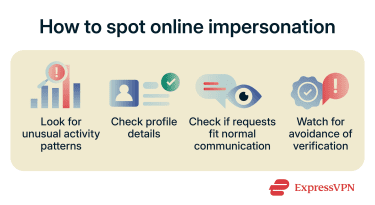
- Check account history: Recently created profiles with little real interaction, sudden bursts of activity, or long inactive periods may indicate fake accounts.
- Look for identity mismatches: A credible profile usually has a steady mix of posts, connections, and references that match what the person claims.
- Check whether the message matches the relationship: A message asking for money, login codes, documents, private details, or off-platform contact should fit the person’s usual role and past communication.
- Watch for resistance to basic checks: If someone avoids simple checks or pushes you to skip normal confirmation, that’s worth questioning. A verification badge isn’t enough on its own.
Tools for checking someone’s online identity
No single tool can fully confirm an online identity, but comparing multiple trusted sources can help build confidence in whether a profile or persona is legitimate. Tools you can use include:
- Reverse image search: This can reveal whether a profile photo belongs to someone else or appears on unrelated websites under different names.
- Official source checks: Company websites, staff pages, or professional directories can confirm whether a claimed role or organization exists.
- Domain and email checks: Suspicious domains, misspelled company names, or free email addresses used for business communication can indicate fake organizations.
- Independent contact: When the stakes are high, use contact details found separately rather than details supplied in the message being checked.
FAQ: Common questions about online identity
How do I know if someone is using my identity online?
What should I do if my identity is compromised?
How can I improve my online reputation?
Can social media affect my online identity?
Explore the web with greater privacy
Get ExpressVPNSign up today for a chance to win FIFA World Cup 2026™ tickets.