VPN for PC: Fast, secure Windows VPN download
Rely on secure connections for work, travel, and play with the best VPN for Windows
- Access work resources and apps securely with strong 256-bit AES encryption
- Stream and game reliably with a global network of high-speed servers
- Stay in control with network automation and built-in speed testing
Start Your Risk-Free TrialDownload Windows VPN
Compatible with Windows 10 and Windows 11 (64-bit), including PCs with ARM-based processors
30-day money-back guarantee for new users

Why use a VPN on Windows PCs?
Find out how a VPN for Windows can enhance your daily online activities, for work and play

Safeguard your data and online activity
Using a VPN for Windows helps shield you from a wide range of concerns, whether you make a PayPal transaction or access work resources from abroad.
Some ISPs are required by local law to collect and retain user metadata. However, VPN encryption helps keep your Windows traffic private. This combination also prevents various public Wi-Fi threats, like data interception and theft.

Get stable connections for online entertainment
With a VPN, you may experience more stable connections for streaming and low latency gaming on Windows. Since a VPN prevents ISPs from seeing your activity, you can avoid content-based ISP throttling. It also prevents DDoS attacks for safer gameplay.
In addition, a premium service gives you access to IP addresses from across the globe. That means, you can watch shows and movies on PC via your favorite subscriptions from home and while away.
Set up ExpressVPN on Windows in 3 steps
Install the best VPN for PC and secure your connection within minutes
-
![How to sign up for ExpressVPN]()
Step 1
Sign up and create your account
Choose a subscription tier and follow the prompts to register your account.
-
![Download Windows App]()
-
![Connect To Server Us]()
Step 3
Connect to a secure server location
Select a VPN server from ExpressVPN’s global network and click to connect.


Video guide: Install ExpressVPN on your PC
Follow this quick tutorial to get a VPN for Windows set up and connected

Why choose ExpressVPN for Windows
Advanced security features paired with global connections you can count on
Protection for work and more with strong security
You get strong privacy protection at home, for remote work, and while using free Wi-Fi in public places, like Starbucks.
ExpressVPN’s 256-bit AES encryption safeguards your data as you access personal accounts and work resources. Plus, our Lightway protocol includes built-in post-quantum protection to future-proof your security.

Fast, reliable streaming and gaming connections
With the ExpressVPN download for PC, you can binge-watch shows and play fast-paced MMORPGs via your favorite subscriptions without slowing down.
Our 40Gbps and 10Gbps servers across 113 countries support live streaming, 4K video, and low-ping gaming with unlimited bandwidth. You can run speed tests from the app to see your internet and VPN performance side by side, helping you choose the best server for your connection.

Privacy protection you can trust
ExpressVPN doesn’t record or monitor your online activity or personal data while you use our Windows VPN.
Our TrustedServer technology runs on RAM-only servers that wipe all session data with each reboot, which helps to ensure we can’t collect your information.
Leading firms like Cure53 also regularly audit these systems to ensure they align with our no-logs policy. Your privacy is not just a promise, it’s verified.

A money-back guarantee and 24/7 support
New subscribers can download ExpressVPN on PC and other devices, and try it risk-free for 30 days. This gives you plenty of time to test all the VPN’s features.
You alsp get expert support in real time with 24/7 live chat that you can launch directly from the Windows app. Need help with security settings or setup? Support is just a click away.
ExpressVPN Windows compatibility
Download ExpressVPN for PC with full compatibility with older or newer devices
User-friendly apps for Windows 11 and 10
Get easy VPN protection with ExpressVPN's app for Windows 11 and 10 devices. A dedicated app is also available for PCs with ARM-based processors, such as Copilot+ PCs.
Enable auto-connect to launch ExpressVPN on startup and connect automatically, so you’re protected from the moment your PC boots up. You can also set up shortcuts that let you launch your favorite apps and sites right from the app’s main interface.

Protect up to 14 devices under one subscription
With up to 14 simultaneous device connections, you can cover your entire household, from Windows PCs to smart TVs.
You can download ExpressVPN for mobile devices, like Android and iOS to keep your data secure while you’re on the go, plus Mac and Linux to protect your devices across the board.
ExpressVPN vs. free PC VPNs
Free Windows VPNs will end up costing you in the end, with weak security and poor connections
-
![Network Lock@2x 1]()
Robust security vs. missing features
Free VPN: No reliable kill switch or leak protection, leaving your PC and sensitive data vulnerable when connections drop. This puts remote work and online banking at risk.
ExpressVPN: Internet Kill Switch and advanced leak protection automatically safeguard your PC, even when your connection drops.
-
![Audited Protection@2x]()
Privacy protection vs. vulnerabilities
Free VPN: Vague privacy policy that may not prevent the VPN from logging and selling your data. P2P model that routes other users' traffic through your PC, linking their activity to your IP address.
ExpressVPN: RAM-only servers and a verified no-logs policy keep your data private. ExpressVPN is also based in the privacy-friendly British Virgin Islands.
-
![10gbps Servers@2x 3]()
Dependable connections vs. slow and unreliable
Free VPN: Limited server locations and slow speeds disturbs everyday tasks on your PC, from streaming and gaming to video calls on Microsoft Teams or syncing files with OneDrive.
ExpressVPN: Lightning-fast network of VPN servers across the globe supports reliable streaming, gaming, and browsing on your Windows PC.



Why do you need a VPN on a Windows device?
Transform your Windows experience with VPN Protection
-
![Lightway@2x 4]()
Before
- Exposed data on public Wi-Fi networks
- ISPs track online activity on your Windows PC
- Limited access while traveling abroad
- Vulnerable to malware and hackers
- Feeling exposed, frustrated, and unsure
-
![Lightway@2x 5]()
After
- Encrypted connections on your PC
- Enhanced privacy while browsing on Windows
- Access your home content safely while traveling
- Better security against PC-targeted online threats
- Feeling secure, empowered, and confident


Advanced ExpressVPN features for Windows
Go beyond basic features to enhance your online protection and personalize your experience
-
![Bolstered security with toggleable blockers ExpressVPN’s Advanced Protection features let you filter ads, malicious sites, trackers, and adult c...]()
Bolstered security with toggleable blockers
ExpressVPN’s Advanced Protection features let you filter ads, malicious sites, trackers, and adult content.
Say goodbye to annoying third-party pop-ups and banner ads while you shop on Amazon and keep your Windows devices clean and safe.
-
![Reliable access with obfuscation and Dedicated IPs ExpressVPN’s automatic obfuscation activates when it detects VPN blocks on school or work netw...]()
Reliable access with obfuscation and Dedicated IPs
ExpressVPN’s automatic obfuscation activates when it detects VPN blocks on school or work networks to keep your Windows PC safely connected through the VPN.
Dedicated IP(included with the Express Pro plan) helps you avoid increased CAPTCHAs and simplifies safe access to location-based services and work resources.
-
![Customizable connections for security and speed Want more control? You got it. Split tunneling lets you choose which Windows apps use the VPN and w...]()
Customizable connections for security and speed
Want more control? You got it. Split tunneling lets you choose which Windows apps use the VPN and which connect directly.
You can secure your online banking while keeping online multiplayer games running smoothly outside the VPN connection.
-
![More control over your privacy with network automation Set rules that automatically connect or disconnect ExpressVPN based on the Wi-Fi network you...]()
More control over your privacy with network automation
Set rules that automatically connect or disconnect ExpressVPN based on the Wi-Fi network you join.
Automatically connect on public Wi-Fi and stay idle on trusted home or office networks, keeping protection consistent without manual steps.
-
![Check your connection speed with built-in speed test Run a built-in speed test directly in the Windows app to see how your internet performs with a...]()
Check your connection speed with built-in speed test
Run a built-in speed test directly in the Windows app to see how your internet performs with and without the VPN.
Compare results instantly to choose the fastest server for your connection and reduce trial-and-error when switching locations.
-
![Quick access with simplified navigation The Windows app is designed to make everyday actions easy to access. Smart Location connects you to the bes...]()
Quick access with simplified navigation
The Windows app is designed to make everyday actions easy to access.
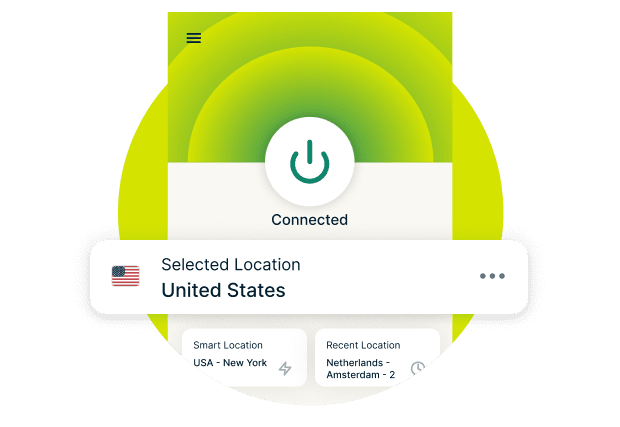
Smart Location connects you to the best available server instantly, while Recent Location lets you reconnect in one click.
-
![Control your VPN with AI tools using the MCP server ExpressVPN’s MCP server connects your AI tools to your VPN. You can use natural language com...]()
Control your VPN with AI tools using the MCP server
ExpressVPN’s MCP server connects your AI tools to your VPN. You can use natural language commands to check your connection state, switch regions, or run diagnostics right from your workflow.
It runs locally on your device, and you can access it from the ExpressVPN Windows app. It’s an easy way to automate VPN tasks without opening the app or disrupting your flow.







What people are saying about ExpressVPN
See why people across the globe choose ExpressVPN for Windows and more
I have ExpressVPN on all my devices - phone, laptop, tablet, AppleTV, etc., and absolutely love it.


* A sample of reviews from our most satisfied customers
Got an account with @expressvpn yesterday. Great decision for traveling out of the country!
@D_Geiger

* A sample of reviews from our most satisfied customers
With its consistent performance and reliable security, ExpressVPN is the best VPN out there.

* We sometimes pay expert sites for customer referrals
FAQ: VPN for Windows PC
Get all the facts, so you can get the best VPN for Windows
Can I securely access work resources with ExpressVPN?
Yes. ExpressVPN is a great choice for securing business connections on Windows devices, whether in-office or remote. Our app uses 256-bit encryption, leak protection, and Internet Kill Switch to prevent data leaks. You can stay connected to essential work tools like printers while keeping company data private and secure.
If you are a growing organization looking for a team management solution, ExpressVPN for Teams provides centralized VPN access management for system administrators, the option to add a fixed IP address solution for easy whitelisting, and flexible plans with bulk discounts of up to 50% off.
Learn more about ExpressVPN for Teams.
Can ExpressVPN prevent ISP monitoring and public Wi-Fi threats?
Yes. ExpressVPN protects your online activity with 256-bit AES encryption and DNS/IP leak protection on Windows and other devices. Your traffic passes through a secure tunnel that shields sensitive data from cyberthreats, even on public Wi-Fi at places like Starbucks or LAX—ideal for work, shopping, or banking.
Does Windows have a built-in VPN?
No, Windows doesn’t include a built-in VPN service. It only has a VPN client, which connects to an existing VPN server, such as one provided by ExpressVPN. To use it, you need to enter the server address and login details from your VPN subscription.
When you connect through the Windows VPN client, you won’t get access to all the features offered by your VPN provider.
ExpressVPN provides all of these automatically, with 256-bit encryption, a kill switch, and DNS leak protection to keep your browsing, apps, and downloads private on the ExpressVPN apps for Windows 10 and 11.
How do I choose the best VPN for PC?
Choosing the best VPN for PC means prioritizing speed, security, and reliability. With 256-bit encryption, a kill switch, leak protection, and Advanced Protection to block ads and malware, ExpressVPN's high-speed servers (up to 40Gbps) deliver fast, consistent performance for gaming and streaming.
What is the fastest VPN for streaming and gaming on Windows?
ExpressVPN delivers some of the fastest speeds for streaming and gaming on PC. Our high-capacity servers support low-latency gaming and stable connections via your favorite subscriptions. With our proprietary Lightway protocol, you can maintain ultra-fast performance and reliable speeds, whether you connect locally or internationally.
How do I set up a VPN on Windows?
Getting a VPN for PC is simple with ExpressVPN. Sign up on our website and download the ExpressVPN app for Windows. After signing in, select a server location and click Connect. Your PC’s internet traffic will then route securely through ExpressVPN’s encrypted, private servers.
Is there a free VPN for PC?
Free VPNs for Windows often lack essential features like a kill switch, leak protection, or reliable servers. Some free VPNs even record and sell user data. ExpressVPN’s Windows app offers full VPN protection, an audited no-logs policy, and high-speed global servers for secure, reliable streaming and gaming performance.
Is a VPN legal and safe to use?
Yes. ExpressVPN is designed to enhance your online safety by keeping your personal data and activity private on Windows PCs. VPNs are legal in most countries, though some restrict their use. Always follow local laws and use ExpressVPN responsibly for lawful browsing, streaming, and communication.
Try ExpressVPN risk-free
Don’t have ExpressVPN yet? New users can sign up today and take advantage of our risk-free 30-day money-back guarantee. Cancel anytime within 30 days and get a full refund.