

Online privacy explained: Why it matters and how to protect yourself


Online privacy broadly refers to your ability to control what others can learn about your internet activity. That includes details you may actively provide (such as your name, address, and payment information), as well as background data such as your IP address, GPS coordinates, browsing activity, and analytics signals.
While it’s impossible to remove every trace of online activity, reducing exposure is achievable and beneficial. This guide explains how data is often exposed and how you can improve your online privacy.
What is online privacy?
In practice, online privacy is about gaining more control over what data is collected and how it’s used, stored, and shared.
For example, if you buy running shoes online, the retailer will likely collect your name, email address, payment details, and delivery address. Many e-commerce sites also record technical information, such as your IP address and device type. Behavioral data is also collected, including how long you spent on the platform, which product pages you viewed, and which items you added to or removed from your cart.
Also read: What is data privacy and why it matters: A complete guide.
What counts as personal data?
Personal data generally refers to any information that identifies you or can be linked back to you specifically. This includes obvious things, such as your name, phone number, home address, email address, date of birth, and Social Security number (SSN) or another national identification number.
Other data may seem less personal on its own, but can still identify, profile, or single someone out when combined with other details. Examples include:
- IP addresses
- Cookie IDs
- Device IDs
- Location data
- Search history
- Purchase history
- Login records
- Voice recordings
- Biometric data
- Social media handles
- Workplace or school details
In some countries, laws such as the EU’s General Data Protection Regulation (GDPR) define personal data broadly and set rules for how companies handle it. For example, the GDPR defines personal data broadly and includes identifiers such as location data and online identifiers when they relate to an identified or identifiable person.
How online tracking works
When visiting many modern websites, browsers will connect to external services as the page loads. These services may provide ads, analytics tools, embedded media, or scripts. Those connections can share technical details, such as IP addresses, browsers, device types, and the pages visited.
This interconnectedness helps websites function, but it can also support online tracking. Websites, apps, and third parties often use the data they collect to build profiles. They may attempt to track users across the web, sell this information, or use it for advertising, analytics, personalization, or data brokerage.
Trackers is a broad term, but websites and services often use these common methods to gather information about users:
- Account-based tracking: Websites that require users to log in can track data across sessions, including search, comment, and purchase history.
- Location tracking: Services may use GPS, Wi-Fi signals, Bluetooth beacons, cell towers, and IP-based location data to estimate a device's location or movement history.
- Cookies: Websites use cookies, which are small files that contain identifiers or store preferences, to recognize a browser across visits or sessions. Third-party cookies can also support tracking across multiple sites
- Tracking pixels: Websites, emails, ads, and analytics services can use small tracking elements to learn when content loads or when someone takes an action.
- Device fingerprinting: This method combines details such as browser version, screen size, language, time zone, and operating system to identify a browser or device setup.
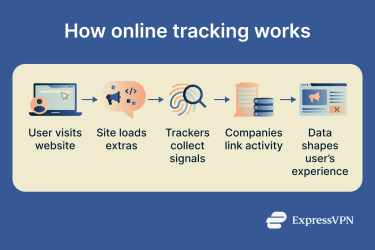 Once this data is collected, it can support a number of processes that benefit advertisers and tech companies. Notable examples include:
- Real-time bidding: In the moments it takes a page to load, ad exchanges may share information about the page, device, browser, or user profile with companies competing to show an ad.
- Cross-device linking: Ad networks and platforms may link activity across a phone, laptop, tablet, or smart TV, especially when the same account, email address, phone number, or browser profile is used on multiple devices.
- Server-side tracking: A site may send data from its own server to a partner’s server. This can make tracking less visible in the browser and may bypass some browser-based blocking tools.
The important takeaway is that online tracking isn’t limited to one cookie, app, or website. Small signals can be collected across pages, apps, devices, and accounts, then used to build a picture of online activity. Some of that data may stay with the company that collected it, but it may also be shared with third parties.
Also read: What is the Internet of Behaviors (IoB)? Meaning, examples, and privacy impact.
Why is online privacy important?
Online privacy matters because personal information can affect your finances, reputation, safety, and overall online experience. Data about your activity can influence the ads, offers, recommendations, search results, content, and sometimes prices you see.
That said, not every data collection practice is harmful. Many services need some information to work. A delivery app needs your address, for example.
Concerns about online privacy come down to proportion, clarity, and control. Is more data collected than is needed for an app or service to function? Is it shared? Can users opt out of data collection or request deletion where privacy laws or service policies allow it? Is the data stored securely?
Maintaining good online privacy reduces the data available to advertisers, scammers, data brokers, stalkers, and other third parties.
Risks to your identity and finances
Many online accounts contain large amounts of personal information about the account holder. If these accounts are compromised, this data could potentially be used to support identity theft and other types of fraud.
Even basic personal details can help scammers make scams more persuasive. A criminal doesn’t always need a full identity profile. Sometimes, an email address or phone number is enough.
Specific risks include:
- Leaked login details that provide access to email, shopping, or banking accounts.
- Phishing emails or texts that use real personal details to sound more believable.
- SIM-swap scams that take over a phone number to intercept calls, texts, or verification codes.
- Fraudulent credit applications that rely on stolen personal information.
- Fake support messages that impersonate real services like Netflix, PayPal, or a bank.
- Password reset attempts on accounts associated with an email address.
How privacy affects your safety and reputation
Having lots of personal information exposed can lead to real safety risks. This applies to both public information that a user may post and data collected by companies.
Some internet users may have a long history of public posts, detailed profile bios, check-ins, photos, and more. These details may allow an observer to determine where someone lives or works, who they know, what their schedule looks like, and which services they use.
Even if a person doesn't directly post their home address, someone may be able to piece together a general location or even an exact address using small clues from different sources. Alternatively, a company that has collected an address may suffer a breach, making that information publicly available.
Either scenario could expose the risk of harassment, impersonation, unwanted contact, or targeted attacks aimed at taking over accounts. Poor online privacy can therefore increase overall vulnerability.
Similarly, some people may have old posts that they would rather not have resurfaced. A long and public online history could affect job applications, school admissions, personal relationships, and more.
Also read: How reputation management can help you stay private.
Common threats to online privacy
Threats to online privacy come from a variety of sources. Weak network security, oversharing, excessive tracking, vague privacy policies, and data breaches can all contribute to serious privacy risks.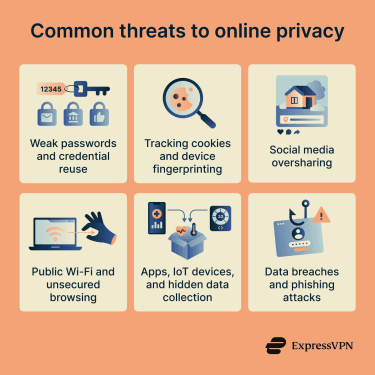
Weak passwords and credential reuse
Weak passwords make accounts easier to compromise. Reused passwords create a similar problem: when one account is breached, attackers often use the same email and password combination on other sites. This tactic is called credential stuffing.
For example, if the same password is used for a shopping site and an email account, a breach at the shopping site can have serious repercussions. Once someone controls an email account, they may be able to reset passwords or access other accounts tied to that address.
Tracking cookies and device fingerprinting
Cookies can keep websites working smoothly, but they can also support cross-site tracking. Ad networks, analytics services, and embedded content providers can use cookies or other identifiers to connect activity across multiple sites.
Methods like device and browser fingerprinting can be harder to manage because they involve more than just an easily deleted file. These techniques instead rely on signals such as the operating system, screen size, browser version, language settings, and time zone.
Together, such data points can be used to recognize a browser or device setup across sessions. That can make it harder to reset a privacy trail, since clearing cookies may not stop a site or tracker from recognizing the same setup again.
Social media oversharing
Posts, profile details, photos, comments, and shared messages can all reveal personal information. A photo may show a school uniform, a street sign, a house number, a workplace badge, or a car number plate. This information could be used by stalkers, scammers, and other threat actors.
The same risks apply beyond social media. Forum comments, gaming profiles, messaging apps, group chats, community servers, review sites, and public comment sections all pose the same fundamental risk.
Public posts could help someone guess account recovery answers, send more convincing phishing messages, impersonate a person, or identify a home, school, workplace, or routine.
Public Wi-Fi and unsecured browsing
Public Wi-Fi in airports, hotels, cafés, and malls can be convenient, but it can carry more risk than a trusted home network. Risks include fake hotspots with familiar names, poorly secured routers, and traffic interception on sites that don’t use HTTPS.
HTTPS improves online privacy by encrypting the data sent between a browser and a website. This makes it harder for someone on the same network to read page content, steal form details, or intercept account information.
But HTTPS doesn’t hide everything, and malicious websites may still use the protocol. Even with HTTPS, the network administrator may still be able to see the domain being visited, though not the specific page content or form details.
Apps, Internet of Things (IoT) devices, and hidden data collection
Apps and connected devices can collect data through permissions, sensors, and connected accounts. On phones and tablets, apps may ask for access to location, camera, microphone, contacts, photos, files, or health-related data. Smart devices like TVs, speakers, fitness trackers, cameras, and doorbells can collect data that may affect overall privacy.
Data breaches and phishing attacks
Data breaches occur when personal, financial, or account data is exposed, accessed, stolen, or disclosed without authorization. This may result from human error, weak security, system misconfiguration, lost devices, insider misuse, or a cyberattack. When breaches occur, affected users may face privacy, identity, or financial risks.
Even if a company collects data in ways that don't compromise online privacy, there is no guarantee it can keep the data secure indefinitely.
Phishing campaigns are direct attempts to trick people into revealing sensitive information, such as passwords, payment details, or verification codes. These often arrive as emails or texts claiming there's an issue with an account and may include links to fake login pages designed to steal account information.
How to protect your online privacy
Maintaining online privacy is largely about adopting simple habits. Following these practices takes effort, but the benefits are real.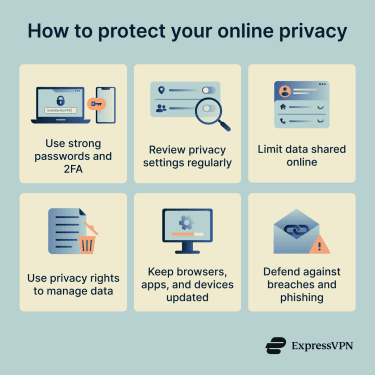
Use strong passwords and two-factor authentication
If someone can access accounts, they may be able to view sensitive personal details. Account takeovers are serious breaches of online privacy.
To defend against this threat, choose long passwords or passphrases, and avoid names, birthdays, pets, or other details that may be guessable from your public profiles. A password manager can make strong password security much more manageable.
Turn on two-factor authentication (2FA) wherever you can, especially for email, banking, cloud storage, social media, and password manager accounts.
Passkeys and security keys are generally stronger because they can be phishing-resistant. Authenticator apps are usually safer than SMS codes, which can be vulnerable to SIM-swap attacks. Even so, SMS-based 2FA is still better than relying on passwords alone.
Review privacy settings regularly
Many online services offer privacy settings, but default options are not always the most privacy-friendly. New settings may be added, making it hard to keep track of them across different accounts.
Review privacy settings regularly and look for privacy-friendly options across key accounts.
Start with accounts that hold the most personal information, such as email, cloud storage, e-commerce, and social media. Look for options that enable you to:
- Limit who can view your profile or posts.
- Limit optional data sharing.
- Disable ad personalization.
- Remove connections to third-party services.
- Review connected devices and active sessions.
- Manage cookie and tracking preferences.
- Opt out of personalized recommendations.
- Delete old data and search history where possible.
It’s also a good idea to read the privacy policies for services that handle sensitive data. Focus on the key points: what data the service collects, why it collects it, who it shares it with, how long it keeps it, and how users can delete or limit it.
Limit the data you share online
Protecting your privacy online can start with sharing less sensitive information. This includes details that can identify you, locate you, help others impersonate you, or support account recovery abuse, such as your full birth date, home address, and phone number.
Before sharing this information, ask whether the service needs it. A bank or tax portal may require sensitive identity details; a newsletter, quiz, store discount, or one-time download usually shouldn’t need the same level of information.
Consider using separate email addresses where appropriate. For example, you might use an email address that includes your real name for banking and government services and another, more anonymous email account for shopping, social media, and forums.
Email aliasing services can make this easier. Services like ExpressMailGuard (included with active ExpressVPN subscriptions) let you sign up for services without providing your actual email address. Messages sent to the alias can be forwarded to your chosen inbox, depending on the alias settings. If you stop using the service, receive too much spam, or the alias appears in a breach, you can disable or delete the alias without exposing your main email address.
Read more: How to stop spam with anonymous email forwarding.
Use privacy rights to manage your data
Depending on where you live, privacy laws may give you the right to ask companies what personal data they hold about you and request a copy of that data. Many of the same frameworks also allow you to request the deletion of personal data, though companies may be permitted or required to retain some information in certain cases.
Exercising these rights can help you understand what data a company has collected and take steps to reduce unnecessary exposure. The GDPR includes a right to erasure, while the California Consumer Privacy Act (CCPA) gives eligible California consumers a right to request deletion of personal information, subject to exceptions. People elsewhere may have similar rights under other privacy laws.
Read more: Personal data removal laws: Do they protect you?
Keep browsers, apps, and devices updated
Software updates often fix security flaws, including some that could expose personal information. Update your operating system, browser, apps, router firmware, and smart devices when updates are available. For devices that no longer receive updates, limit what you use them for. An old phone, tablet, router, or camera may still work, but unsupported software may leave known flaws unpatched.
Best tools for better online privacy
Privacy tools work best when they support good habits. No single tool can provide complete privacy or eliminate every risk, but the right setup can reduce tracking, protect your accounts, encrypt your traffic, and limit what you share.
Password managers
A password manager stores your login details in an encrypted vault and can generate strong passwords for new accounts. By strengthening account security, password managers reduce the risk of compromises that would harm online privacy.
Many password managers, like ExpressKeys, can help flag reused, weak, or leaked passwords and include a built-in 2FA code generator.
Use a strong master password, keep recovery information in a safe place, and enable any additional account or device protections your password manager supports. If your password manager supports passkeys, you may be able to use them for accounts that support passwordless login.
VPNs
A virtual private network (VPN) can improve online privacy by encrypting traffic between your device and the VPN server. It can also mask your IP address from websites, apps, and other online services.
This helps on public Wi-Fi, when you want to reduce what your internet service provider (ISP) can see about your browsing, or when you want to reduce IP-based tracking. Proper configuration, Domain Name System (DNS) handling, leak protection, and secure servers are essential for keeping covered traffic within the VPN tunnel.
However, a VPN can’t stop a website from collecting data you enter directly, tracking you through a logged-in account, or seeing what you do inside that service.
When evaluating VPNs, look for clear privacy policies, strong encryption, independent audits, and leak protection.
Privacy-focused browsers
Privacy-focused browsers can limit third-party cookies, reduce some forms of fingerprinting, isolate site data, and give you more control over permissions for location, camera, microphone, and notifications. Some mainstream browsers also include strong privacy settings, but you may need to enable them.
Private browsing options like incognito mode can help keep browsing activity off your local device history, but they offer limited protection for overall online privacy. Websites, employers, schools, ISPs, and other network managers may still be able to see activity.
Ad and tracker blockers
Ad and tracker blockers can reduce the number of third-party scripts, cookies, and tracking elements that load on websites. This may reduce profiling, speed up page load times, and cut down on intrusive ads. For example, ExpressVPN's Threat Protection can help reduce tracking by blocking connections to known trackers and malicious sites while the VPN is on.
Some sites may ask you to disable blockers before viewing content. In those cases, decide whether the content is worth the cost of allowing more ads, scripts, or tracking elements to load. You can also create exceptions for sites you trust and want to support, while keeping blockers enabled elsewhere.
Secure search engines
Privacy-focused search engines can reduce search profiling by limiting how much they store about queries or by avoiding the creation of personal search profiles. They may avoid linking searches to a personal account or building long-term ad profiles from search history.
This doesn’t stop tracking on the websites that you visit after clicking a result. For better privacy, pair a privacy-focused search engine with other tools and privacy habits.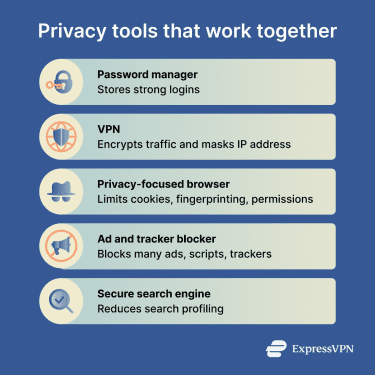
Online privacy on social media
Social media can be entertaining and beneficial, but public or semi-public accounts can expose more information than intended. The same privacy checks also apply to forums, gaming platforms, comment sections, review sites, and other public profiles.
You don’t need to make every account private. Decide what each account is for. A public professional profile may need your name, work history, and contact information. A gaming profile or forum account usually doesn't
What to avoid sharing publicly
- Travel dates or posts that show when you’re away from home.
- Home exterior, street view, or nearby landmarks.
- Children’s names, school details, uniforms, activities, or routines.
- Workplace badges, school IDs, or access cards.
- Images where license plates or number plates are clearly visible.
- Photos that show private documents in the background.
- Screenshots that reveal account details, messages, addresses, or contact information.
- Answers to common security questions, such as your first pet.
- Links to other accounts you don’t want connected to your real identity.
How to manage account privacy settings
For social platforms, forums, gaming accounts, streaming profiles, review sites, and other public or semi-public accounts, focus on what other people can see and how they can interact with you.
Go through your settings and ask:
- Can strangers see your posts, photos, profile details, or connections?
- Can people find the account through phone number or email discoverability?
- Can others tag you in posts or photos without approval?
- Can strangers send you messages, comments, or friend requests?
- Can posts, photos, or check-ins reveal location data?
- Are old posts still public?
- Are linked accounts exposing more information than intended?
Read more: Social media privacy: How to protect your data online.
Online privacy on mobile and smart devices
Phones and smart devices deserve a separate privacy check because they combine account data, sensors, location access, photos, messages, payment cards, health data, and authentication codes in one place.
App permissions to review
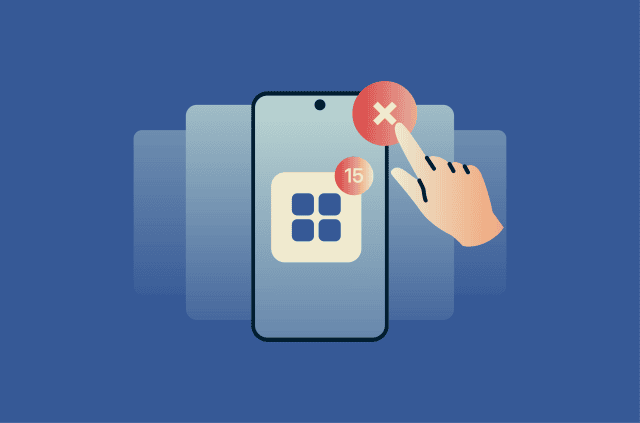
Apps may ask for permissions during setup or when a feature needs access to certain data or sensors. Some permissions are necessary for the app to function, but others may be optional.
Both Android and iOS allow you to review apps based on their permissions. Carefully consider whether each app needs to access:
- Location
- Camera
- Microphone
- Photos and videos
- Contacts
- Calendar
- Bluetooth
- Local network or nearby devices
- Notifications
- Health data
- Storage
- Background activity or refresh
Give each app only the permissions it needs for the feature you’re using. For example, a map app may need location access while you’re using it, but a coupon app can likely do without it.
Delete apps you don’t use, or remove their permissions where supported, as unused apps may still have access to data or sensors.
Smart home privacy risks
Smart home devices can collect data about what happens inside and around your living space. For example, a smart speaker may process voice commands, and a camera may record video. But as with mobile apps, some devices may collect more data than expected or than is needed for basic features.
A big concern is what is done with this data. Before buying or setting up a smart device, check:
- What data does it collect?
- Are recordings stored locally or in the cloud?
- Can recordings be deleted?
- Does the device still receive updates?
- Can the default password be changed?
- Does the privacy policy clearly explain data sharing?
Change default passwords, update firmware, disable features you don’t use, and keep smart devices on a separate guest network if your router supports it.
Online privacy for families and children
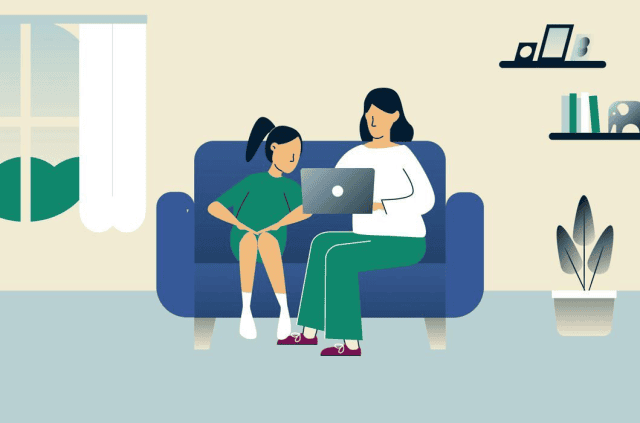
Parents of children and teens may want to take extra care with online privacy. It’s worth considering that children may not want a searchable record of their childhood. A good starting point is to post about them less, avoid unnecessary tags, and limit who can see family posts.
How to protect kids online
Children’s privacy warrants special attention. Children may be less able to recognize how public posts, game chats, in-app purchases, and account profiles can expose information.
Use age-appropriate privacy settings on:
- Phones and tablets
- Gaming accounts
- Social platforms
- Messaging apps
- Streaming profiles
- School apps
- Smart speakers
- App stores
- Browsers and search engines
Talk through the basics: don’t share full names, addresses, school names, phone numbers, passwords, verification codes, or private photos in chats or profiles. Teach kids to ask before downloading apps, accepting friend requests, joining servers, or clicking links sent to them.
Read more: Dangers of social media for kids and how to protect them.
FAQ: Common questions about online privacy
Can websites track me in private browsing mode?
Does a VPN make me fully anonymous online?
What is the difference between online privacy and security?
How often should I check my privacy settings?
What are the first steps to improve online privacy?
Explore the web with greater privacy
Get ExpressVPNSign up today for a chance to win FIFA World Cup 2026™ tickets.












Comments
Good
Ya u can say so