
Cloud data platform explained: Benefits, use cases, and how to choose one


As organizations collect more data from a wider variety of sources, they need systems that can bring information together and make it usable at scale. Cloud data platforms address this need by providing teams with a flexible environment for managing and analyzing data.
This article explains in detail what cloud data platforms are and how they work. It also covers their main benefits, potential drawbacks, common use cases, and key factors to consider when choosing a platform.
Overview of cloud data platforms
A cloud data platform is a cloud-based system or suite of services for collecting, storing, processing, governing, and analyzing data from multiple sources.
Unlike traditional on‑premise data centers, which require organizations to purchase and maintain physical servers, cloud platforms provide virtualized resources that can scale with demand. In business practice, this is often described broadly as a Cloud-as-a-Service (CAAS) model, in which organizations access cloud-based infrastructure, platforms, or software without managing the underlying hardware themselves.
Cloud data platforms provide organizations with a centralized environment that can handle data from disparate sources in various formats. Instead of relying on separate systems for each stage of the data lifecycle, teams can bring information into the platform and prepare it in the same cloud-based environment.
This helps reduce data silos and makes it easier to turn large volumes of information into useful insights.
How cloud data platforms work
Cloud data platforms often operate like data pipelines. Data enters through connectors, application programming interfaces, batch uploads, or streaming services that pull information from business applications and other connected systems. Some data moves on a set schedule, while time-sensitive information can flow continuously.
When data enters the platform, it may land in object storage, a staging area, a data lake, a data warehouse, or a lakehouse, depending on the platform design. Processing tools can then clean, validate, transform, and aggregate the data according to pipeline rules. Structured Query Language (SQL) is commonly used to query structured data, while other tools may be used for unstructured data, streaming analytics, machine learning (ML), or large-scale processing.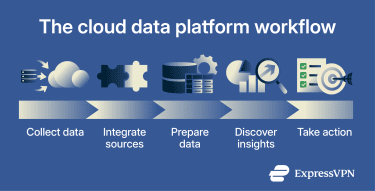
Architecture of cloud data platforms
Although the specific architecture can vary across implementations, cloud data platforms generally include four core layers. These are:
- Data ingest layer: The first layer collects data from internal systems, third-party applications, Internet of Things (IoT) devices, and external services using connectors and APIs.
- Data storage layer: After ingestion, the data storage layer provides an environment where collected data can be safely stored for later use. When users or applications request stored data, this layer works with security and governance controls to restrict access to approved users and services.
- Data processing and analytics layer: This layer takes stored data and turns it into a form that people and systems can actually use. It improves raw information by cleaning, validating, transforming, and aggregating data for analysis, often keeping this work close to where the data already lives to improve efficiency.
- Data serving layer: The final layer makes prepared data available through approved access points for use where needed. As data is delivered, it enforces permissions so each request receives only the information it's allowed to access.
Types of cloud data platforms
Cloud data platforms generally fall into one of four categories:
- Managed data warehouses: Provide SQL-based environments for structured data, often with storage and compute separated so teams can scale each independently. They're commonly used for reporting, business intelligence, and analytics workloads.
- Data lakes: Store raw structured, semi-structured, and unstructured data at scale, often preserving it in its native format. This lets teams transform, organize, and analyze data later depending on the use case.
- Lakehouses: Combine the low-cost, scalable storage of a data lake with the structured management features of a data warehouse. They help support analytics and governance and may be further organized into medallion architectures.
- Multi-cloud and hybrid platforms: Work across multiple cloud providers or connect cloud and on-premises environments. They support greater flexibility and give organizations more control over their data flow.
Key features of cloud data platforms
From essential tools that support storage to extras that offer greater control or customization, modern cloud data platforms come with a range of features.
Data ingestion and integration
Cloud data platforms typically need to connect to diverse data sources. Ingestion services include pre‑built connectors for databases and applications. Many support both batch and real‑time pipelines.
Ingestion services simplify data movement by handling API connections, authentication, and pipeline setup in the background. This allows teams to spend less time managing ingestion and devote more resources to analysis.
Cloud storage and processing
Cloud data platforms use elastic storage to handle both structured and unstructured data. They often offer separate storage layers, such as a warehouse for relational, schema‑based information or a data lake for raw data in a range of formats.
Storage is often decoupled from compute, which can make it easier to scale and manage costs based on workload needs. Another benefit is that data capacity can often be expanded without planned downtime.
Processing engines run on top of this storage to transform and aggregate data. Languages like SQL are used to write queries, while the platform’s query engine or scheduler allocates compute resources based on workload needs. Many modern platforms use distributed computing frameworks to process datasets in parallel, enabling rapid analysis of large volumes of data.
Analytics, AI, and machine learning (ML)
Cloud platforms bring analytics and ML closer to the environments where data is stored. Teams can use interactive queries, dashboards, predictive models, recommendation features, and ML interfaces to explore collected data and act on insights.
This setup keeps storage and processing close together, so teams can work with fresh data without moving it into separate systems.
Security, governance, and compliance
Given that they often manage large volumes of sensitive information, cloud data platforms must offer robust security features.
Essential measures include secure backups and encryption that protect data both at rest and in transit. Role-based access control can help enforce least-privilege permissions, especially as part of a broader zero-trust cloud security strategy. Detailed logs and tools that facilitate streamlined auditing are important for investigating incidents, demonstrating compliance, and highlighting unsafe practices.
Ideally, governance should be built into the platform. Metadata catalogs and lineage tools can help show where data comes from and how it's processed. Platforms with built-in policy controls can make it easier to meet regulatory and contractual obligations.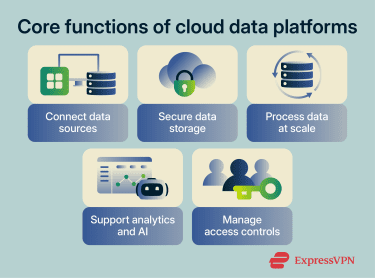
Benefits of cloud data platforms
While cloud data platforms have some challenges and limitations, they can offer significant benefits when implemented well. These include:
- Cost efficiency and flexible pricing: Many cloud platforms operate on a pay‑as‑you‑go or consumption-based model, allowing organizations to align costs more closely with the resources they use. Cloud data platforms also offer an alternative to purchasing and maintaining expensive hardware, helping organizations of different sizes manage large amounts of data.
- Scalable storage and processing: Many cloud data platforms decouple storage from compute, making it easier to scale capacity and processing power independently. This elasticity helps minimize downtime and accommodate business demands as a company grows and its needs change.
- Improved collaboration across teams: Centralizing data in a single platform makes it easier for teams to work from the same information. Workflows can also be streamlined through app integrations.
- Faster insights from real-time data: Where supported, streaming analytics lets organizations respond as data arrives, rather than waiting for it to be collected and processed later. Because events are processed quickly, teams can make decisions sooner and adjust accordingly.
Common use cases for cloud data platforms
Organizations turn to cloud data platforms to consolidate data and enable advanced analytics. Some need real‑time insights, while others seek scalable infrastructure for ML. The following examples illustrate where cloud platforms deliver value.
Real-time data analytics
Real-time analytics prioritizes speedy analysis. Once data is ingested, it may pass through queues, streams, or processing services for validation, enrichment, and analysis. Real-time analytics is not always instantaneous, but delays are generally short in well-designed systems.
Continuous ingestion and processing enable organizations to monitor events and trigger automated actions. For example, an e-commerce firm may rely on such functions to adjust recommendations in real time.
In terms of security, real-time analytics may also help spot anomalies early. If these are detected and properly responded to, some risks can be avoided.
ML and AI workflows
Scalable storage and compute help teams train models, run ML workloads, and analyze large datasets. Many cloud platforms integrate with ML frameworks and offer interfaces that enable predictive modeling without separate on-premises infrastructure.
IoT data processing and analytics
IoT devices can generate streams of data that often benefit from real-time or near-real-time processing. Cloud platforms ingest these flows and run analytics to predict failures or optimize operations. Similar patterns occur in retail and energy, where high‑velocity IoT data informs supply chains and grid management.
Also read: Understanding IoT cloud security.
Faster application development
Cloud data platforms can facilitate speedier application development of data-driven applications. They offer frameworks, integrations, and tools that enable developers to build scalable analytics features, dashboards, recommendation systems, or application backends without purchasing expensive hardware. By leveraging the scalability of cloud resources, programmers can develop and test code across various languages and frameworks.
Common drawbacks and challenges of cloud data platforms
Cloud environments introduce security considerations that may differ from those in traditional on-premises database environments. Organizations must consider these risks and challenges while preparing to move to a cloud data platform.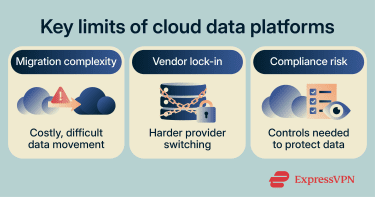
Cloud migration and adoption risks
Migrating to a cloud data platform can be complex and resource-intensive. It may require data migration planning, integration work, security reviews, staff training, and changes to legacy systems. According to Eurostat, paid cloud computing is now used by more than half of EU enterprises, but adoption doesn't remove the technical and operational challenges of migration.
Misconfigurations can create real security gaps, and technical issues may not become apparent until the switch is fully implemented. Legacy systems may also require substantial refactoring, which increases technical complexity and raises the risk of delays, disruption, and unexpected performance issues.
Vendor lock-in concerns
Cloud services often rely on provider-specific technologies, making it difficult to switch providers later. This can create vendor lock-in, where an organization becomes dependent on a single vendor. Even if a company wants to change providers, it may determine that the effort isn't worth it.
Each cloud data platform may use different services, APIs, data formats, and management tools that aren't always directly compatible with other environments. This can make it harder for organizations to keep workflows running smoothly across platforms. Even when migration remains possible, portability may be limited, and exporting data can be complex.
Data privacy and compliance requirements
Organizations must comply with a variety of legal frameworks. Failing to do so can result in fines and negative press, especially if customers learn of a data breach. The regulatory environment can include laws aimed at protecting personal data, as well as data sovereignty rules that dictate where data must reside.
The EU’s General Data Protection Regulation (GDPR) can apply to organizations that process personal data about people in the EU, even if they're based elsewhere. It sets terms for lawful processing, purpose limitation, data minimization, and retention.
In the U.S., the California Consumer Privacy Act (CCPA), as amended by the California Privacy Rights Act (CPRA), gives California consumers rights over personal information collected by covered businesses.
While most large cloud providers are familiar with relevant legislation and can provide tools that support compliance, companies are ultimately responsible for adhering to applicable laws.
How to choose a cloud data platform
Selecting a cloud data platform requires a clear understanding of your data strategy. A thorough evaluation can help you choose a platform that meets your operational needs.
Define your data strategy and goals
The first step is to clarify the objectives that drive your cloud initiative. This will involve identifying the data types you collect and how they're used in various workflows. Companies will need to consider whether they need real-time or batch processing and estimate how many users will access the platform. Having clear, achievable goals makes it easier to find a platform that suits your needs.
Evaluate scalability and performance
Compare the platform’s scalability with your company’s current needs and future plans. Ensure the platform can scale compute and storage as workloads grow. Be aware that hybrid or multi-cloud options may be useful when organizations need to distribute workloads across regions, connect to existing environments, or satisfy data residency requirements.
Compare security and governance capabilities
Review security features such as encryption, key management, identity management, and fine‑grained access controls. Consider whether secure connectivity, such as a cloud virtual private network (VPN) or private connection, is needed to link existing systems to the platform. Confirm compliance certifications and tools that support regional legal requirements, while remembering that organizations remain responsible for configuring and using the platform appropriately.
Review integration and ecosystem support
Check integration with existing systems and evaluate connectors and APIs. A broad ecosystem of integrations, which may include ML libraries and business intelligence tools, can reduce implementation friction while expanding functionality.
Consider the total cost of ownership
Look closely at the full cost of the platform, not just the initial price. Ongoing expenses may include storage and processing, but moving data, getting support, or sending data off the platform may incur additional costs. Migration adds its own costs as well, especially when teams need to move existing data or adapt to a very different system.
FAQ: Common questions about cloud data platforms
Is a cloud data platform the same as a data warehouse?
Can small businesses use cloud data platforms?
How long does cloud data migration take?
Who manages a cloud data platform?
How do you measure cloud data platform success?
That said, adoption can take time and cause friction. This means it may not be possible to determine whether a platform will ultimately succeed right away.
Explore the web with greater privacy
Get ExpressVPNSign up today for a chance to win FIFA World Cup 2026™ tickets.