The ultimate guide to phishing detection


One of the most common types of cybercrime, phishing uses deceptive methods to trick people into sharing sensitive information, sending money, or downloading malicious software. It often relies on creating a false sense of trust, encouraging victims to take actions that put their data or devices at risk.
Detecting these scams early is essential to protecting your personal or business information, devices, and accounts. This guide will help you recognize phishing attempts across channels, explore how detection technologies work, and provide practical steps to protect yourself and your organization.
What is phishing detection?
Phishing detection encompasses a range of methods and technologies designed to identify and mitigate phishing threats before they can cause harm. It works by analyzing elements of messages, websites, and human behaviors to flag or block malicious content.
Detection approaches fall into two complementary categories:
- Automated phishing detection tools: These technologies can automatically scan emails, links, and attachments to flag or block suspicious content before you interact with it.
- Manual detection: Even with automated tools, awareness is a key defense against phishing. For individuals, this means learning to recognize common phishing red flags and applying caution before responding or clicking links. For businesses, this also includes training employees regularly to identify phishing attempts and encouraging a security-aware culture.
Automated tools provide broad, consistent protection, while human judgment adds critical context and adaptability to evolving phishing tactics.
Common types of phishing attacks
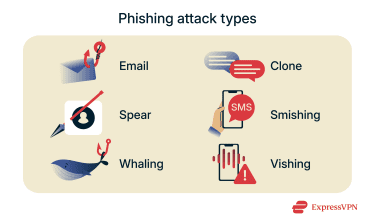
- Email phishing: Attackers send emails that appear legitimate, often from trusted sources, containing links to fake websites designed to steal your information.
- Smishing and vishing: Phishing conducted via text messages (smishing) or voice calls (vishing) to trick victims into revealing sensitive data.
- Spear phishing: Targeted attacks aimed at specific individuals or organizations to steal credentials and gain unauthorized access.
- Whaling and CEO fraud: Phishing targeting high-level executives to access sensitive company data through carefully crafted scams.
- Clone phishing: Scammers copy and resend a legitimate email, replacing links or attachments with malicious ones.
How automated phishing detection works
Phishing detection tools are designed to identify suspicious messages, websites, or even phone calls at scale, often before users ever encounter them.
These systems can typically analyze large volumes of emails, links, and attachments in real time, using a combination of rules, pattern recognition, and adaptive learning. While no single method is foolproof, layered detection techniques work together to reduce the risk of phishing reaching inboxes.
Key approaches include:
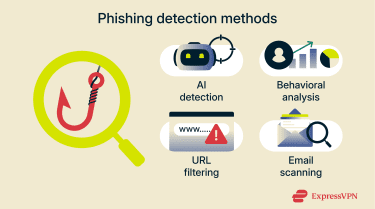
- AI and machine learning (ML): AI can analyze message content, links, and metadata to identify common signs of phishing, such as deceptive language, impersonation attempts, unusual sending patterns, and inconsistencies in sender information. Rather than relying only on known signatures, ML models are trained on large datasets of past phishing campaigns and continuously updated. This allows them to recognize previously unseen or newly emerging phishing techniques that resemble known attack patterns, even when the exact message or link has not been encountered before.
- Behavioral analysis: This involves monitoring for unusual or suspicious user behavior that may indicate a phishing compromise, helping limit the impact of attacks as they occur.
- URL filtering: Many phishing messages include links that lead to malicious, fake websites. URL filtering involves examining those links and comparing them against known databases of suspicious URLs.
- Email scanning: Scanning tools examine individual email messages and attachments for signs of phishing activity.
Tools and technologies for phishing detection
Email authentication protocols (SPF, DKIM, DMARC)
Email authentication protocols help verify whether an email genuinely comes from the domain it claims to be sent from. They are designed to prevent email spoofing, a common technique used in phishing attacks. The three main protocols are:
- Sender Policy Framework (SPF): Checks if the sending server is authorized by the domain owner to send emails on their behalf.
- DomainKeys Identified Mail (DKIM): Uses cryptographic signatures to verify the email content hasn’t been altered during transit.
- Domain-based Message Authentication, Reporting, and Conformance (DMARC): Coordinates SPF and DKIM results and instructs email providers on how to handle emails that fail these checks.
For individuals, these checks typically run automatically. Major email providers like Gmail, Outlook, and Yahoo Mail apply SPF, DKIM, and DMARC to incoming emails behind the scenes, using the results to filter certain phishing and spoofed messages before they reach your inbox.
For organizations, these protocols can be configured on their own email domains and servers to protect employees and customers from phishing attacks that impersonate the organization. When properly set up, they help prevent attackers from sending fraudulent emails that appear to come from a legitimate business.
Secure email gateway (SEG)
Typically deployed by organizations, a secure email gateway (SEG) is an email security system that sits between the internet and an organization’s mail server to inspect incoming messages for threats before they reach users’ inboxes.
They check sender reputation, message headers, links, attachments, and content for signs of phishing. Suspicious emails can be blocked, quarantined, or flagged to help prevent users from opening dangerous messages.
SEGs often use advanced threat intelligence, signature analysis, and ML to detect both known and emerging email-based attacks, including phishing, malware, and spam.
Learn more: What is a business email compromise (BEC) attack?
Domain Name System (DNS) filtering
Domain Name System (DNS) filtering blocks devices from accessing known malicious websites by checking domain requests against threat databases. If a website is flagged as phishing or unsafe, the DNS filter stops your device from connecting, preventing exposure to dangerous sites before your browser even loads them.
For example, ExpressVPN’s Threat Manager can block known trackers and malicious domains at the network level, reducing exposure to phishing sites and other online threats before they reach your device.
Spam and scam call filtering
Spam and scam call filtering tools identify and block phishing or robocalls by analyzing incoming calls in real time. These systems use databases of known scam phone numbers, call behavior patterns, and caller reputations to flag suspicious calls before you answer. When your phone displays labels like “Scam Likely,” it means these filters have detected potential threats.
Filtering can occur at the carrier network level, stopping dangerous calls before they reach your device, or directly on your phone through specialized apps that maintain constantly updated threat lists.
Endpoint detection and response (EDR)
Endpoint detection and response (EDR) tools watch individual devices closely for unusual or suspicious behaviors that may indicate a security threat. Unlike traditional antivirus software, which relies on known malware signatures, EDR focuses on detecting abnormal patterns like unusual login attempts, unauthorized data access, or malware execution. This real-time monitoring allows organizations to detect threats that bypass email filters or network defenses.
EDR can identify the consequences of a successful phishing attack, such as malware running on a device or stolen credentials being used, even if the original phishing email wasn’t blocked.
Intrusion prevention system (IPS)
An intrusion prevention system (IPS) can monitor all data traveling through your network, looking for suspicious patterns linked to phishing or other cyberattacks. It can detect unusual spikes in traffic, connections to dangerous sites, or known attack signatures, alerting security teams or blocking harmful activity to protect your network infrastructure. IPS tools typically work alongside firewalls, endpoint protection, and other security controls.
Firewalls
Firewalls control network traffic based on set security rules, blocking or allowing connections. They can help prevent users from accessing suspicious sites and stop attackers from communicating with infected devices. While firewalls are not specific to phishing, they form a critical part of layered defense by controlling traffic flows linked to phishing infrastructure.
How to detect phishing attempts manually
Manual detection relies on careful review and informed judgment to prevent phishing attacks from having their intended impact. Individual and employee awareness plays an important role in identifying suspicious messages, especially when attacks are highly targeted or use innovative techniques.
Understanding how phishing scams manipulate users
Detecting phishing can be challenging because it uses social engineering tactics that exploit emotions to influence behavior. Common tactics include:
- Creating urgency: Many phishing messages pressure people to act immediately. This sense of urgency can lead to rushed decisions, leaving little time to think or check with others.
- Stoking fear: Some phishing messages use threatening language to scare recipients. They may falsely claim an account has been compromised or warn of legal consequences if no action is taken.
- Building trust: Phishing messages often appear to come from well-known companies like Apple or Amazon. By impersonating trusted brands, attackers increase the chances that people will follow instructions or share sensitive information.
Recognizing the warning signs of phishing
 When reviewing an email, message, or call, watch for the following warning signs:
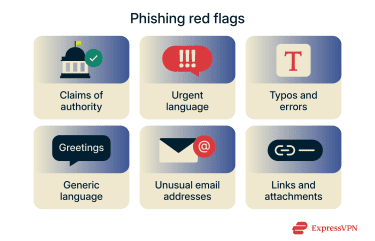
- Claims of authority: Scammers will often pose as a figure of authority, like a bank or business. They might even pretend to be a law enforcement officer, lawyer, or government official.
- Urgent or coercive language: Scammers often try to make you act quickly. They use warnings, threats, or tight deadlines to pressure you into responding without thinking.
- Typos or grammar mistakes: Phishing messages may contain spelling mistakes, awkward phrasing, or inconsistent terminology. In many cases, it’s possible that these flaws are actually intentional, helping attackers filter for a smaller pool of recipients more likely to engage deeply with the scam across multiple steps.
- Generic greetings: Phishing messages often start with generic greetings like “Dear Customer.” Scammers may send these emails or messages to thousands of people and often don’t personalize them.
- Unusual sender addresses: Phishing emails may come from sender domains that resemble legitimate ones but include subtle misspellings or extra characters (for example, “rnicrosoft” instead of “microsoft”). Scam calls may use spoofed caller IDs that appear local or familiar but don’t match the organization being claimed.
- Links and attachments: Many phishing scams try to get you to click a link or download an attachment. If an unsolicited message urges you to do so, be cautious; it’s likely a scam.
Learn more: How to check if a website is safe to visit
Steps to take if you suspect a message is phishing
If you spot the red flags of phishing and suspect that a message, website, or interaction is unsafe, the safest approach is to avoid engaging with it. Here are a few key steps you can take to protect yourself and your information:
- Don’t click any links or download attachments.
- Verify the sender by contacting the organization directly using its official channels (for example, if you receive a suspected UPS phishing email, contact support using the details on the official UPS website).
- Report the suspicious message to your email provider or IT department.
- Delete the message to avoid accidental interaction later.
- If you think your account may be compromised, change your passwords and enable two-factor authentication immediately.
How to reduce the impact of phishing attacks
Even the most effective phishing detection tools can’t catch every threat. Taking additional security measures can help reduce the impact of phishing attempts, especially if credentials are exposed or a malicious link is clicked.
Use two-factor authentication (2FA)
Two-factor authentication (2FA) adds an extra layer of security to online accounts. With 2FA enabled, logging in requires not only a password but also a unique code or biometric verification, such as a fingerprint. This makes it much harder for scammers to access accounts even if a password is compromised.
Use strong, unique passwords
Using a different password for each account ensures that even if one password is exposed through phishing, other accounts remain secure. Passwords that combine random words, letters, numbers, and symbols are harder to guess than easily deduced options such as pet names. Password managers can help you generate and securely store strong passwords.
Protect sensitive information
Phishing attacks often begin with attackers obtaining your contact details from data breaches, public sources, or data brokers. Protecting your personal information reduces your exposure to phishing attempts.
Monitor for data breaches using trusted alert services, consider dark web monitoring to detect if your data has been compromised, and limit sharing personal details publicly. Where possible, opt out of data collection by third parties to minimize your digital footprint.
Stay informed
Staying informed about phishing tactics is vital for both individuals and organizations. Phishing scams constantly evolve, and ongoing education helps you recognize new threats and avoid falling victim.
For businesses, regular employee training is key. Training programs teach staff to identify phishing red flags, verify requests for sensitive information, and report suspicious emails promptly. Simulated phishing exercises can reinforce these skills, creating a security-aware culture that reduces the risk of successful attacks.
As an individual, you can also keep up to date with the latest phishing trends through trusted security news sources and periodic reviews of your digital habits.
Learn more: What is a digital footprint and how can I manage it?
Can a VPN help reduce phishing risks?
A virtual private network (VPN) is not designed to detect or prevent phishing attacks directly. It can’t stop phishing emails or messages from reaching you, nor can it prevent users from clicking on malicious links or falling victim to social engineering scams.
However, a VPN can help reduce certain phishing-related risks by enhancing your online security in the following ways:
- Protection against man-in-the-middle (MITM) attacks: VPNs encrypt your DNS requests and internet traffic, making it significantly harder for attackers to intercept or redirect your connection through techniques like DNS spoofing or poisoning. This encryption defends against MITM attacks, where hackers secretly position themselves between you and legitimate websites to steal information or redirect you to fraudulent sites.
- Securing public Wi-Fi: VPNs encrypt all internet traffic between your device and the VPN server, protecting your data from interception or tampering on unsecured public networks where phishing-related attacks might occur.
- Blocking malicious domains: Some VPN services include features (like ExpressVPN’s Threat Manager) that block access to known malicious or phishing-related domains.
FAQ: Common questions about phishing detection
How is phishing detected?
To detect phishing attacks, automated systems can scan emails, links, websites, and attachments for known threat indicators such as malicious URLs, spoofed sender information, suspicious language, and abnormal behavior. These tools include secure email gateways, authentication checks, URL filtering, and endpoint or network monitoring. At the same time, users play a role by recognizing red flags and reporting suspicious messages.
What are the most common signs of a phishing attack?
Some of the most common signs of a phishing attack include vague or generic greetings, offers that seem too good to be true, urgent or coercive language, requests for personal information, grammatical errors or typos, and prompts to click on links to protect accounts or update details.
How do phishing scams work?
Phishing scams typically involve a scammer sending a message (via email, text, or other methods) posing as someone the victim trusts. They may impersonate a close contact, business, or authority figure. The scammer often encourages the victim to take an action, like clicking a link or opening an attachment, which can lead to sharing sensitive information or downloading malware.
Which tools help detect phishing attacks?
Various tools and solutions can provide phishing detection for businesses and everyday users. These include Domain Name System (DNS) filtering tools, firewalls, and network intrusion detection systems, as well as endpoint detection and response (EDR) systems, AI phishing detection programs, and email scanners to automatically flag or remove suspicious messages.
What should I do after receiving a phishing email?
If you receive a suspected phishing email, avoid opening it or interacting with any links or attachments. Use your email provider’s tools to block and report the sender. You can also report the phishing attempt to organizations like the Federal Trade Commission (FTC) or the Internet Crime Complaint Center (IC3) in the U.S., as well as other anti-cybercrime groups worldwide.
How can I report phishing attempts?
You can forward suspected phishing emails to the Anti-Phishing Working Group (APWG) using the email reportphishing@apwg.org. Online reports can also be filed with the Federal Trade Commission (FTC), the Internet Crime Complaint Center (IC3), and other relevant authorities. If the scammer is posing as a trusted brand, company, or individual, you can also reach out to the real entity to report it.
What are the best techniques to prevent phishing?
To reduce your risk of phishing, avoid clicking on suspicious links, learn to spot phishing emails, and be cautious with messages from unknown senders. Always double-check email addresses for typos and use phishing filters and detection tools for extra protection. To protect your accounts from the aftermath of phishing attacks, use strong passwords and multi-factor authentication (MFA) for all accounts.
Does a VPN help protect against phishing?
While a VPN can help improve your privacy online by encrypting your data and hiding your IP address, it’s not a phishing detection or prevention tool. VPNs don’t offer specific phishing detection features, nor do they protect against the social engineering tactics used in phishing attacks. That said, some VPNs offer additional tools like Domain Name System (DNS) filtering, which can reduce your exposure to malicious phishing sites.
Take the first step to protect yourself online. Try ExpressVPN risk-free.
Get ExpressVPN