

What is a man-in-the-middle (MITM) attack and why is it dangerous?



A man-in-the-middle (MITM) attack is a type of cyberattack where a malicious actor secretly positions themselves between two communicating parties, typically a user and a website, app, or online service, and intercepts or manipulates the data passing between them.
This guide breaks down how an MITM attack works, signs that can help you spot it, and the steps you can take to reduce the likelihood of a successful MITM attack.
What makes an MITM attack different?
Many cyberattacks target a device, a server, a user account, or an application. MITM attacks target the connection instead.
In a successful MITM attack, neither party realizes a third party is present. The victim interacts with what appears to be a legitimate service, and the server responds to what appears to be a legitimate user.
The other defining characteristic is the lack of visibility. Unlike a security event like a ransomware attack, there's no obvious moment of compromise. This can make MITM attacks hard to detect.
How does an MITM attack work?
MITM attacks typically unfold in two stages: interception and decryption. Different techniques can be used at each stage, and attackers often combine multiple methods to position themselves between a victim and a legitimate service.
Here's a breakdown of each stage and possible scenarios:
Interception
In the interception phase, the attacker inserts themselves into the communication path between a victim and a legitimate service. The goal is to ensure that the attacker’s system receives traffic so it can be observed or altered.
To achieve this, attackers typically use the following techniques:
ARP spoofing
In local network environments such as office networks or public Wi-Fi, attackers commonly use Address Resolution Protocol (ARP) spoofing to position themselves between the victim and the network gateway.
This attack works by manipulating local network traffic so devices send data through the attacker's system.
DNS spoofing
Attackers can use Domain Name System (DNS) spoofing to redirect victims to websites they control by manipulating domain name resolutions, causing legitimate domain names to resolve to attacker-controlled IP addresses.
If successful, when a victim attempts to access a website, their system receives a false IP address and connects to the attacker’s server instead of the real website.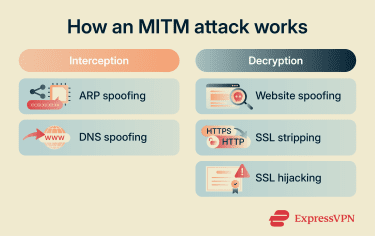
Decryption
In the decryption phase, attackers focus on accessing and interpreting the data they have intercepted. Since most modern communications use Hypertext Transfer Protocol Secure (HTTPS) and Transport Layer Security (TLS), the goal in this phase isn’t simply to “decrypt” data directly but to bypass, weaken, or exploit encryption so that readable information can be obtained.
Historically, some MITM attacks have taken advantage of weaknesses in older encryption protocols and software implementations. As these vulnerabilities become known, they’re typically addressed through browser, operating system, and protocol updates.
Website spoofing
In website spoofing, attackers trick users into visiting fake websites that appear legitimate. This is often done through typosquatting (using slightly altered domain names) or visual tricks such as homograph attacks, where similar-looking characters from different scripts are used in domain names.
When the user enters the fake website, they are no longer communicating with the real service but directly with the attacker’s server. Any information they submit, such as login credentials or personal data, is sent straight to the attacker. In this case, encryption is not broken or intercepted; instead, it is bypassed because the user has been deceived into trusting a malicious endpoint.
SSL stripping
Secure Sockets Layer (SSL) stripping is a technique where the attacker downgrades a secure HTTPS connection to an unencrypted HTTP connection during the initial connection process.
The attacker intercepts the request and prevents the browser from upgrading to HTTPS, forcing the victim to continue communicating over HTTP instead. As a result, all transmitted data is exposed in plaintext and can be read or modified by the attacker.
Modern protections such as HTTP Strict Transport Security (HSTS) reduce the effectiveness of this attack by enforcing HTTPS connections and preventing insecure fallbacks.
SSL hijacking
In some more sophisticated MITM attacks, an attacker attempts to position themselves between a victim and a legitimate website while maintaining separate encrypted connections with each side. This can allow the attacker to inspect or modify traffic before passing it along, while the communication may still appear secure to the user.
Successfully carrying out this type of attack typically requires the attacker to overcome modern security controls, such as certificate validation and browser security checks. As a result, SSL hijacking is generally more complex than many other MITM techniques.
Warning signs of an MITM attack
Detecting an MITM attack can be difficult because many of the signs overlap with ordinary network or website issues. In most cases, detection begins with unusual behavior that warrants further investigation.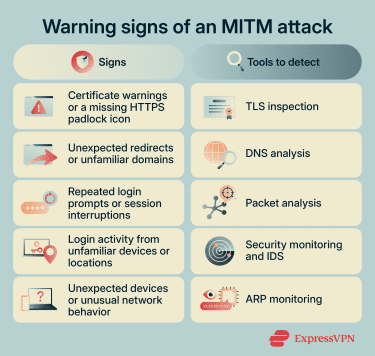
Signs of an MITM attack
These are observable symptoms that may indicate traffic is being intercepted or altered. None of them alone confirms an attack, but they can signal suspicious activity.
Certificate and HTTPS warnings
MITM attacks that intercept encrypted traffic may attempt to interfere with or replace digital certificates used to verify secure connections. Since browsers rely on these certificates to confirm a website’s identity, any mismatch or invalid certificate can trigger security warnings.
Users may see messages such as “Your connection is not private” or “certificate not trusted,” or notice that the HTTPS padlock icon is missing when it normally should appear.
However, these warnings can also be caused by expired certificates, misconfigured websites, incorrect system time settings, or legitimate security inspection tools.
Unexpected redirects or login behavior
MITM attacks that manipulate traffic flow, such as DNS spoofing or SSL stripping, can cause websites to behave abnormally. This may include unexpected redirects or loading of unfamiliar domains.
That said, similar behavior can occur due to normal website issues such as session expiration, caching problems, or server-side errors.
Session and account anomalies
If an MITM attack involves capturing or interfering with session data, it may result in unusual authentication behavior. This can include unexpected logouts, repeated login requests, or sessions resetting without user action.
In more severe cases, accounts may show activity from unfamiliar devices, locations, or IP addresses, which can suggest that session credentials have been intercepted or reused.
However, legitimate security mechanisms such as multi-device logins, session timeouts, or automated security protections also trigger these signs.
Connection anomalies
Some MITM attacks introduce an additional intermediary between the user and the destination server, which can affect how network traffic behaves. In some cases, users may notice unusual network activity, such as unexpected devices appearing on a local network, increased latency, intermittent connection issues, or instability during secure connections.
However, these symptoms are not specific to MITM attacks. Network congestion, weak connectivity, misconfigured devices, and server-side issues can produce similar behavior.
How MITM attacks are investigated
Several tools and techniques can help security analysts investigate suspected MITM attacks and identify signs that communications may be being intercepted or altered.
Packet analysis tools
Analysts can use tools to capture and inspect network traffic in detail. These tools allow them to observe how data moves between devices and look for signs that communications are being redirected, intercepted, or modified.
ARP and local network monitoring
On local networks, analysts can check IP-to-MAC address mappings to confirm whether ARP spoofing is taking place. Monitoring tools inspect ARP tables and detect cases where multiple devices claim the same IP address or where gateway mappings change unexpectedly.
Intrusion detection systems (IDS)
Security teams use IDS to continuously monitor network traffic for known attack patterns and abnormal behavior.
These systems can detect signs of MITM activity, including:
- Suspicious ARP traffic.
- DNS spoofing attempts.
- Unusual TLS or certificate behavior.
- Abnormal routing patterns.
TLS and certificate inspection
Security tools and browser-based inspection features can be used to verify whether encrypted connections are being tampered with. Analysts may inspect certificates and encrypted connections for signs of tampering or unexpected intermediaries.
These can help identify SSL interception or proxy-based MITM attacks.
DNS verification tools
Analysts can use DNS analysis tools to compare domain name resolutions against trusted sources. This can help show whether DNS responses have been intercepted or altered in transit.
How to reduce the risk of MITM attacks
Reducing the risk of MITM attacks involves securing communication channels, using encryption correctly, and reducing opportunities for attackers to intercept or alter data. Since MITM attacks target both networks and user behavior, effective protection requires multiple layers of security.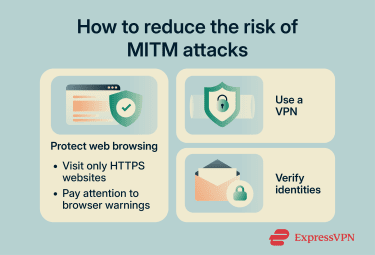
Protect web browsing
Web browsing is one of the most common entry points for MITM attacks, so securing it is a critical first step.
Visit only HTTPS websites
Using HTTPS websites helps protect against MITM attacks because it encrypts communication between the browser and the server. The padlock icon in the browser indicates that the connection is encrypted and the website’s identity has been verified.
Certificate authorities issue the certificates for this verification, which you can view by clicking the padlock icon in your browser. If the certificate does not match the website, the browser will show a warning.
Pay attention to browser security warnings
Modern browsers usually include security features designed to detect problems with website identities and secure connections. If a browser displays warnings such as "Your connection is not private," "Certificate not trusted," or similar messages, it may indicate that the site's certificate cannot be verified or that the connection is not secure.
While these warnings do not necessarily mean an MITM attack is taking place, they shouldn’t be ignored. Before proceeding, verify that the website address is correct and investigate the warning rather than bypassing it automatically.
Use a VPN
A virtual private network (VPN) encrypts internet traffic between your device and the VPN server. This can help reduce the risk of certain interception attacks, particularly when using networks you do not control, such as public Wi-Fi.
However, a VPN is not a complete defense against MITM attacks. It can’t prevent users from visiting fraudulent websites or bypassing browser security warnings. VPNs work best as one layer of a broader security strategy that also includes HTTPS, software updates, and careful attention to website identities.
Learn more: Wi-Fi VPN: Stay safe on public Wi-Fi networks
Protect messaging and communication
MITM attacks aren’t limited to browsing. They can also target email and messaging communications, where the attacker's goal is often to intercept messages or impersonate a trusted contact.
One of the more common defenses is to use messaging apps that support end-to-end encryption (E2EE), meaning that messages can only be read by the intended recipient and no other third party, including the platform provider itself.
Some encrypted messaging platforms also provide features that allow users to verify each other's identities, such as security codes, fingerprints, or device verification tools. These features help confirm that messages are being exchanged with the intended recipient and not someone impersonating them.
While encryption helps protect message contents, identity verification adds another layer of protection by reducing the risk of impersonation or interception. If a messaging app offers identity verification features, using them can help reduce the likelihood of a successful MITM attack.
FAQ: Common questions about man-in-the-middle (MITM) attacks
Can an MITM attack happen on HTTPS websites?
Can public Wi-Fi make MITM attacks easier?
Can attackers steal passwords through an MITM attack?
What should you do after a suspected MITM attack?
Also monitor for unusual activity such as unknown logins or transactions. If needed, revoke active sessions or certificates and collect relevant logs to investigate further.
Explore the web with greater privacy
Get ExpressVPNSign up today for a chance to win FIFA World Cup 2026™ tickets.
























Comments
So if I understand this post correctly, there is really no way to completely protect myself from a hacker, especially if I have an e-commerce website. I have had a hacker steal my customer sales and I have tried and tried to stop her. She knows what I am doing all of the time. The man-in-the-middle would explain how she does it but it also seems to explain how she can overcome every effort to stop her too.
elenka
Seems to me rather the hacker, the business or the developer. Everyone is making money from you. One way or another.
Remove me and my devise ( ios ) and account from this app . And adroid is trying to comprimise my account .legal and my identity is using android devoce ..