What is riskware? Definition, examples, and security risks


Riskware is legitimate software that isn’t designed to cause harm but can still introduce security or privacy risks. This is because its technical capabilities, if misused, misconfigured, or exploited, could expose systems to threats such as unauthorized access, data theft, and malware infection.
In this article, we explain how riskware can threaten your cybersecurity, highlight common types, and provide guidance on removing them from your system.
What is riskware?
Riskware is legitimate software whose functionality or design can pose a danger to users when used improperly. It shouldn’t be confused with malicious software (malware). This is reflected in how antivirus software typically flags riskware differently than malware.
The key difference between the two is intent. While both can lead to negative consequences, malware is made to harm systems or steal data; riskware isn’t.
Imagine an app that automatically backs up your files to the cloud. It’s legitimate and helpful software. But it could expose sensitive information if poorly secured, for example, by not having strong encryption or proper access controls. In that case, it qualifies as riskware.
Another example is remote access software or remote desktop software. These tools can be used for legitimate purposes, such as IT support. However, if they’re installed on your device by someone else without your knowledge, they’re considered riskware because they could be used to take control of your device.
Note that whether a program can be considered riskware is, to some extent, subjective. It depends on context, configuration, and user judgment. This is why some antivirus solutions allow users to choose whether to flag certain programs or add them to an exception list.
Common types of riskware
Riskware can take many forms, since many different types of software can introduce privacy or security risks. Below, we discuss the types of software more commonly associated with riskware.
Monitoring software
Monitoring software is designed to track user activity, system behavior, or network usage. There are many legitimate uses for this type of software. For example, parental controls can help manage children's screen time and protect them from inappropriate content, while employee monitoring tools can track productivity or ensure compliance with workplace policies.
However, this type of software is often associated with riskware because it collects a lot of sensitive information. If this data isn’t properly secured, it could potentially be leaked or stolen. In addition, monitoring software can introduce legal and privacy risks if used without proper authorization or consent.
Vulnerable or poorly secured software
Any software may be classified as riskware when it contains known or unpatched vulnerabilities that malicious actors can exploit.
An example of this type of riskware is an outdated app. It becomes riskware when the lack of security updates makes it an easy target for attackers.
Another example is software designed without strong security measures. Most modern messaging apps use encryption to prevent sensitive information from being intercepted by third parties, but a messaging app that transmits data without encryption could be considered riskware.
Software that can violate the terms of service or laws
Some software is labeled riskware not because it poses a security risk, but because it can lead to legal or regulatory consequences if used improperly.
As mentioned before, monitoring software can fall under this category. When it’s used to collect private data without proper consent, it may violate the app's terms of service and breach privacy laws.
Another example is a file-sharing program that may be used to share copyrighted content without authorization. While the software itself is not inherently harmful, certain uses could expose users to legal consequences.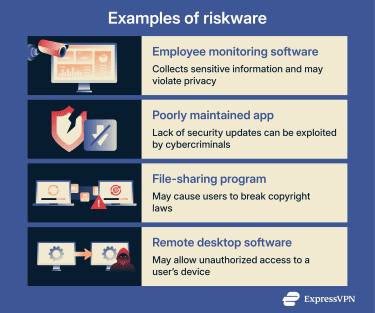
How riskware affects your security
While riskware isn’t inherently malicious, it can have serious consequences for your security if it’s misused, exploited, or improperly configured. Riskware on your system can lead to:
- Unauthorized access to your device: Remote administration tools or programs that allow someone to control a computer from another location can be used by attackers to take control of a system without the user’s consent. The risk increases if weak passwords are used or the software’s insecure default settings are left unchanged.
- Abuse of system resources or activity: After gaining access to a device by exploiting riskware, the attacker may run unwanted programs such as cryptominers, monitor user activity, or add the device to a botnet. All of these can reduce performance and disrupt normal operation.
- Theft or exposure of sensitive data: Riskware with broad visibility into a device or that collects personal information, such as monitoring software, can expose files, credentials, or activity data if it’s not properly secured.
- Installation of malware: Riskware isn’t malware, but it can be misused or exploited to create entry points for malware, allowing attackers to remotely install adware, Trojans, spyware, or other malware on the system.
How to identify riskware on your device
Since riskware is legitimate software, it can be difficult to detect. Here are some red flags to watch out for:
- Unknown software: Riskware can appear on your system unexpectedly because it’s sometimes bundled with other apps. If you don’t remember installing a piece of software, investigate it thoroughly, since unknown factors on your system create potential risks.
- Excessive permissions: Some legitimate software requires broad permissions to function properly. However, programs with access to sensitive areas, such as your camera, microphone, or contacts, are inherently riskier. So you should review apps with broad permissions carefully and evaluate whether you need and trust them.
- Outdated or unsupported software: Apps that no longer receive updates may have unpatched vulnerabilities, making them easier for attackers to exploit.
- Software with uses that may violate laws or terms of service: Some apps are legitimate but are often used in ways that break terms of service or local laws.
- Unexpected access to data: Programs that gather or transmit data beyond their stated purpose can expose personal information.
Tools and methods for removing riskware
Not all riskware needs to be removed, so long as you understand what it does and manage it properly. But if you’ve identified unwanted riskware on your device, there are two main ways to remove it safely: using antivirus software or uninstalling it manually.
Many modern antivirus programs can both detect and remove riskware. Simply install a reputable security solution, run a scan, and follow the on-screen instructions to quarantine or remove any flagged programs.
Sometimes, riskware will trigger a “not a virus” alert. This happens because the antivirus detects no malicious code but identifies behavior that could pose security risks. In these cases, it’s up to you to review each alert and decide what to do with the program.
Manual uninstallation is another option. Since riskware is legitimate software, you can usually just uninstall it through your system’s control panel or application manager.
Note that if you’re using a corporate or managed device, be careful when removing software. Some programs may be installed intentionally by your organization, and uninstalling them could affect system functionality or violate IT policies.
Best practices to avoid riskware
The best way to avoid riskware is to take proactive steps to manage the software and apps you use. Here are some best practices to follow:
- Install software from trusted sources: Avoid unofficial or modified versions. Third-party versions may include unsafe features or not receive proper security updates. Only download software from official websites and verified app stores.
- Review permissions before installation: Avoid software that requests permissions it doesn’t need, and recognize that even when extensive permissions are justified, this increases risk.
- Check the terms of service: Some software is legitimate on its own but is commonly used in ways that break the rules of other apps or platforms. Reading the terms of service carefully can help you avoid trouble.
- Read the privacy policy: Look at what data the software collects, how long it’s stored, and whether it’s shared with others. Programs that collect a lot of data create a higher risk if that data is mishandled or exposed.
FAQ: Common questions about riskware
What is a riskware application?
Riskware is legitimate software that can introduce privacy or security risks. It’s not made with malicious intent, but its functionality or design can make it vulnerable to misuse, exploitation, or accidental data exposure.
Should you delete riskware?
It depends. Some riskware can be used safely if you understand its purpose and manage it carefully. For example, remote access tools or monitoring software can be legitimate for IT support, parental controls, or system management. That said, if you don't need the software or don't trust it, it's usually safer to remove it.
What are common examples of riskware?
Common examples include monitoring software, remote access tools, outdated or poorly secured apps, and programs that can lead to legal issues if misused, such as file-sharing programs that distribute copyrighted content without authorization. These programs are all legitimate but can become risky depending on context, configuration, or user behavior.
How can you tell if riskware is dangerous?
All riskware carries some risk by definition. Therefore, the real question is whether the software is necessary and whether you can manage the potential risks.
For example, parental control software might be considered riskware because it collects extensive data on device use and online activity. However, if you trust the vendor to handle that data securely, you may feel the benefits for your child’s safety outweigh the potential privacy risks.
Are there tools to detect and manage riskware?
Yes, antivirus software can help you detect and remove riskware from your system. Since riskware is legitimate software, you can also just manually review and uninstall riskware via your system’s control panel or application manager.
Take the first step to protect yourself online. Try ExpressVPN risk-free.
Get ExpressVPN