
What is a digital bank and is it the right choice for you?


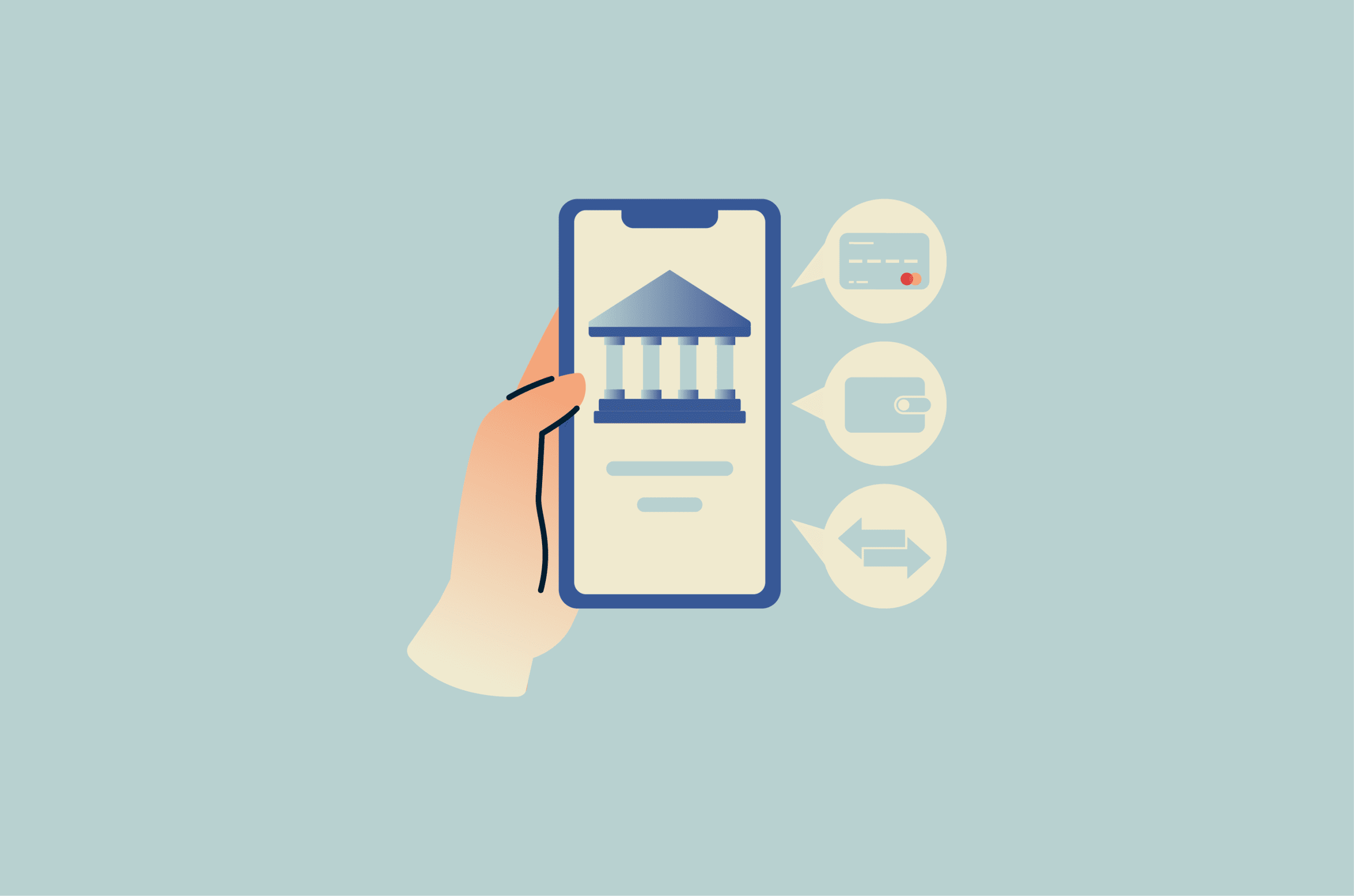
Digital banks promise a faster, simpler way to manage money, but the experience can vary widely depending on the provider behind the app. Fees, features, support, and protections can all differ, especially when a service relies on partner banks.
This guide explains how digital banks work, how they compare with traditional banks, and what to consider before choosing one.
Note: This information is for educational purposes only and does not constitute financial or legal advice.
What is a digital bank?
A digital bank is a financial service that operates through a mobile app or website instead of physical branches. Digital banking apps allow users to handle tasks like opening accounts, transferring money, and tracking spending online.
What are challenger banks?
Challenger banks are newer banks or banking providers that compete with established banks through app-first services, lower-cost models, and faster feature rollouts. In many cases, they hold their own banking licenses and follow the same core banking regulations as traditional banks.
The term "challenger" refers to their business strategy. They typically avoid large branch networks to reduce overhead, which can help them offer lower fees and launch new features faster than traditional banks.
What are neobanks?
In many markets, neobanks are app-based financial technology companies that don't hold a full banking license. They partner with licensed banks or regulated financial institutions to offer banking features, but the neobank itself may not be the legal bank holding customer deposits.
From a user perspective, the experience can feel identical to using a challenger bank. The key difference is regulatory: customer protection depends on who legally holds the funds, how the account is structured, the jurisdiction, and whether deposit insurance or pass-through insurance conditions are met.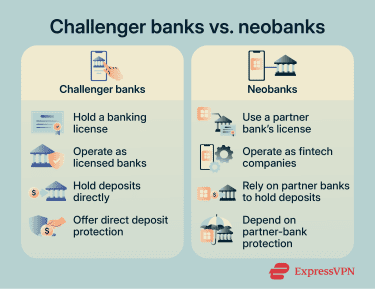
Digital banks vs. traditional banks: What’s the difference?
Sign-up and verification
Digital banks usually handle account opening online. Users enter personal details, upload identification, and complete verification via an app or website. In many cases, the process takes minutes, though some applications may require extra checks or manual review.
Many traditional banks also offer online applications, but accounts that require higher levels of verification, such as business or non-resident accounts, may still require a visit to a branch.
Services
Both digital and traditional banks offer core services such as transfers, bill payments, and account management.
Traditional banks offer branch-based services like cash deposits, cashier's checks, and in-person support. Digital banks usually offer fewer branch-style services. Some support cash deposits through ATM or retail partner networks, but fees, limits, and availability vary.
Digital banks may also offer features that traditional banks lack or provide only through specific account tiers, such as multi-currency accounts, instant virtual cards, and in-app investing.
Fees
Without branch networks, digital banks may have lower operating costs and pass some savings on through lower fees, fewer monthly maintenance charges, and cheaper international transactions.
That said, pricing still depends on the provider and account type. Traditional banks may charge more for international transfers or branch services, but some offset this with added account benefits, overdraft options, or higher interest rates on premium accounts.
Efficiency and support
Digital banks automate routine tasks. For example, onboarding uses facial recognition and automatic ID scanning. Some transfers can be processed instantly or near-instantly, and simple account changes may take effect quickly.
Traditional banks may process transactions more slowly, especially when they involve legacy systems, branch checks, manual review, or cross-border payment networks. International transfers can take one to five business days, depending on the destination country, currency conversion, intermediary banks, cut-off times, and compliance or fraud checks.
That said, digital banks may rely on in-app chat or email support, with limited phone or branch support. This can make urgent issues like fraud disputes, account lockouts, and failed transfers harder to resolve quickly.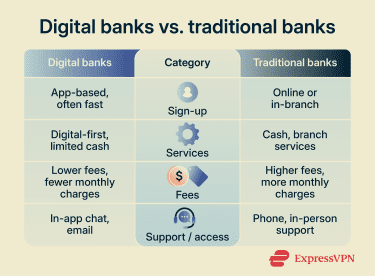
Are digital banks safe?
Digital bank safety depends on two things: regulatory protections and the provider's account security.
Regulatory protections
Digital bank protection depends on the provider’s license and operating jurisdiction.
For deposits, the critical factor is whether the money is held by a licensed, insured bank. In the U.S., the Federal Deposit Insurance Corporation (FDIC) generally protects eligible deposits up to $250,000 per depositor, per FDIC-insured bank, per ownership category.
However, the FDIC notes that fintech apps don't always clarify whether customer funds are held by an FDIC-insured bank or by the app company itself in uninsured accounts. This distinction determines whether deposit insurance applies. For fintech apps that place funds with partner banks, coverage may also depend on the account structure, recordkeeping, and whether pass-through insurance conditions are met.
In the EU, deposit guarantee schemes protect eligible deposits up to €100,000. For cross-border banks, the relevant scheme is typically tied to the bank’s home member state, so customers may need to verify which national scheme applies.
Regulation also governs payment processing and dispute resolution. In the U.S., consumer electronic transfers fall under the Electronic Fund Transfer Act (EFTA), which sets rules for unauthorized transactions and error resolution. In the EU, the Second Payment Services Directive (PSD2) requires strong customer authentication for many electronic payments and account-access actions, subject to exemptions, and sets standards for secure communication.
Digital banks also have data protection obligations. In the EU, the General Data Protection Regulation (GDPR) sets rules for processing personal data, including financial information linked to an identified or identifiable person.
Before opening an account with a digital bank, review the terms and conditions to confirm who holds the funds and whether deposit insurance applies. For U.S.-based services, the FDIC's BankFind database can verify whether the underlying institution is insured by the FDIC.
Account security
Digital banks offer multi-factor authentication (MFA), and financial institutions are expected to use risk-based authentication controls for digital banking access. MFA requires more than one form of verification, such as a password plus a one-time code, a trusted device, or a biometric check. This makes account takeover harder because stolen login credentials alone usually are not enough.
However, some MFA methods remain vulnerable to phishing, SIM swapping, malware, or account recovery abuse, so the level of protection varies by method and attack scenario.
That said, some MFA methods remain vulnerable to phishing, SIM swapping, malware, or account recovery abuse, so the level of protection depends on the method used and the attack scenario.
Banks also use fraud-monitoring systems to analyze patterns and flag unusual activity, such as logins or transactions from unfamiliar devices or locations.
Some apps send real-time transaction alerts and provide controls such as card freezes and device-based authorization checks. These can help users respond quickly when they spot suspicious activity.
Security risks of digital banks
Digital banks often rely on app notifications, email, text messages, and in-app support. Because customers expect digital communication, phishing attempts can be harder to distinguish from legitimate alerts, creating more opportunities for scammers to steal credentials or trick people into approving fraudulent transactions.
The Federal Trade Commission (FTC) says impersonation scams were the most commonly reported scam category in 2024, with consumers reporting $3 billion in losses.
Some banking-related scams aim to take over accounts by stealing credentials or authentication codes. Others try to trick people into directly approving fraudulent transfers. If attackers also compromised the person’s email, phone number, device, or authentication app, they could bypass certain MFA methods.
Also read: How to avoid Zelle scams and protect your money.
Social engineering attacks
Phishing is one of the most common methods. Attackers impersonate banks or services to trick users into entering login details or approving actions.
Advanced phishing sites may act as a relay between the victim and the legitimate bank site. When login details are entered, the phishing site forwards them to the real service, relays the MFA prompt, and may capture authentication codes, session cookies, or tokens to complete the login.
SIM swapping is another technique. Attackers convince a mobile carrier to transfer a phone number to a SIM card they control. This can let them intercept SMS-based login codes or attempt account resets tied to the phone number.
Some attackers use MFA fatigue. They flood victims with login approval requests until the victim accidentally approves one, granting the attacker access.
Device-based attacks
Malware installed on a device can steal saved passwords from browsers, capture keystrokes via keyloggers, or display fake login forms over real apps to collect credentials. Other attacks use session hijacking, cookie theft, or stolen authentication tokens, allowing attackers to access accounts without re-entering passwords or MFA codes.
Attackers may also target authentication codes or copied sensitive data. Clipboard hijacking monitors copied text, while some banking trojans intercept SMS messages that contain one-time passwords (OTPs). On compromised networks, attackers may try man-in-the-middle (MITM) attacks, fake login pages, or traffic manipulation, although HTTPS/Transport Layer Security (TLS) makes direct interception of banking credentials much harder.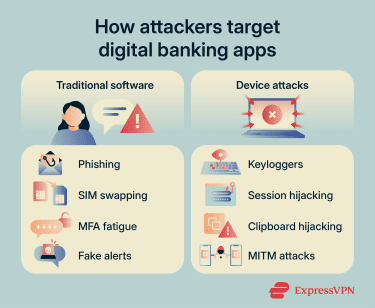
How to stay protected when using a digital bank
Safely using a digital bank comes down to a few simple habits and controls.
Use strong passwords and MFA
Set a long, unique password for your banking account. Reusing passwords across apps means a single breach can put multiple accounts at risk. Avoid common passwords or passwords based on personal details, such as your name or birthday. Consider using a password manager, like ExpressKeys, to generate and store passwords securely.
Enable MFA to reduce the risk of unauthorized access if your password is stolen. Where available, use app-based, device-based, or phishing-resistant MFA instead of SMS codes.
Be wary of scams
Scammers often exploit urgency. For example, an SMS might claim the bank detected suspicious activity on an account and ask the person to click a link to verify their identity within 24 hours.
It’s best to avoid clicking links in messages or push notifications or following instructions from unexpected alerts. Instead, open the banking app to confirm the issue, or contact customer support using the details in the app itself, not the ones in the message.
Also read: What is smishing? Spot and prevent SMS phishing scams.
Keep your device and app updated
Outdated software may contain known security vulnerabilities that attackers can exploit. Keep your phone, operating system, and banking app up to date. Enable automatic updates, so you receive security patches as soon as they’re available, instead of delaying them.
Read more: The importance of software updates for security and performance.
Monitor account activity and set up alerts
Check your transaction history and account settings regularly for unauthorized activity, unfamiliar logins, or changes you didn't make.
Alerts make this easier. Most digital banks enable basic transaction alerts by default, but you may need to manually enable alerts for logins, password changes, or account setting updates. Check the app's notification or security settings to enable all available alerts.
Use caution on public Wi-Fi
Attackers can create fake Wi-Fi hotspots that mimic legitimate networks to monitor traffic, redirect users to fake pages, or trick them into entering sensitive information. Public Wi-Fi is safer than it used to be because modern banking apps and websites use encryption, but a virtual private network (VPN) can add protection on the local network.
A VPN creates an encrypted tunnel between the device and a remote VPN server, helping keep traffic unreadable to anyone monitoring the local network. However, it doesn't protect against fake banking pages, malware, or scams, so still use the official app or website.
Should you use a digital bank?
The right choice depends on how much you rely on branches, cash, in-person support, and app-based features.
Use a digital bank if:
- You’re comfortable managing your account entirely through an app.
- You rarely use cash or branch services.
- You want faster transfers, where available, and real-time account updates.
- You need multi-currency features or lower-cost international transfers.
- You want extra app-based features, such as virtual cards, budgeting tools, or investing options.
Use a traditional bank if:
- You regularly handle cash or need branch-based cash services.
- You want in-person support for urgent issues.
- You need branch-based services, such as cashier’s checks, notarization, or document support.
- You value having a dedicated banker who knows your account history.
FAQ: Common questions about digital banks
Do digital banks have banking licenses?
Can you deposit cash into a digital bank?
What fees do digital banks charge?
Can a digital bank replace a traditional bank?
Who benefits most from using a digital bank?
Explore the web with greater privacy
Get ExpressVPNSign up today for a chance to win FIFA World Cup 2026™ tickets.