Phishing-as-a-Service (PhaaS): What it is and why it’s dangerous


Phishing used to require technical skills, infrastructure, and time. An attacker had to write their own emails, build fake websites, and manage their own servers. Phishing-as-a-Service (PhaaS) has changed all that.
Today, anyone with a few hundred dollars and ill intentions can launch a professional-grade attack. This shift has turned phishing from a specialized skill into an accessible product. It hasn’t just made phishing more common; it’s changed how these attacks spread and made them much harder to detect.
This article explains what PhaaS is, how it works, and why it has made phishing a more widespread and persistent threat.
What is Phishing-as-a-Service?
Phishing-as-a-Service (PhaaS) is a business model where organized groups sell ready-made “all-in-one” phishing kits that attackers can rent.
These platforms work like any other software subscription service. Attackers pay a monthly fee (around $50–$1,500, depending on features) and get everything they need to run campaigns at scale: fake login pages, email templates, hosting that resists takedown, control panels to launch and track campaigns, and even customer support.
This practically means that these services handle the hard technical work, so almost anyone can run a phishing campaign: no coding required and no server management. Cybercriminals just need to pick a brand to impersonate, customize it a bit, and hit "Send."
Traditional phishing meant one-off efforts: craft an email, set up a site, wait, and collect data manually. PhaaS makes it repeatable and scalable. When campaigns can be sent at massive scale, even a small fraction of victims responding can make an operation profitable.
How does Phishing-as-a-Service work?
Attackers buy or rent a kit on dark web forums and encrypted messaging platforms. Phishing kits lower the technical barrier for carrying out phishing attacks by providing prebuilt infrastructure rather than requiring attackers to create everything themselves.
A typical phishing kit bundles commonly reused components, such as imitation login pages that resemble well-known online services and backend systems that collect information entered by victims. These elements are designed to look familiar and trustworthy, increasing the likelihood that a target will interact with them.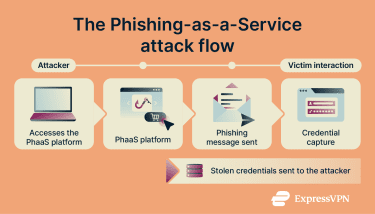
Instead of building campaigns manually, attackers rely on the platform to handle much of the setup and coordination behind the scenes, including hosting and campaign management. Activity is often monitored automatically, allowing operators to see when messages are opened or when information is submitted.
What makes PhaaS so dangerous?
According to the FBI’s 2024 Internet Crime Complaint Center (IC3) report, phishing/spoofing was the #1 complaint (193,407 cases), resulting in over $70 million in losses.
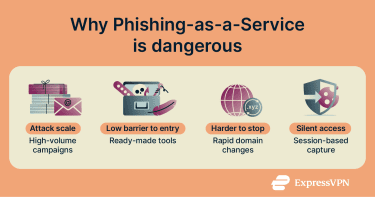
There are several reasons why PhaaS attacks are becoming increasingly successful and dangerous:
- Attack automation: Many services automate routine tasks such as sending large volumes of messages, rotating domains, or relaunching pages when links are blocked. This reduces manual work and helps campaigns stay active longer.
- Detection evasion: Some modern phishing kits include anti-detection and anti-analysis techniques (for example, filtering based on IP or browser characteristics and code obfuscation) that make it harder for automated security tools and crawlers to recognize and flag the malicious pages.
- Session hijacking: Some phishing toolkits aim to capture session tokens (such as cookies), which can allow attackers to access an account without re-entering credentials, even when multi-factor authentication (MFA) is enabled. In these cases, the authentication process appears to work normally for the victim. They enter their credentials, complete MFA, and successfully log in while the attacker quietly gains access using the captured session.
- Bulletproof hosting: PhaaS platforms often rely on hosting environments that intentionally delay responding to abuse complaints or law enforcement requests. This makes it incredibly difficult for security teams to take them down quickly. By the time a link is flagged, the attacker has already moved to a new domain.
- High-quality clones: Old phishing emails were often easy to spot because of spelling mistakes or blurry logos. PhaaS kits use “pixel-perfect” clones. They don’t just copy the logo; they copy the entire user experience, including the loading animations and “Privacy Policy” links.
- Takedowns don’t stop campaigns: Removing one phishing page rarely ends a PhaaS campaign. New domains and pages can appear within minutes, allowing attacks to continue with little interruption.
Red flags of PhaaS-based phishing attempts
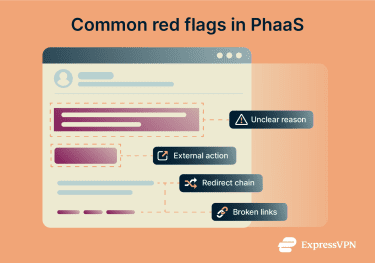
PhaaS changes what suspicious messages look like. Many classic phishing red flags, like poor grammar, unprofessional design, and obvious fake addresses, no longer apply. PhaaS attacks look polished.
The clues are in the behavior, not the appearance.
It looks right, but it doesn’t explain why
The branding may look spot-on, but the message feels generic and disconnected from anything you actually did. You might see a security notice or account update that could apply to anyone.
PhaaS kits are reused across thousands of victims, so while the wording sounds professional, it has to stay vague.
You’re asked to leave the regular platform
A service you usually access through an app suddenly asks you to confirm something in a browser, or an email asks you to click a link instead of handling the issue within the platform you already use.
Legitimate services rarely force you to step away from their own app or dashboard to fix routine issues.
The page looks complete, but it doesn’t work properly
A phishing page may look convincing at first glance, but parts of it don’t function as expected. Links like “Help,” “Privacy,” or “Contact” may do nothing or just reload the page.
That’s because phishing kits focus only on capturing login details. Everything else is there to make the page look complete, not to work properly.
The link takes a detour
Instead of linking directly to a familiar site, the message routes you through a redirect, tracking link, or URL shortener before landing on an unfamiliar domain.
This extra step helps phishing campaigns slip past filters but also makes the destination harder for you to verify.
How to stay safe from PhaaS
PhaaS attacks are designed to blend into everyday online activity. Nothing about these messages forces you to stop and think, which is exactly why pausing matters. Here are some of the best ways to prevent a phishing attack.
For individuals
- Verify context before acting: When a message asks you to do something, check whether it matches your recent activity, such as a login attempt, purchase, or account change. Generic alerts that are disconnected from anything you actually did deserve extra caution.
- Check link destinations before clicking: On a desktop, hover your mouse over the link to see the full URL. On a mobile device, press and hold the link to preview it without opening. Look for misspellings, extra words, or unfamiliar domains. If anything looks off, don’t open it.
- Notice how pages behave: If you do open a page, don’t enter information right away. See how it behaves. Legitimate sites work as expected. Pages with broken links, unresponsive buttons, or endless reloads are strong signals to leave immediately without typing anything.
- Access services directly: Avoid using links in emails. Instead, access services through their official apps or by typing the address directly into your browser.
- Use unique passwords: Avoid repeating the same password across services. Use strong passwords that are at least 12 characters long and include a mix of uppercase and lowercase letters, numbers, and symbols. A password manager is extremely helpful in juggling all these login details.
- Use phishing-resistant MFA: Whenever possible, enable MFA methods that can’t be easily reused on fake sites, such as security keys or built-in device authentication. These methods help protect your account even if a password is exposed, because they verify the legitimacy of the site you’re signing into rather than just asking for a one-time code.
For organizations
At an organizational level, effective strategies focus on reducing exposure, detecting problems early, and preventing a single compromised account from turning into a wider incident.
Tailor training to reality
Show employees the kinds of messages they’ll actually encounter, including polished security alerts and routine-looking work notifications. Generic “don’t click bad links” training doesn’t prepare people for well-crafted PhaaS campaigns.
Create a reporting culture
Make it easy and safe for people to flag suspicious messages quickly. The faster a threat is reported, the less damage it can cause.
Just as importantly, avoid blaming or shaming people who report phishing attempts, even if they clicked or entered information. A blame-free culture encourages faster reporting, which helps security teams contain incidents early and protect others from being affected.
Implement technical controls
There are a few ways you can do this:
- Email filtering and link scanning to analyze messages before they reach inboxes.
- Restricting account permissions so that if one set of credentials is compromised, the attacker can’t access everything.
- Monitoring for unusual sign-in behavior such as new locations, devices, or access patterns.
- Using anti-phishing solutions with high detection rates.
Prepare incident response processes
Make sure everyone knows who to notify, how to lock accounts quickly, and how to reset access if credentials are compromised. Clear procedures reduce response times when incidents happen.
Use continuous monitoring
Identify abnormal activity early and escalate incidents before they affect critical systems.
For smaller teams, a few well-chosen protections and clear response procedures often work better than complex systems that are difficult to maintain.
FAQ: Common questions about Phishing-as-a-Service
How does PhaaS work?
Phishing-as-a-Service (PhaaS) provides complete phishing toolkits through subscription services. Attackers typically pay a monthly fee to access templates, hosting, credential harvesting, and distribution tools. Everything is managed through a dashboard and requires minimum to no technical skills. This makes it easier for malicious actors to launch phishing campaigns at scale.
How can I recognize a phishing attack?
Phishing messages often look convincing, so context matters more than appearance. Be cautious of messages that feel generic, create urgency, or ask you to click links unexpectedly. If a message doesn’t clearly explain why you’re receiving it or asks you to leave your normal platform, pause before doing anything.
What makes PhaaS different from traditional phishing?
Traditional phishing requires technical know-how, manual effort, and time. Phishing-as-a-Service (PhaaS) automates everything and provides professional templates, making sophisticated attacks accessible to anyone. It’s also harder to stop: when one domain is blocked, new ones appear immediately.
What should I do if I think I’ve been phished?
Act immediately. Change your password for the affected account and any other account with the same password and enable multi-factor authentication (MFA). Check your account activity for unauthorized access. Report the incident to your IT team if it’s a work account.
Take the first step to protect yourself online. Try ExpressVPN risk-free.
Get ExpressVPN