What is HTTP/3 and should you use it?


HTTP/3 is the newest version of Hypertext Transfer Protocol (HTTP), the protocol that allows browsers to request web pages and servers to send them back. It defines how those requests and responses are structured and delivered across the internet.
The update was introduced to improve performance on slower or less stable networks. Support is built into modern browsers, and many websites offer it alongside earlier versions.
Ahead, we break down what HTTP/3 is, how it differs from earlier versions, what benefits it offers, and whether it should be enabled by site owners.
How does HTTP/3 work?
The latest iteration of HTTP, HTTP/3 changes how data travels between a browser and the server.
Earlier versions of HTTP use Transmission Control Protocol (TCP) as their transport protocol. TCP is reliable, but part of that reliability can lead to slow or interrupted data transfers. For example, TCP requires data packets to be sent and received in order. If a data packet is lost during a TCP transfer, the protocol can delay remaining packets until the lost data is resent.
HTTP/3 replaces TCP with Quick UDP Internet Connections (QUIC), a newer transport protocol that handles packet loss without stalling the entire connection. This makes pages load more smoothly on mobile and wireless networks, where packet loss is more common.
Evolution from HTTP/1.1 to HTTP/3
HTTP/1.1 handled one request at a time on each connection. To load pages with many resources, browsers either waited for each request to finish or opened multiple connections in parallel. This worked, but opening and managing several connections added overhead and made loading less efficient.
HTTP/2 reduced that overhead by allowing multiple requests and responses to share a single connection, a technique known as multiplexing. This lets multiple-page resources be transferred at the same time. Resources could be requested and delivered without waiting for others to complete, which reduced the need for parallel connections and improved efficiency.
However, HTTP/2 still relied on TCP, so its performance was still limited by TCP’s connection model. HTTP/3 keeps HTTP/2's multiplexing, but it replaces TCP with QUIC to tackle transmission slowdowns.
QUIC protocol and UDP explained
QUIC is built on top of User Datagram Protocol (UDP) instead of TCP.
Unlike TCP, UDP sends packets without first establishing a connection or checking whether data arrives or arrives in order. This makes it faster but unreliable on its own. QUIC adds reliability on top of UDP by tracking which packets arrive, retransmitting lost data where necessary, and adjusting send speed to avoid congesting the network.
QUIC also splits a connection into multiple independent streams, each carrying a separate resource (such as a video or image file). If one stream loses a packet, only that stream pauses. Other streams continue delivering data as normal.
HTTP/3 uses QUIC to improve connectivity during network switching, too.
TCP identifies a connection using the IP addresses and ports of a browsing device and the relevant website server. When a device switches networks, such as moving from Wi-Fi to cellular, its IP address and port change. That means the connection has to be re-established, halting any data transfers in progress.
To solve this problem, QUIC uses unique connection IDs to allow connections to migrate. As long as a server supports connection migration, data transmissions can continue even if the device's network changes.
Encryption and TLS 1.3 integration
With HTTP/1.1 and HTTP/2, encryption is available but not required. A site can serve traffic over plain HTTP without any encryption at all. Earlier versions of HTTP also only encrypt the content of a request but leave some connection details visible, such as which stage of the connection setup is in progress.
HTTP/3 requires encryption and uses TLS 1.3 to protect all data exchanged between the browser and the server. Transport Layer Security (TLS) is the standard protocol used to secure data in transit, and version 1.3 is its most recent major update.
With HTTP/1.1 and HTTP/2, the browser and server also complete two separate handshakes before page data can be sent. A handshake is a short exchange where both sides agree on how to communicate. First, the TCP handshake establishes the connection. Then, the TLS handshake sets up encryption. Each requires one or more round trips, which adds delay.
HTTP/3 combines connection setup and encryption into a single QUIC handshake. This reduces the number of round trips needed before data can begin flowing.
Lastly, HTTP/3 supports zero round-trip time (0-RTT). On a repeat visit, a browser can send its first request immediately using encryption settings saved from a previous session. The handshake still completes in the background, but the page can begin loading sooner.
HTTP/3 vs. HTTP/2 vs. HTTP/1.1
| HTTP/1.1 | HTTP/2 | HTTP/3 | |
| Connections used | Multiple | Single | Single |
| Impact of packet loss | Affects that connection | Can pause entire connection | Limited to affected data stream |
| Network switch handling | Connection restarts | Connection restarts | Connection maintained |
| Encryption setup | Separate connection and encryption | Separate connection and encryption | Connection and encryption together |
| Performance on stable networks | Slower | Efficient | Similar to HTTP/2 |
| Performance on unstable networks | Some page elements may stall; multiple connections isolate packet loss | A single lost packet can pause entire connection; higher packet loss than HTTP/1.1 | Lost packets only affect their stream; significantly better performance than HTTP/1.1 and 2 |
| Encryption | Available but not enforced | Available but not enforced | Enforced |
| Deployment status | Legacy | Widely used | Supported |
Related: What’s the difference between SSL and TLS?
Benefits of HTTP/3
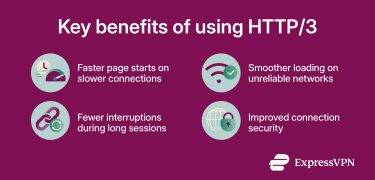
Faster page starts on slower connections
On connections with higher delay, such as mobile networks or long-distance servers, HTTP/3 can reduce the time before a page begins loading. The browser can start sending requests sooner because connection setup and encryption happen in fewer round trips.
Smoother loading on unreliable networks
Some networks lose data from time to time, particularly crowded Wi-Fi networks and mobile connections with a weak signal. With earlier HTTP versions, a single lost packet could stall the entire page. HTTP/3 isolates the problem. Each resource loads on its own stream, so a lost packet only delays the resource it belongs to. The rest of the page continues loading normally.
Fewer interruptions during long sessions
During downloads, streaming, or video calls, a device may switch networks, such as moving from Wi-Fi to cellular. With earlier HTTP versions, this breaks the connection and forces it to restart, halting the transmission.
Since HTTP/3 uses a connection ID that stays valid across network changes, transfers on video platforms, online stores, and communication tools can continue without interruption.
More secure connections
HTTP/3 requires encryption, and that encryption covers more connection metadata than HTTP/1.1 and HTTP/2. This makes it harder for anyone monitoring a network to learn anything about a connection beyond the fact that it exists.
Related: Difference between HTTP and VPN, and do you need both?
Downsides of HTTP/3
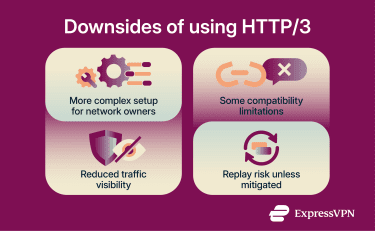
Technical complexity
Because QUIC covers transmission reliability, congestion controls, and encryption, HTTP/3 can be more complex to set up and manage than HTTP/2.
For most site owners, implementing HTTP/3 is just a matter of enabling the protocol via the site’s hosting provider. For enterprises or teams running servers or networks directly, however, QUIC offers greater customization but can complicate setup, debugging, or performance tuning.
Compatibility issues
Older devices or browsers might not support QUIC, so site owners or network admins also need to set up HTTP/1.1 or HTTP/2 as a fallback.
Some network tools, like firewalls, also block UDP traffic for security reasons. This is because UDP doesn’t require an initial handshake between sender and receiver as TCP does. It can make UDP traffic more vulnerable to attacks like spoofing or distributed denial-of-service (DDoS). While QUIC addresses many of these issues, networking tools can still detect UDP and block HTTP/3 connections.
UDP can be allowed on most firewalls, but other tools (for example, load balancers or packet analyzers) might require software or hardware updates.
Encryption and traffic monitoring
As well as compatibility issues, network monitoring tools can also struggle with HTTP/3’s built-in encryption.
For example, the encryption hides information from monitoring techniques like deep packet inspection (DPI). It can make malware detection or content blocking harder to manage on networks.
Low risk of connection hijacking
Because 0-RTT allows an HTTP/3 connection to start sending data before the handshake is fully confirmed, it introduces a replay risk. An attacker could capture and resend previous data to the server, like the action of logging into an account.
To limit this risk, most modern servers typically restrict 0-RTT to read-only requests, such as loading a page or fetching an image. They reject requests that modify data or trigger account actions.
When to enable HTTP/3
HTTP/3 is enabled on the server side. Site owners and administrators decide whether to support it. Visitors don't need to do anything. If a site supports HTTP/3 and your browser does too, it's used automatically.
Whether it's worth enabling as a site owner depends on your traffic. If most of your visitors use mobile networks, public Wi-Fi, or access your site from far away, HTTP/3 is more likely to help. These connections tend to have higher delay or packet loss, and HTTP/3 is designed to limit how much those issues slow down the rest of a page.
If you already use a content delivery network (CDN), enabling HTTP/3 is often low effort. Services like Cloudflare, Akamai, Fastly, and Amazon CloudFront support HTTP/3 between visitors and the CDN’s servers. Some enable it by default, while others require it to be turned on in the CDN's settings. The origin server (the server where your site’s content is hosted) can continue using HTTP/2 or HTTP/1.1 without changes.
If most visitors are nearby and on stable broadband, the difference may be small. HTTP/3 doesn't hurt performance, but it may not be worth prioritizing if supporting it requires expensive or time-consuming changes to your setup.
Sites that benefit most are those with mobile-heavy traffic, longer-lasting connections, or time-sensitive loading, such as video streaming, real-time communication, and online stores.
How to enable HTTP/3
The steps below apply to site owners or administrators who manage servers, CDNs, or firewall rules.
Allow UDP on port 443
HTTP/3 runs over QUIC, which uses UDP instead of TCP. Your server and firewall must allow UDP traffic on port 443. Many firewalls permit TCP on this port by default but block UDP.
Check firewall rules for your hosting provider, cloud network, or the server's local firewall before enabling HTTP/3.
Configure your web server
After allowing UDP on port 443, you need to enable HTTP/3 in the web server software that runs your site. The exact steps depend on which server you use.
Nginx (1.25.0 or later)
In your server configuration, add support for QUIC and keep regular HTTPS enabled. A minimal example looks like this:
listen 443 ssl;
add_header Alt-Svc 'h3=":443"; ma=86400';
- The first line enables HTTP/3 over QUIC.
- The second keeps regular HTTPS available as a fallback.
- The third tells browsers the site supports HTTP/3 on future connections.
LiteSpeed (6.0.2 or later)
HTTP/3 is enabled by default in recent versions. In most cases, you only need to confirm that UDP on port 443 is allowed.
Caddy (2.6.0 or later)
HTTP/3 is enabled automatically when HTTPS is configured.
Apache
Apache doesn't support HTTP/3 directly. If you use Apache, you can still offer HTTP/3 by placing it behind a CDN or a reverse proxy that handles HTTP/3 connections.
How to check if your browser is using HTTP/3
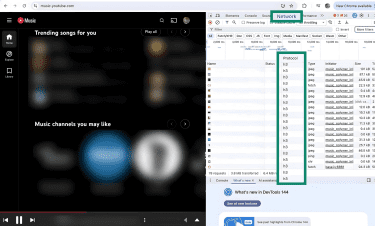
Modern browsers use HTTP/3 automatically when available. Here’s how to check whether a page is using HTTP/3, using Chrome as an example:
- Right-click any webpage and select Inspect to open developer tools.
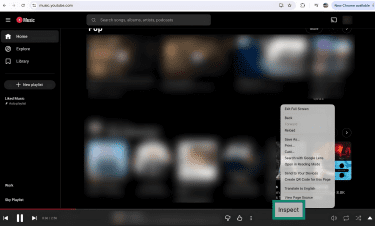
- Click the Network tab, reload the page, and look at the Protocol column. Requests labeled h3 indicate HTTP/3.
FAQ: Common questions about HTTP/3
What is HTTP/3 used for?
What port does HTTP/3 use?
How does HTTP/3 improve speed and latency?
Do all browsers support HTTP/3?
Is HTTP/3 secure?
Will HTTP/3 replace HTTP/2?
Take the first step to protect yourself online. Try ExpressVPN risk-free.
Get ExpressVPN