Expressvpn Glossary
Webhook
What is a webhook?
A webhook is an automated HTTP callback that delivers real-time data from one system to another when a predefined event occurs. Also known as push application programming interfaces (APIs) or reverse APIs, webhooks streamline automation and integrations, allowing applications and services to respond instantly without manual checks or delays.
How does a webhook work?
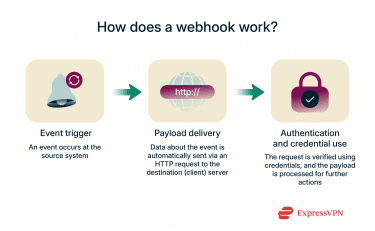 A webhook uses event-driven triggers to enable one system to automatically notify another system when something happens. Here’s how:
- Event trigger: The event occurs (like a payment being processed or a file being uploaded).
- Payload delivery: The source system sends an HTTP request to a destination URL. The request contains the event data (often in JSON format), so the receiving system can act on it immediately.
- Authentication and credential use: Depending on the service, the source may be verified via authentication or credentials such as API keys, signatures, or tokens. The data payload can then be processed for further actions.
Webhook vs. API
Webhooks and APIs are both ways for systems to share data, but while webhooks use “push” communication (data is automatically sent when an event happens), APIs generally rely on request/response communication, where a system asks for data when it needs it.
Webhooks are ideal for real-time updates, while APIs are better for on-demand access; for example, logging into an online banking application to view the full details of a credit transaction (API request) after a deposit notification has been received (webhook).
Because webhooks deliver data only when necessary, they tend to be more efficient and scalable for event-driven use cases, whereas APIs are a better choice for on-demand, controlled data access.
Benefits of using webhooks
Webhooks offer the following benefits:
- Real-time updates: Instantly notify systems when events happen.
- Reduced server load: Avoid constant polling requests and save resources.
- Streamlined workflows: Process is automated across apps without manual checks.
- Scalability: Handle growing integrations efficiently by sending only necessary data.
- Improved user experience: Faster responses (e.g., instant payment confirmations).
How webhooks are used in practice
There are many applications for webhooks, including but not limited to:
- Payment processing (e.g., Stripe, PayPal): Webhooks notify the service when someone makes a payment or when a payment has been successfully deposited.
- Messaging platforms (Slack, Discord): Webhooks can be used to automate a welcome message for new channel users, for example.
- E-commerce and customer relationship management (CRM) integrations: Webhooks are used to send customers real-time updates on events such as price drops on in-cart items or availability of formerly out-of-stock items.
- Developer workflows (e.g., GitHub): Webhooks make it possible to automate code changes to shared repositories.
- Automation tools (e.g., Zapier): Webhooks help automate processes between multiple apps so that an event from one app triggers a response in another app.
Further reading
- Gmail end-to-end encryption: How to truly secure your emails
- HTTP vs. HTTPS: How to choose the secure option for your site
FAQ
What is an example of a webhook?
A good example of a webhook is an automated message from a bank’s mobile app about a deposited payment or a streaming service notification for changed payment information.
Is a webhook the same as an API?
Webhooks aren’t the same as APIs, since, instead of the client making constant calls for information (pulls), the client hosts a small API and the server sends a payload to it whenever an event is triggered (push).
How to secure webhooks?
Webhooks can be secured by forcing all communication to go over HTTPS, the more secure HTTP variant. Webhook sources can also provide clients with a server IP address, which should be whitelisted to ensure the received payload is only coming from the authorized IP address.
Can webhooks work without the internet?
Webhooks don’t strictly require the internet; they’re point-to-point callbacks over HTTP and can also work on a local network, for instance, between devices connected via Wi-Fi, though they’re most often used to connect online applications.