
Expressvpn Glossary
Private IP address

What is a private IP address?
A private Internet Protocol (IP) address operates within a local network rather than on the public internet. Devices use these addresses to communicate internally while remaining unreachable directly from the public internet.
Private IPv4 addresses use reserved ranges like 10.0.0.0–10.255.255.255, 172.16.0.0–172.31.255.255, and 192.168.0.0–192.168.255.255. These ranges are set aside for private networks and aren't publicly routed on the internet.
IPv6 can use unique local addresses (ULAs), which are roughly equivalent to internal-only addressing but use a different format (for example, fd00::1 instead of 192.168.1.1).
Unlike public IPs, private addresses only need to be unique within a single network. Different networks can use the same private IP address simultaneously.
Networks typically assign private IPs automatically, allowing devices to connect and communicate without manual configuration.
How does a private IP address work?
Within a local network, devices use private IP addresses to communicate directly with each other. This covers everyday traffic such as file sharing, printing, and connecting to local services, all of which remain within the network.
When a device needs to reach the public internet, the request goes through a router. In many IPv4 networks, routers use Network Address Translation (NAT) to map private IP addresses to public IP addresses, allowing multiple devices on the same network to share one public IP address for outbound connections.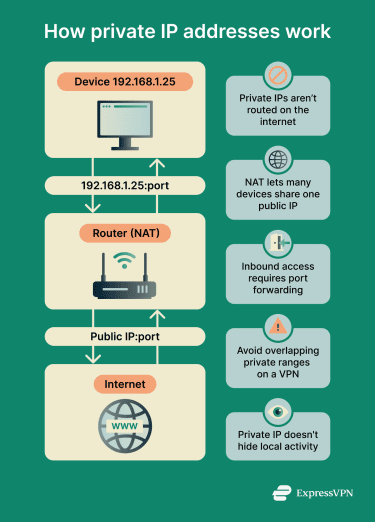 Inbound connections (connections that attempt to reach the network from outside) work differently. Because private IP addresses are not publicly routed, outside systems cannot normally reach them directly over the internet. In many networks, unsolicited inbound traffic is also blocked unless the router or firewall is configured to allow it.
If an internal service needs to be accessible from outside, the router may use port forwarding or similar NAT/firewall rules to direct incoming requests to a specific device and port.
Another way to connect private networks is through a remote virtual private network (VPN). It typically creates an encrypted connection over the public internet, allowing remote devices or networks to securely join private networks. This lets remote devices or networks communicate as part of the internal network, even though the traffic travels over the public internet.
Why is a private IP address important?
Private IP addresses help address several networking challenges:
- Conserve scarce public IPv4 addresses: A large number of devices can operate internally without each needing a unique public IPv4 address.
- Support segmentation and access control: Organizations can organize devices into separate subnets and apply routing, firewall, and access-control policies that restrict traffic between systems.
- Reduce exposure to unsolicited inbound traffic: Devices with private IP addresses are not directly reachable from the public internet unless access is explicitly configured.
Where are private IPs used?
Private IP addresses appear in nearly every type of network:
- Home Wi-Fi networks: Most home networks assign private IP addresses to phones, laptops, smart TVs, and other connected devices. This default configuration lets many devices join the network without each requiring a separate public IP address from the internet service provider (ISP).
- Corporate local area networks (LANs): Businesses use private IP addresses across LANs to separate departments, systems, and services into internal subnets.
- Cloud infrastructure and data centers: These connect virtual machines (VMs), containers, and backend services using private IPs, reserving public IPs only for services that face the internet.
- Remote VPN access: When users connect remotely, they're often assigned private IP addresses from the internal network or a VPN address pool, which allows access to internal resources under the organization's network policies.
Risks and privacy concerns
Private IP addresses support internal network organization, but they don't guarantee privacy or security on their own. Common concerns include:
- Not anonymous by default: Private IP addresses only prevent direct access from the public internet. Routers, network administrators, and the services accessed can still log or monitor activity. ISPs can generally observe traffic that leaves the local network, though not all traffic that stays entirely within it.
- Port forwarding can expose internal services: It makes specific devices or services reachable from the internet. Misconfigured or unsecured port forwarding increases the risk of unauthorized access.
- Private IP leaks can reveal network structure: Some applications or connection methods may expose private IP information, revealing details about a network’s internal layout even though the addresses themselves aren’t publicly routable. Modern browsers mitigate some of this exposure in certain cases, but it can still occur.
- Overlapping private ranges can disrupt VPN connections: When two VPN-connected networks use the same private IP ranges, routing conflicts can occur. This commonly affects remote-access and site-to-site VPNs and may require address translation or reconfiguration to resolve.
- Carrier-grade NAT (CGNAT) can complicate inbound connectivity: Some ISPs use CGNAT with the 100.64.0.0/10 shared address range, placing multiple customers behind a shared public IP address. This extra layer of address translation can interfere with port forwarding, peer-to-peer (P2P) connections, and hosting services from home networks.
Further reading
- What is my local IP address?
- What are non-routable IP addresses?
- Types of IP addresses explained
- What is a NAT firewall?
- What is a subnet?




