Expressvpn Glossary
Internet security
What is internet security?
Internet security is the practice of protecting data, accounts, devices, and networks against cyber threats, such as phishing, malware, and identity theft. It’s a combination of security tools, policies, and best practices.
How does internet security work?
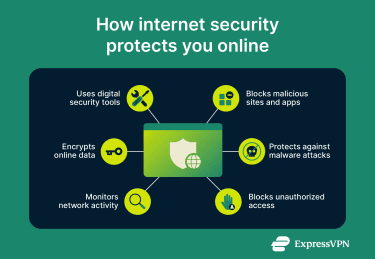
Internet security involves several key methods that help prevent and detect online threats, including:
- Using security software, such as antivirus programs, virtual private networks (VPNs), firewalls, and password managers.
- Encrypting data while browsing the web, sending emails or messages, and sharing files.
- Monitoring network traffic for suspicious activity that could indicate a cyberattack.
- Blocking access to unknown or malicious websites and online applications.
- Protecting devices and online services against malware attacks.
- Blocking unauthorized access to accounts, services, and databases.
Why is internet security important?
Internet security is essential because it:
- Protects against data breaches, which can expose personal details and financial information online.
- Prevents data theft, where cybercriminals steal personal information to sell or use for identity fraud.
- Secures online transactions and communications, ensuring attackers can’t intercept valuable data.
- Helps websites and online services enforce privacy protections and maintain user trust.
- Prevents malware infections, which can compromise devices, steal sensitive information, and monitor user behavior.
- Protects against account takeovers, where malicious actors gain unauthorized access to accounts.
Common internet security threats
The most common internet security threats include:
- Phishing attacks: Cybercriminals trick users into revealing sensitive information or visiting fake websites.
- Malware infections: Attackers use malicious code to remotely control devices, install ransomware, or steal data.
- Man-in-the-middle (MITM) attacks: Cybercriminals intercept user data, for example, on a public Wi-Fi network, and steal it or redirect the user to harmful websites.
Internet security vs. cybersecurity
Internet security focuses on protecting devices, users, networks, and data as they connect to or interact with the internet. Cybersecurity, on the other hand, is a broader term that encompasses all areas of digital protection, including offline systems and data.
Beyond online protection, cybersecurity also involves physical security and risk management. Internet security is generally considered to be a component of cybersecurity.
Further reading
- How to secure your smart home from cyber threats and attacks
- 12 smart ways to secure your home Wi-Fi network
- How to encrypt your internet traffic and protect your privacy
- What’s a possible sign of malware? 11 red flags to watch for
- What is cybersecurity? A simple guide for beginners
FAQ
What is the difference between internet security and online safety?
Internet security refers to technologies, tools, and measures used to protect devices, accounts, data, and networks from cyber threats, such as malware and phishing. Online safety, on the other hand, refers to practices and policies that help protect people while using the internet; for example, recognizing phishing attempts and avoiding oversharing personal information.
What are examples of internet security software?
Common security software examples include antivirus programs, VPNs, and firewalls. Antivirus tools detect and block malicious files, VPNs protect privacy by changing IP addresses and encrypting internet traffic, and firewalls monitor network activity for suspicious behavior.
How can I improve my internet security at home?
Good ways to improve internet security at home include using internet security tools, like antivirus software to protect against malware and VPNs to encrypt internet traffic. In addition, password managers can help secure logins, while firewalls protect against suspicious network activity.
Why is a VPN part of internet security?
A VPN is an internet security tool because it encrypts online traffic, making it difficult for various third parties, including cybercriminals, to monitor or intercept data. It also helps protect privacy by masking your IP address.