Expressvpn Glossary
Block storage

What is block storage?
Block storage (block-level storage) is a technology that stores data blocks, commonly in storage area networks (SANs) or in cloud environments, and presents it to systems as a raw disk-like volume rather than as files and folders.
Its core purpose is to provide efficient, reliable storage for workloads that require consistent, low-latency read and write access.
How block storage works
During storage operations, data is typically split into fixed-size blocks. Each block is stored as an independent unit with a unique identifier and typically without higher-level file metadata such as type, ownership, or timestamps.
A mapping structure (for example, a lookup table maintained by the storage layer or application) tracks which identifiers correspond to which storage locations, including when blocks are stored nonsequentially across different systems.
During read and write operations, the storage system uses this mapping to locate and update blocks, while the host OS/filesystem on top of the block device determines how blocks make up higher-level data (such as files).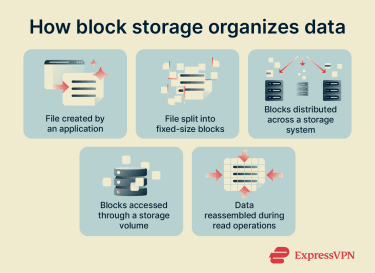
Benefits of block storage
- High performance and low latency: Limited metadata and unique block identifiers reduce overhead during read/write operations, supporting latency-sensitive workloads such as databases and virtual machine (VM) file systems.
- Efficient updates through granularity: Fixed-size blocks allow changes to be written to specific blocks instead of rewriting an entire file, which supports frequent modifications.
- Flexible, scalable capacity management: Storage volumes can often be resized to increase capacity, or additional volumes can be attached as needs grow. Volumes can be used across different OSs when the filesystem and drivers are compatible.
- Availability and optimization options: Many block storage architectures support redundant access paths to the same data (for example, multipathing in SAN environments) and can enable granular placement or tiering strategies (such as separating frequently changing data from static data) to meet performance and availability goals.
Common use cases
- Databases: Block storage is commonly used for input/output (I/O)-intensive databases because it supports low-latency reads and writes and scales as data volumes grow.
- VMs: Block storage volumes are used to host VM OSs and file systems. Volumes can be formatted for VM use, resized, and moved between hosts to support virtualization workflows.
- Containers: Block storage is commonly used to provide persistent storage for containerized, stateful workloads. In orchestrated environments, persistent volumes can help retain data when workloads are rescheduled across nodes
- Transactional applications: Block storage is used for systems that continuously record and update transaction data (for example, logs and business records).
- Boot disks and OS volumes: Block storage is used for boot disks, where the OS and system files reside, because it can be presented as a disk-like volume.
Security considerations
Block storage is often used for critical systems, making security an important part of its deployment and management. Data is commonly protected through encryption at rest and strict identity and access management (IAM) that limit who or what can interact with storage volumes. This is especially relevant in cloud environments, where infrastructure is shared across multiple tenants.
Storage volumes are typically attached to a specific server or VM at a time, which helps reduce unintended access between workloads. To protect against data loss, snapshots and backups are commonly used to support recovery after failures or accidental changes.
Block storage can also fit into environments that follow zero-trust principles, where access is continuously verified rather than assumed. This approach helps reduce risk in modern, distributed systems.
Block storage vs. file storage vs. object storage
| Storage type | How data is stored | Common use cases |
| Block storage | Data is divided into equal-sized blocks and presented as a raw, disk-like volume (a block device) for direct access | Databases, VMs, transactional systems |
| File storage | Data is stored in a hierarchical structure of files and folders | Shared folders, file servers, and collaboration tools |
| Object storage | Data is stored as objects in a flat structure; each object has a unique identifier and metadata | Unstructured data, such as text, video, and images |