What is federated identity? A complete guide to secure and seamless authentication



Accessing online services typically involves proving who you are. When you have to repeat that process across multiple platforms, entering credentials separately for email, project management tools, cloud storage, and customer databases, identity verification quickly becomes a source of friction.
Federated identity solves that problem.
It’s a model where one system verifies your identity, and other independent systems trust that verification. Instead of creating and managing separate accounts everywhere, authentication happens in one place, and trusted services rely on that result.
This guide explains how federated identity works, the protocols behind it, where it’s used, and what security considerations matter.
What is federated identity?
In a traditional identity setup, every application manages its own user accounts. Each system stores usernames and passwords, and users must sign in separately to every service they use.
As organizations adopt more cloud-based tools and services, this model becomes increasingly difficult to manage. More systems mean more accounts to create, update, and secure.
Federated identity addresses this problem by separating authentication from the application. It allows people to use a single trusted account to access multiple, separate systems without creating a new username and password for each one.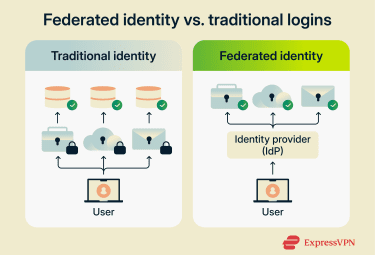
A common example is clicking “Sign in with Google” or “Log in with Facebook.” Instead of building and maintaining its own authentication system, the website relies on Google to verify who you are.
This setup solves two practical problems:
- Password fatigue: The average person manages dozens or even hundreds of passwords. As the number grows, people reuse passwords across services, choose weaker ones to remember them more easily, or submit frequent reset requests. This increases security risk and adds pressure on IT teams.
- Administrative overhead: IT teams must create, update, and remove access separately in each system. When an employee leaves, administrators have to manually revoke access across dozens of tools. Each unrevoked account represents a security gap and a compliance risk. Manual processes also mean mistakes happen, leaving former employees with access they should no longer have.
How does federated identity work?
The shift from traditional identity management to federated identity represents a fundamental change in how credentials are handled.
In a federated model, applications no longer manage credentials themselves. Instead, one system explicitly agrees to accept authentication decisions made by a trusted external system.
A useful analogy is passport control. A government verifies your identity and issues your passport. Airlines trust that passport without revalidating your identity themselves. That trust exists because there is a recognized authority and a defined verification standard.
Similarly, in federated identity, trust is formalized through technical standards that define how identity information is issued, shared, and validated.
Key components in federated identity
A federated identity system relies on four main components.
- Identity provider (IdP): The system that authenticates users and issues a signed identity message once they sign in. The IdP is the authoritative source of identity in the federation. Examples include Microsoft Entra ID or Google Workspace.
- Service provider (SP): The application the user wants to access, such as Salesforce, Slack, or a cloud-based HR platform. Instead of collecting passwords and managing its own authentication system, the SP relies on the confirmation that the IdP issues.
- Assertions or tokens: The secure messages the IdP sends to confirm a user’s identity. The SP verifies this message before granting access.
- Trust relationship: The digital contract between the IdP and SP. It includes exchanging cryptographic certificates so each party can verify signatures from the other, agreeing on which protocol to use, defining which user attributes will be shared, and setting policies for token lifetime and other security parameters.
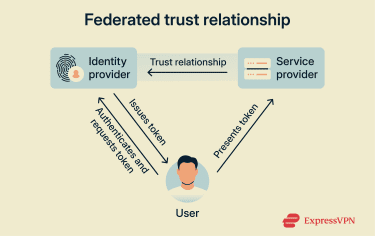 Because of this model, applications don’t store passwords or sensitive login data. They only validate secure identity messages issued by a system they’ve configured to trust. This reduces the attack surface. There are fewer places storing credentials that could be compromised.
Step-by-step workflow of federated identity systems
Federated identity follows a consistent redirect-and-verification pattern, though the exact technical details vary depending on the protocol.
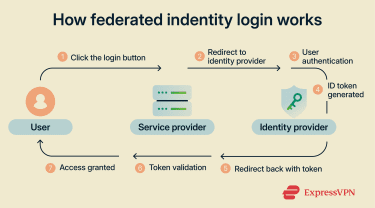
Here’s what happens when you log into a project management tool using Google:
- You request access: You go to the project management tool and click “Sign in with Google.” The project management site doesn’t ask for your password. Instead, it redirects your browser to Google’s authentication endpoint.
- Authentication at the IdP: You arrive at Google’s login page. If you’re not already signed in, you authenticate using your password, biometrics, or multi-factor authentication (MFA). Google verifies your identity using its internal authentication system. If you are already signed in, you skip this step. This is what creates the single sign-on (SSO) experience: one login that works across multiple services.
- Identity token generation: After verifying your identity, Google generates a digitally signed ID token. This token contains key information, such as your unique user ID, email address, authentication time, and expiration time. It’s digitally signed using Google’s private key.
- Return to the SP: Your browser is redirected back to the project management tool with the ID token. The redirect includes the signed token but never your Google password.
- Token validation: The project management tool uses Google’s public key to verify the token. It also checks that the token was issued by the expected IdP, confirms the token was issued for this specific app, and validates the token hasn’t expired.
- Access granted: If the signature is valid, it maps the identity details to your internal user profile. If this is your first login, it creates a new account. It then assigns permissions based on your role or group and creates a session.
Service-initiated vs. identity-initiated flows
The authentication flow can start from different places, and understanding this distinction is important for both usability and security.
Service-initiated flows start when you navigate directly to an app and are then redirected to sign in through a trusted IdP. For example, you go to “projecttool.com” → click Sign in with Google → redirect to Google → authenticate → return to the project tool.
This is the most common approach and is generally considered more secure because:
- The request begins directly with the service you’re trying to access.
- The SP controls the initial request and can include security parameters.
- It prevents certain types of attacks, like unsolicited authentication responses.
Identity-initiated flows start from a central portal, sign in once, and choose from a list of available applications. This is often used in enterprise environments that provide a dashboard of approved tools.
While convenient, this approach can be less secure if not properly configured:
- There’s no initial request from the SP to validate against.
- The IdP must know in advance where to send you.
- It’s more vulnerable to certain types of replay attacks.
How the information stays secure
Security in federated identity relies on cryptography to ensure that identity messages can be trusted.
Digital signing is the main security mechanism. The IdP provider signs each token or assertion using its private key. The SP can then verify that signature using the IdP's public key. This assures:
- Authenticity: The token came from the expected IdP.
- Integrity: The token wasn’t modified after it was issued.
If an attacker intercepts the token and tries to modify it, for example, by changing the email address, the signature verification will fail, and the SP will reject the token.
While digital signatures protect against tampering, federated systems also use HTTPS with Transport Layer Security (TLS) to encrypt data in transit. This prevents attackers from intercepting tokens as they travel between systems.
Some protocols also support encrypting the token or assertion itself, but this is less common. Most implementations rely on TLS for confidentiality and digital signatures for integrity.
The trust relationship depends on both parties maintaining valid cryptographic certificates. SPs have to securely store the IdP’s public certificate to verify signatures. IdPs must protect their private keys used for signing.
Certificates expiring is a common cause of federation failures, which is why certificate lifecycle management and rotation processes are critical.
Tokens are generally short-lived, which limits an attacker’s window of opportunity. Even if they intercept a valid token, they can only use it until it expires.
For longer-term access, systems use refresh tokens that can generate new access tokens without requiring the user to re-authenticate, though both token types can be revoked at any time.
Key protocols and standards in federated identity
Federated identity is built on a set of shared protocols. While there are several federated identity protocols, they all perform the same core function: sending a secure, verifiable message confirming who you are.
What differs between protocols is the message’s format, the type of data it carries, and how flexible the system is. Hence, they have different typical use cases: enterprise vs. consumer apps, API authorization, and consumer-facing services all have different requirements.
Security Assertion Markup Language
Security Assertion Markup Language (SAML) is an enterprise-focused identity protocol based on the XML standard for data sharing. SAML 2.0, released in 2005, became the de facto standard for enterprise SSO across corporate networks and cloud services.
SAML is commonly used in corporate and institutional settings, especially when organizations want employees to access cloud-based tools using their existing work credentials. It’s a familiar choice in environments where access needs to be tightly controlled and managed centrally.
In a typical SAML flow, the IdP sends a digitally signed XML document called an assertion, confirming the user has been authenticated. The SP verifies the signature, confirms the issuing authority, checks that the assertion hasn’t expired, and grants access if everything is valid.
It’s still widely trusted in enterprise environments because it’s been extensively tested, is broadly supported across legacy systems, and provides detailed attribute statements, which are extra pieces of identity data about the user, such as their email address, role, department, or group membership, which services can use to decide what the user is allowed to access.
However, it can be complex to configure, relies heavily on browser-based flows, and is less suited to modern API-driven or mobile-first architectures.
OAuth 2.0
OAuth 2.0 is an authorization framework that focuses on delegated access, not identity. Instead of answering “Who is this user?”, it answers a different question: “What is this app allowed to do on the user’s behalf?”
OAuth is used when you want to let an app perform actions without giving it your password. It works by issuing access tokens with defined scopes. Scopes specify what an app is allowed to do, for example, letting Canva access your Google Drive to import images or allowing a scheduling tool to read your calendar availability.
OAuth’s token-based architecture allows secure, delegated access without exposing passwords. It’s API-friendly and well-suited for modern web services and mobile apps. It’s become the foundation for most modern API security, with platforms like Google, Microsoft, Facebook, and GitHub all using OAuth to control third-party access.
However, OAuth alone does not verify identity. It controls access, but it does not confirm who the user is. That role is handled by OpenID Connect (OIDC), which adds an identity layer on top of OAuth.
OpenID Connect
OIDC builds on OAuth’s authorization framework, adding an identity layer that confirms who the user is.
It introduces an ID token that contains verified identity information, including who the user is, when they authenticated, expiration, who authenticated them, and cryptographic proof that the information is valid.
Unlike SAML, which uses XML, OIDC uses JavaScript Object Notation (JSON) Web Tokens (JWTs). This makes it lighter, easier to implement into modern applications, and better aligned with API-driven architectures. It supports browser-based logins, mobile authentication flows, and cloud-native architectures without relying on legacy enterprise conventions.
| Standard | Main role | Common use | Typical environments | Token format |
| SAML | Authentication | Employee access using work credentials | Corporate and institutional systems | XML-based SAML assertions |
| OAuth 2.0 | Authorization | Granting apps limited access to user accounts | APIs and third-party integrations | Access tokens |
| OIDC | Authentication + authorization | User sign-in for apps and services | Modern web and mobile applications | ID tokens + access tokens |
Federated identity vs. SSO
Federated identity and SSO are related concepts that are often mistaken for one another.
SSO is about convenience. It’s the experience of signing in once and remaining signed in as you move between related applications or services. Federated identity sits underneath that experience. It’s the trust model that allows separate systems to accept authentication performed elsewhere.
SSO can exist within a single organization without any external federation. Federated identity enables SSO to work across organizational boundaries, where one organization’s identity is trusted by another organization’s services.
Think of an office building with multiple rooms. SSO is like using your badge to move freely between the rooms. Federated identity is the agreement between companies that allows your badge, issued by your employer, to also open doors in partner buildings.
From the user’s perspective, the two may look the same. The difference lies in how trust is structured and enforced behind the scenes.
In traditional SSO, there’s an implicit trust mode. Applications trust the IdP because they’re all part of the same security domain, managed by the same organization.
In federated identity, trust is explicit and formalized. Each SP makes a conscious decision about which external IdPs it will trust. That trust is defined in advance and can be revoked independently, without affecting unrelated systems.
| Aspect | SSO | Federated identity |
| Primary focus | Seamless user experience | Trust among independent systems |
| Scope | One organization or security domain | Multiple organizations or domains |
| Trust model | Often implicit within one organization | Explicit trust relationships between organizations |
| Common use | Convenience across related apps in one company | Access to services across separate companies |
Applications and use cases of federated identity
Federated identity is used when access needs to work across systems owned or operated by different organizations.
Business-to-business collaboration
Federated identity is used to give partners or contractors access to internal applications without creating and managing separate accounts for external users or giving out local credentials. The partner’s IdP authenticates the user, and the host organization trusts that.
For example, an automotive manufacturer might grant supplier companies access to its production planning system. Engineers at the supplier log in using their own company credentials, and the manufacturer’s system trusts those credentials without creating separate accounts.
Consumer-facing applications
In consumer-facing applications, federated identity appears as a social login option, such as “Sign in with Google” or “Sign in with Apple.” It allows users to authenticate using an account they already have. The application receives confirmation of the user’s identity but does not store the password itself.
This reduces friction during signup, which can improve conversion rates, and significantly reduces the number of passwords the SP has to manage.
Cloud and SaaS environments
In cloud environments, organizations connect their existing identity systems to platforms like Amazon Web Services, Microsoft Azure, Salesforce, or other Software-as-a-Service (SaaS) applications. This allows employees to sign in to externally hosted services using their existing work credentials.
Cross-institutional access
Federation is also widely used in higher education and government settings, where users need access to services across multiple institutions or agencies. For example, eduroam is a federated identity system that allows you to access Wi-Fi at a different university using the credentials from your home institution.
These diverse use cases share a common requirement: secure, auditable access across organizational boundaries without duplicating credentials in every system.
Benefits of implementing federated identity
Federated identity centralizes authentication around a trusted IdP instead of duplicating it across every application. This brings several distinct advantages:
- Centralized enforcement of access rules: When authentication happens in one place, security policies, such as MFA and conditional access, become easier to apply consistently. When access needs to be revoked, removing the user at the IdP cuts off entry to all connected services.
- Fewer credentials to manage: For users, federated identity reduces repeated login prompts and password juggling. For IT teams, it means fewer password reset requests and reduced manual provisioning and deprovisioning tasks.
- Simpler compliance and auditing: Authentication events are logged centrally, making it easier to audit who accessed which systems and when.
- Fits zero-trust models: Federated identity supports zero-trust security architectures by requiring explicit authentication and verification before access is granted, regardless of network location.
Best practices for securing federated identity
Federated identity simplifies access, but it also concentrates risk. If an attacker compromises the IdP, they could gain access to multiple applications without needing to break into each one individually.
Think of IdP as the master key. Protecting it is paramount.
Implement phishing-resistant authentication at the IdP
Every federated login starts at the IdP, so this is where security matters most. Traditional MFA methods like SMS codes are vulnerable to phishing attacks. Attackers can trick users into providing their MFA codes through fake login pages. Phishing-resistant methods, such as hardware security keys or biometric authentication, protect against this.
Enforce conditional access
Context matters in authentication. A login from a user’s normal device and location is less risky than one from a new device in a different country.
Implement risk-based authentication policies:
- Device trust: Require devices to be registered and managed for accessing sensitive applications and apply different policies to trusted vs. untrusted devices.
- Location-based policies: Require additional verification from unusual locations and apply stricter policies when accessing from public networks.
- Application sensitivity: Require step-up authentication when accessing financial data or making configuration changes.
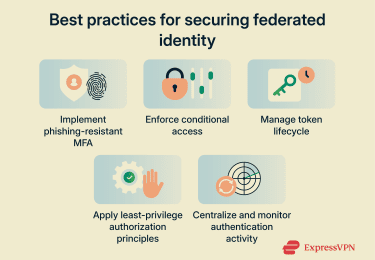
Manage token lifecycle carefully
In federated systems, tokens are temporary access keys. If an attacker steals a valid token, they can impersonate the user until the token expires. Properly managing the token lifecycle limits this.
- Use short access token lifetimes: Set access token lifetimes to a short window, especially for sensitive operations.
- Implement refresh token rotation: Configure refresh tokens so each one can only be used once and is immediately replaced with a new one. If a stolen token is used, the legitimate application’s next refresh attempt will fail.
- Monitor token usage for anomalies: Watch for signs of misuse, such as the same token being used from multiple IP addresses at the same time, unusual geographic patterns, or repeated failed refresh attempts.
Apply least-privilege authorization principles
Federated identity handles authentication (who you are), but authorization (what you can do) is still the responsibility of each application. Successful authentication shouldn’t necessarily grant full access.
- Minimize shared attributes: Only share the identity details and permissions necessary to complete the task. For example, a reporting tool may only need a user ID and role, while your HR system will need full employee profiles.
- Use dynamic attribute-based authorization: Assign access according to user attributes (role, department, and group memberships) rather than static permissions that quickly become outdated.
- Automate deprovisioning: Manual offboarding processes can be unreliable. Integrate identity systems with HR or directory services so that access is revoked automatically.
Centralize and monitor authentication activity
As all authentication flows through the IdP, federated identity makes centralized monitoring possible.
- Centralized logging: Collect authentication logs from the IdP and all connected SPs in a centralized security information and event management (SIEM) system or log analysis platform.
- Monitor trust relationships and configuration: Trust relationships and certificates rarely change during normal operations. Any unexpected change could indicate a compromise or misconfiguration and should be investigated.
- Set up specific security alerts: Configure alerts for federation errors, such as SAML assertion validations, certificate expiration warnings, rejected token signatures, newly added IdP trust relationships, or unexpected changes to SP metadata.
- Implement anomaly detection: Use automated tools to identify unusual patterns such as multiple failed login attempts, impossible travel scenarios where the same user appears to log in from different continents within minutes, or sudden spikes in token issuance requests.
FAQ: Common questions about federated identity
Is federated identity the same as SSO?
SSO can exist without federation. Federation enables SSO to work across separate organizations.
Is federated identity secure?
What are the most common federated identity protocols?
Does federated identity eliminate passwords?
Take the first step to protect yourself online. Try ExpressVPN risk-free.
Get ExpressVPN