What is a daemon? How background processes keep your system running



Whenever someone uses a computer, dozens of processes run in the background. These background service processes are often called daemons. Most users aren’t aware of them, but they help the system stay connected, organized, and responsive.
In this article, we’ll define what daemons are, their role in modern computing systems, and show how they differ from other background and foreground processes.
What is a daemon?
A daemon is a service process that runs in the background of an operating system. It usually starts automatically, continues running without a user session, and performs system or application tasks such as logging, scheduling, networking, or time synchronization.
Daemons originated in Unix systems and remain common in Unix-like operating systems such as Linux and macOS. Windows has similar background programs called services.
What is the difference between a daemon and a normal process?
A regular foreground process is usually started by a user or an application and is tied to a user session. It may display a graphical user interface (GUI), run in a terminal, or produce visible output while it runs.
A daemon runs independently of direct user interaction. Users may open programs that rely on daemons, while system administrators can manage daemon lifecycles through command-line tools or service managers. This is different from directly interacting with a foreground process, where a user provides input and receives visible output.
For example, when a user types a URL into a browser, the browser runs in the foreground. In the background, the system's Domain Name System (DNS) resolver service may help look up the domain name and return the corresponding IP address.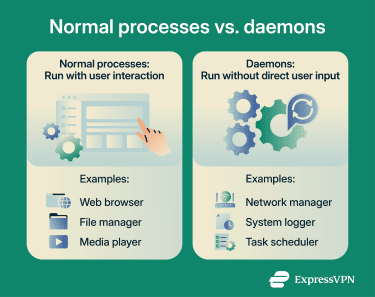
What is the difference between a daemon and a server process?
A server process handles requests from clients, while a daemon is any process running in the background. The two concepts overlap but aren’t synonymous. Daemons can function as servers, but not all daemons are servers, and not all servers are daemons.
For example, web servers often use the HTTP daemon (httpd) that receives HTTP requests from remote clients. When a request arrives, httpd processes it using the server’s configured worker model, such as child processes, threads, event-driven handling, or a combination of these.
Server, database, and network applications frequently run as daemons because they need to stay available in the background, listen for requests, perform scheduled work, or provide services without a user actively opening an app.
History of the term daemon
The computing use of the term "daemon" is widely attributed to programmers at the Massachusetts Institute of Technology (MIT) in 1963 during Project Mathematics and Computation (MAC). Project MAC helped advance time-sharing systems and influenced later operating system design.
The term drew inspiration from Maxwell’s demon, a thought experiment in theoretical physics that appears to challenge the second law of thermodynamics. It imagines an agent controlling a tiny door between two chambers to sort faster- and slower-moving gas molecules. Like this imaginary agent, software daemons work quietly in the background to help maintain system functions.
The spelling “daemon” also echoes the Greek “daimon,” a term for a supernatural power, spirit, or intermediary being rather than an inherently evil figure.
The phrase “Disk And Execution MONitor” is often treated as a later technical explanation or backronym. The Maxwell’s demon metaphor is the more widely cited origin of the term.
How do daemons work?
Daemons start and operate differently depending on their role within the system. They can start in several ways:
- At system startup: The operating system starts certain daemons at boot to manage core system services. Examples on Linux/Unix systems include logging (rsyslogd), Secure Shell (SSH) daemons (sshd), task schedulers (cron or crond), and service managers (systemd). These daemons often continue running until the system shuts down, unless they're stopped, restarted, disabled, or fail.
- Launched on demand: Some daemons start only when a request or event occurs. Traditional super-server daemons such as inetd and xinetd, and modern service managers such as systemd, can monitor sockets or events and start the relevant service when needed. These are often called event-driven, socket-activated, or on-demand services.
- Started by an application or service: Some background helper processes are launched when a related application or service needs them. Others, such as web server daemons like httpd or database server daemons like mysqld, are usually managed as standalone services so they can keep running independently.
Daemons communicate with applications, other daemons, and the operating systems through inter-process communication (IPC). An application might send a request to a daemon, receive status information from it, or rely on it to complete a background task.
IPC happens in several ways. Network-related daemons often communicate via sockets, either directly or through intermediary network processes. Locally, IPC can occur via shared memory, pipes, APIs, message buses, or files. Some daemons write logs, status information, or output files that applications, administrators, or other processes can read later. Others interact mainly with the operating system kernel or core system files.
For example, consider a remote SSH connection. A user starts an SSH client in a terminal. The client opens a network connection, and the local operating system sends the traffic through its network stack toward the remote system.
On that remote system, the sshd listens for incoming client connections. When a request arrives, sshd handles key exchange, encryption, authentication, command execution, and data exchange. If authentication succeeds, the user’s terminal opens an encrypted remote session.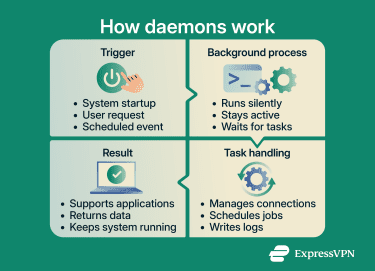
What are the different types of daemons?
Daemons can be categorized by their function and scope, though these categories aren't mutually exclusive. Many daemons handle tasks across multiple areas.
System daemons
These handle core operating system functions with elevated privileges or controlled access to system resources. They may access operating system files, hardware events, and system resources that ordinary application processes cannot. Examples include init or systemd (manages system initialization and other services), rsyslogd (collects and processes system logs), and udevd (handles kernel device events and applies device rules).
Network daemons
These handle network communications and protocols. Web servers may use httpd to process client requests, while sshd manages secure remote access. Named answers DNS queries and can resolve domain names to IP addresses depending on its configuration. Legacy File Transfer Protocol (FTP) daemons, such as ftpd, enable file transfers over networks, while modern systems often use SSH-based file transfer via sshd.
Application daemons
These support specific software platforms or services. They often run under dedicated accounts or application-specific permissions. Examples include dockerd (manages Docker containers), mysqld (processes database queries), and backup service daemons that sync files to cloud storage.
Daemons in different operating systems
Operating systems implement background services differently, but modern multitasking systems rely on them to run core tasks without direct user interaction.
Daemons in Linux
The daemon concept originated before Linux and became closely associated with Unix and Unix-like operating systems, including Linux. Many Unix and Linux daemon names end with "d," but this is a naming convention rather than a rule.
The first userspace process is the init process, which runs as process ID 1 (PID 1) and starts the rest of the system. On most modern Linux distributions, this role is handled by systemd, a system and service manager. It can restart services after failure when their unit files are configured to do so.
Linux stores daemon configurations in .service files (also called unit files), typically located in /etc/systemd/system/ or /lib/systemd/system/ depending on the distribution and configuration.
System administrators manage daemons through terminal commands such as systemctl start, systemctl stop, and systemctl status.
Windows services and daemons
On Windows, daemon-like background programs are called services and use a different architecture from Unix daemons.
Windows stores service configurations in the registry under HKEY_LOCAL_MACHINESYSTEMCurrentControlSetServices. Services run in a security context that determines file access, permitted actions, and available resources. Common service accounts include:
- LocalSystem: Extensive local privileges.
- NetworkService: Limited local privileges but can access network resources using the computer’s credentials.
- Custom accounts: For services requiring specific permissions.
The Service Control Manager (SCM) manages services handling startup, shutdown, dependencies, and failures. Administrators access SCM through the services.msc tool or PowerShell commands.
Daemons in macOS
Built on a Unix foundation that includes Berkeley Software Distribution (BSD) components, macOS uses a master daemon called launchd. macOS distinguishes between system-wide daemons, which run in the background and don’t require a user session, and agents, which run in a user context and can include graphical interfaces.
macOS stores daemon and agent configurations in .plist files, typically located in /System/Library/LaunchDaemons/, /Library/LaunchDaemons/, or /Library/LaunchAgents/.
The launchd daemon handles startup, scheduling, on-demand triggers, and service restarts when jobs are configured to do so. Administrators manage daemons and agents via launchctl terminal commands.
Why daemons matter in computing
Daemons are a ubiquitous component of modern operating systems for several reasons:
- Automation: Without daemons, users would need detailed knowledge of all services required for a system or application to function and would have to manage each one manually. This would be extremely tedious, time-consuming, and error-prone.
- Coordination: Daemons coordinate access to shared resources. For example, cupsd manages a print queue so multiple applications can send print jobs without interfering with each other. Similarly, daemons can coordinate shared resources such as network connections, scheduled jobs, or system logs so multiple applications can use them without conflict.
- Service availability: Daemons help keep critical services available without constant human intervention. Service managers can monitor them, restart them after failure when configured to do so, and run scheduled tasks.
- Security: The core function of some daemons is to enforce security policies. For example, sshd manages secure remote access, fail2ban scans logs for suspicious activity and can block sources, and firewalld provides a dynamically managed firewall.
Daemon security risks
Because daemons may run with elevated privileges, operate in the background, start automatically or on demand, and often handle sensitive processes such as network traffic and system authentication, attackers target them to gain persistent, stealthy access to systems.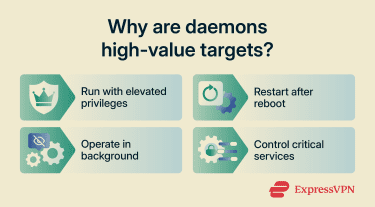
Attackers may exploit daemons in several ways. Network-facing daemons like sshd or httpd become entry points if misconfigured or out of date, potentially enabling unauthorized access, remote code execution, lateral movement, or data theft. If attackers exploit a daemon that runs with root or elevated privileges, they may be able to modify core system files or execute commands with broad system access.
Outdated daemon software may contain known vulnerabilities that attackers can exploit to inject malicious code, escalate privileges, or take control. In some cases, attackers install rogue daemons or hijack legitimate ones to run backdoors, cryptominers, botnets, spyware, or ransomware without detection.
To minimize these risks:
- Keep operating systems and applications updated.
- Disable unused daemons and network services.
- Run services with the least privileges needed.
- Only install software from trusted sources.
- Use security software that monitors for suspicious background processes.
- Be cautious about granting administrator or root permissions to applications.
FAQ: Common questions about daemons
Why is it called a daemon?
Is a daemon the same as a service?
Are daemons always running?
How can you check if a daemon is running?
systemctl status <service> to check an individual service. On macOS, use launchctl list to view launchd-managed jobs, or ps aux | grep <service> to search for a specific running process. On Windows, the Services app (services.msc) provides a visual list of installed services. Explore the web with greater privacy
Get ExpressVPNSign up today for a chance to win FIFA World Cup 2026™ tickets.