What is SysJoker malware? Risks, detection, and prevention



Some malware doesn’t cause immediate disruption or obvious signs of compromise. It runs in the background and resembles normal system activity, which can delay detection. When a threat isn’t identified early, it can be harder to determine how long it’s been present or what systems may be affected.
SysJoker is an example of this type of malware. It's designed to hide on devices and give the attacker remote access and control without the target realizing anything has changed. This is why it's drawn attention as a persistent security risk.
This article explains what SysJoker malware is, how it works, and which systems it affects. We also uncover the risks it poses, how infections are detected, and steps that can help reduce exposure.
What is SysJoker malware?
SysJoker is a type of malware known as a backdoor, or remote access Trojan. A backdoor creates a hidden path into a device that allows someone else to connect remotely. Once that access exists, an attacker can run commands or install additional tools on the device without the user approving each action.
In documented cases, SysJoker has reached systems using Trojan-style techniques, where malicious code is hidden inside files or software that appear legitimate. For example, it’s been delivered as a fake application installer file or system update.
Once it’s infiltrated a device, SysJoker attempts to remain hidden by masquerading as legitimate system components. It adopts file names and locations associated with well-known hardware or system services, making it easier to overlook during routine checks.
The malware was first identified in late 2021 by security researchers at Intezer, who gave it its name. The researchers initially analyzed a Linux sample and subsequently identified related Windows and macOS variants. This cross-platform design is notable because it allows attackers to target organizations that use different operating systems across their infrastructure.
Early reports of SysJoker covered a limited number of cases found during targeted investigations. Its cross-platform design and lack of widespread sightings have led some security analysts to suggest that it’s designed for focused attacks rather than large-scale campaigns.
What systems can SysJoker affect?
Windows systems
On Windows, SysJoker has been delivered through compromised software packages. Some observed infections were linked to malicious packages uploaded by attackers to npm, a public repository developers use to share and reuse code for JavaScript applications. Developers often install these packages as part of routine work, either manually or through automated setups. When a compromised package is installed, malicious code can be added to the system without obvious warning signs.
Once a compromised package is installed and run, the first file that executes is a loader. This is a small program whose only purpose is to retrieve and start the main malware. It connects to a remote server controlled by the attacker, downloads the full SysJoker payload, and launches it. After that step, the loader’s role is finished.
In the samples observed, SysJoker stored its files in C:ProgramData, a folder Windows uses for application data that isn’t tied to a specific user account. The malware used file names that resembled legitimate system components.
To continue running after a restart, SysJoker adds itself to the Windows registry. The registry controls which programs launch automatically when a user signs in.
macOS systems
The macOS version of SysJoker is built to run on both older Intel-based Macs and newer Apple silicon systems. It installs its full malware directly, without a separate loader step. Once installed, SysJoker creates a directory at /Library/MacOSServices/ and places its files there. This location is commonly used for system-wide background services.
To remain active after a reboot, the malware creates a LaunchAgent. This is a configuration file that tells macOS to start a program automatically in the background when the system boots or when a user logs in.
Linux systems
On Linux, SysJoker also installs directly once it reaches a system. It then creates a directory at /.Library in the root of the file system (Linux uses leading dots to hide system and config files). Linux doesn’t typically have a Library folder, so the use of the label also suggests that the macOS and Linux variants share similar architecture.
To maintain access after reboots, the malware sets up a cron job. This is a scheduled task used on Linux systems to run programs automatically at a specified time. In this case, it’s configured to start SysJoker whenever the system boots.
What does SysJoker malware do?
Once SysJoker is installed and running, it establishes a way for attackers to interact with the system remotely. It doesn’t carry out obvious actions on its own. Instead, it stays active in the background and waits for instructions.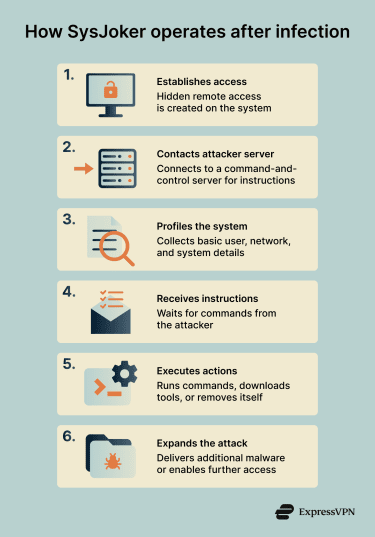
To do this, SysJoker connects to a server controlled by the attacker. This type of server is commonly called a command-and-control (C2) server. The C2 server is where attackers send instructions and receive information back from infected systems.
Backdoor capabilities
After connecting to its C2 server, SysJoker collects basic details about the system it’s running on. This includes information such as the current user account, network details like the IP address, and general system characteristics. This data helps attackers understand what kind of system they’ve accessed and how it’s connected to other networks.
From there, SysJoker can carry out actions when instructed by the attacker. These can include:
- Downloading and running additional programs.
- Executing commands remotely, as if they were entered directly on the system.
- Removing itself from the device if instructed.
Observed instances of SysJoker didn’t keep the attacker’s server address hardcoded inside the malware. Instead, it had a URL leading to files hosted on services like Google Drive or Microsoft OneDrive, which contained dynamic C2 server addresses.
Data and system risks
Because SysJoker provides remote access, the risk depends largely on how attackers choose to use it. On its own, the malware gathers limited system information. However, once access is established, attackers may:
- Access and copy files stored on the system.
- Collect sensitive information, including login credentials.
- Use the compromised system to move deeper into the same network.
- Deploy additional malware with more disruptive or intrusive behavior.
Signs of a SysJoker infection
Unlike ransomware or adware, which produce immediate visible effects, SysJoker doesn't cause noticeable symptoms during regular system use. In documented cases, infected systems continued operating normally, without slowdowns, crashes, or visible warnings.
The malware runs quietly in the background and communicates using standard encrypted web traffic that looks the same as ordinary browsing. It doesn’t display pop-ups, alerts, or system messages that would draw attention.
For individual users, there’s no reliable way to identify an infection through observation alone. Detection typically depends on security tools that can inspect background processes, startup behavior, and network activity more closely.
How is SysJoker detected?
Antivirus software
After SysJoker was publicly documented in late 2021, antivirus vendors added detection rules for the known samples. With up-to-date definitions, many antivirus programs can now identify those documented variants during system scans.
However, SysJoker has changed over time. In 2023, researchers reported updated samples believed to be related to SysJoker that were written in Rust, a different programming language, which meant earlier detection rules no longer applied. When malware changes in this way, detection usually depends on vendors analyzing the new samples and updating their databases.
Still, for most individual users, antivirus software remains the primary and most accessible detection method, as long as it’s kept up to date.
Endpoint detection and response (EDR)
Endpoint detection and response (EDR) tools are typically used in business and enterprise environments. They’re usually managed by IT or security teams and aren’t common on personal devices. Unlike traditional antivirus tools, EDR systems focus on behavior rather than known malware signatures.
These tools monitor what software does after it starts running, including the processes it launches, the files it modifies, and the network connections it establishes. This can identify suspicious activity even when the specific malware variant hasn’t been seen before.
Related: Cybersecurity tips for small businesses
Network monitoring
Organizations with dedicated security teams may detect SysJoker through network monitoring. This involves watching outbound traffic for connections to known malicious servers or patterns associated with C2 activity. Network monitoring tools can then flag systems that may be communicating with known attacker resources.
Memory analysis
Some security tools can inspect what is actively running in a system’s memory. Instead of checking files stored on disk, these tools analyze code that’s currently executing.
Memory analysis can help identify malware even if files have been renamed, hidden, or modified. In general, this technique is usually used during investigations or incident response rather than routine scanning.
Related: How to know if your computer has a virus
What to do if your system is infected
If security software flags SysJoker, or if there’s a strong reason to believe your system has been compromised, the priority is to limit further exposure and remove the malware safely.
If the system is part of a work or organization network, contact your IT or security team first. They’ll be best placed to deal with an intrusion and may need to preserve network activity or logs as part of an investigation.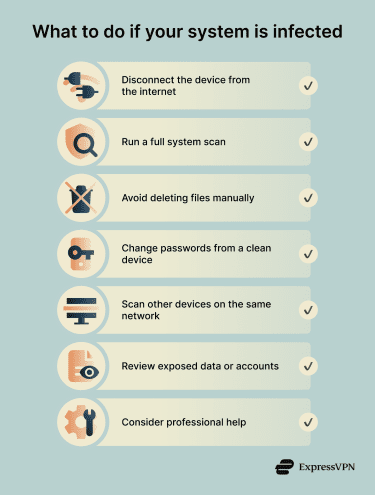
1. Disconnect the system from the network
If you suspect an active infection, disconnect the device from the internet. Unplug the Ethernet cable or turn off Wi-Fi to stop the malware from sending data or receiving further instructions.
2. Use security software to remove the malware
Run a full system scan using up-to-date antivirus or anti-malware software. Many modern security tools can detect and remove known SysJoker variants and undo related system changes.
If your existing software didn’t catch the infection, consider scanning with a second reputable tool. Several vendors offer standalone malware removal scanners that don’t require a full installation.
Manual removal isn’t recommended for most users. Backdoor malware often makes small changes across the system that aren’t obvious at first glance. Removing the wrong file or startup entry can break legitimate software, while missing even one malicious component can allow the malware to keep running in the background.
3. Secure your accounts and credentials
Assume that any accounts accessed from the infected system may be compromised. This includes email, financial services, work accounts, and cloud platforms.
Change passwords using a separate, clean device. Where available, enable two-factor authentication (2FA) or multi-factor authentication (MFA) on potentially compromised accounts. This can reduce the impact of stolen credentials.
4. Check other devices on the same network
Scan other devices on the network as well. Backdoor malware can be used to move between systems, especially where file sharing or administrative access is enabled. This step is particularly important in shared or business environments.
5. Review potential data exposure
Consider what information was stored on or accessed from the affected system. This may include documents, saved passwords, email, or browsing data.
Understanding what may have been exposed helps determine next steps, such as monitoring accounts for unusual activity or notifying others if shared data could be affected.
When to seek professional help
You should consider involving security professionals if:
- The system contains sensitive personal or business data.
- You’re unsure whether the malware has been fully removed.
- Other devices or systems may be affected.
- Legal or regulatory obligations apply.
- You need clarity on what the attackers accessed or how long access lasted.
For business systems, a confirmed infection often means bringing in security specialists to investigate what happened, what was accessed, and how to prevent the same issue from happening again.
Related: How to protect your home computer from hackers and viruses
How to protect against SysJoker malware
Reducing the risk of backdoor malware like SysJoker comes down to two things: limiting how malicious code reaches a system and limiting what it can do if it runs.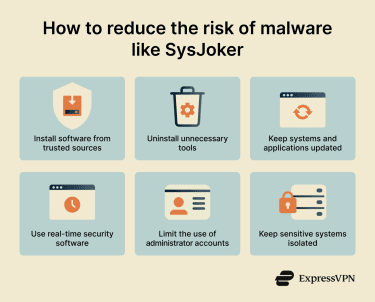
Be careful about where software comes from
SysJoker has been observed arriving through compromised software packages shared online. That makes software sources an important factor in reducing exposure.
For most users, this means downloading software only from official websites or well-established repositories and avoiding unofficial installers or bundled downloads. Installing fewer programs overall also reduces risk.
In development environments, extra caution is needed. Developers often use tools to install reusable code packages that add functionality to applications. These tools sometimes display warnings when a package has been flagged as suspicious, recently altered, or removed by its author. These warnings shouldn't be ignored. Just because a package has been downloaded many times doesn't automatically mean it's safe.
Keep operating systems and software up to date
Software updates often fix security issues that attackers rely on to gain or maintain access. Enabling automatic updates where possible reduces the window of exposure.
Updates are especially important for:
- Operating systems: Core fixes that affect the entire device.
- Web browsers and extensions: Common entry points for many threats.
- Development tools: Outdated tooling can introduce weaknesses.
- Security software: Protection depends on having the latest threat information.
Use security software with real-time protection
Security software that runs continuously provides more protection than occasional scans. Real-time protection may block malicious code during installation or execution, before it can configure itself to start automatically.
On systems connected to business networks or handling sensitive data, more advanced endpoint protection tools may be appropriate. These focus on monitoring behavior rather than just scanning files.
Limit administrative access
Using administrator accounts for everyday work increases the impact of any malware that runs. That’s because admin accounts usually have full system privileges. If malware is able to run under an admin account, it gets access to those privileges too.
Whenever possible, daily tasks should be performed from standard user accounts with limited permissions. Administrator access should be used only when necessary, such as during software installation or system configuration, and logged out of immediately afterwards.
Separate sensitive systems when possible
Where practical, systems that handle sensitive data should be kept separate from those used for general tasks. For example, development or testing environments can be isolated from systems that store credentials or proprietary information.
This limits how much access an attacker gains if a single system is compromised. If a version of the malware hasn’t been analyzed yet, those tools may not flag it. In business environments, security teams often rely on behavior-based tools and network monitoring to catch suspicious activity that doesn’t depend on matching a known file.
Using standard user accounts for daily work instead of administrator accounts also limits what malware can change if it runs.
FAQ: Common questions about SysJoker malware
What is SysJoker malware in simple terms?
What types of systems can be affected by SysJoker?
What are the main risks of a SysJoker infection?
Can antivirus software detect SysJoker malware?
How can users reduce the risk of SysJoker malware?
Take the first step to protect yourself online. Try ExpressVPN risk-free.
Get ExpressVPN