Is QuillBot safe to use?


AI writing tools like QuillBot are now part of many people’s everyday writing workflow, from polishing emails and reports to refining essays and blog posts. As their use grows, so do questions about safety, privacy, and how your activity may be tracked.
This guide explains what QuillBot does with your text, how it handles your data, and what privacy risks come with using AI writing tools. It also shares practical tips for using the platform safely.
What is QuillBot and how does it work?
QuillBot is a popular productivity app and AI paraphrasing tool that helps you rewrite, refine, and organize text. Many people use it to make sentences clearer, adjust tone, or restructure ideas while keeping the original meaning.
When you paste text into QuillBot, it analyzes your writing to understand context, structure, and intent. It then rewrites your sentences in the style you choose, such as Standard, Fluency, or Formal (there are free and premium options). Each mode applies different rules to how much the wording changes, which gives you more control over the final output.
Behind the scenes, QuillBot uses language models designed specifically for rewriting, rather than generating long-form content from scratch. These models are optimized to work quickly and efficiently, which is why QuillBot focuses on improving clarity and structure instead of creating new ideas or arguments.
The interface shows your rewrites after you paste text and select a mode, so you can compare different versions and pick the one that works best for you.
Over time, QuillBot improves its suggestions by analyzing patterns across many users, which helps it avoid awkward or unhelpful rewrites.
Some of the main features include:
- Paraphraser: Rewrites sentences while keeping their meaning.
- Grammar Checker: Fixes errors and improves readability.
- Summarizer: Condenses long readings into key points.
- Citation Generator: Builds citations in common academic formats.
- Plagiarism Checker: Checks your writing against online sources (premium feature).
Is QuillBot safe?
QuillBot doesn’t publish your text or use it to train other tools, but it does collect certain information about your activity.
What type of data does QuillBot collect?
QuillBot collects several types of data depending on how you use the service. According to its privacy policy, this includes:
- Input data: This is the text you paste into QuillBot’s tools, known as “inputs.” QuillBot may store these to run the service or improve its models, although you can opt out of input storage in your settings for certain features.
- Usage data: QuillBot records how you use the platform, including which tools you interact with and general activity patterns. This helps the service function correctly and improve performance.
- Device information: QuillBot stores information about your device, such as your IP address, internet service provider (ISP), operating system, computer model, language settings, CPU details, and web browser type.
- Location information: QuillBot’s privacy policy states it stores approximate information about your location, which is based on your IP address.
- Account information: If you create an account, you provide details such as your email address, login credentials, and account preferences (such as writing style and purpose for using the tool), which QuillBot stores.
- Subscription and billing data: If you upgrade to a premium plan, the payment provider handles your card details. QuillBot may receive limited billing information, such as confirmation that a payment was successful.
- Cookies and tracking technologies: QuillBot uses cookies to remember your preferences, keep you logged in, and understand how you navigate the site.
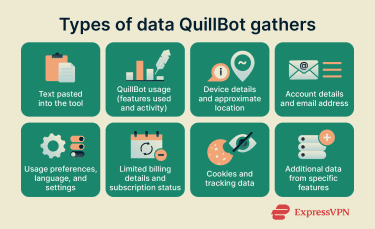
QuillBot also collects personal data in specific situations:
- Reporting content or filing copyright notices: If you submit a report or notice through a Learneo (the company that owns QuillBot) form, you provide contact details (name, address, country, email) so QuillBot can process your request and keep a record of it.
- Communicating with support: If you email QuillBot for help or feedback, the company collects your email address and anything you include in your message.
- Using certain features or integrations: QuillBot may collect additional data when you use specific tools or integrations, such as uploading documents, using AI chat or voice-to-text features, signing in with Google or Facebook, connecting to Google Drive, using analytics-enabled features, or working under a Team Plan.
How QuillBot uses your data
According to its privacy policy, QuillBot uses your data to run its tools and keep the platform working smoothly, which includes tracking the text you enter and using analytics to understand how people use the service. These details help features like the paraphraser, summarizer, and grammar checker work correctly.
If you use an account or the browser extension, you get more control over how your data is handled. You can choose whether QuillBot stores your inputs and whether your text contributes to model training, which you can adjust in your Data and Privacy settings.
QuillBot states that it doesn’t sell your personal data or your writing. It shares some information with service providers or other Learneo services, such as account details and usage data, but only to operate or improve the platform. It doesn’t share your content for advertising.
When using data for product research and service improvements, QuillBot removes personally identifiable information first.
How long QuillBot keeps your data depends on the tool you’re using. It may store your inputs unless you turn off input storage. Other information, such as account or billing details, is kept only as long as needed for account management, security, or legal compliance.
Learn more: How to protect your creative work from AI training
Does QuillBot encrypt your data?
QuillBot states that it encrypts connections, works with cybersecurity providers to help protect data, and has infrastructure in place to secure its traffic.
However, QuillBot doesn’t specify which encryption protocols it uses, and it doesn’t clearly state whether data is encrypted when stored (at rest). If you regularly paste sensitive or personal information into the tool, that’s worth keeping in mind.
QuillBot controls access to customer data for both employees and the service providers it works with. Its privacy policy states that data is only accessible to a limited number of people who are under obligation to keep the information confidential
Should you use a VPN with QuillBot?
A virtual private network (VPN) changes the network path between your device and the internet by encrypting traffic from it to the VPN server. In practical terms, this can reduce what network operators (for example, public Wi-Fi providers, workplaces, or campuses) and your ISP can infer about where your traffic is going, because they typically see an encrypted connection to the VPN service rather than a direct connection to QuillBot.
This doesn’t change what QuillBot can access or log inside its service. If you use QuillBot while signed in, QuillBot can still associate your activity with your account under its own privacy and retention practices. A VPN also doesn’t affect how QuillBot processes text you submit, how it stores data on its servers, or whether third-party AI-detection tools can analyze output.
What changes without a VPN
Without a VPN, the network you use and your ISP can generally observe connection metadata such as your IP address, the services you connect to, and the timing and frequency of use. Since QuillBot uses HTTPS / Transport Layer Security (TLS), this kind of observer typically can’t read the text you submit, but they may still be able to see that you accessed QuillBot and when.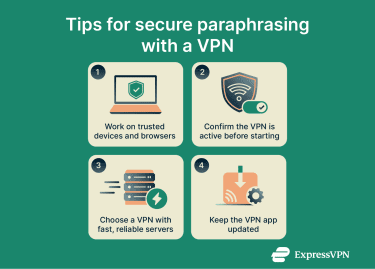
QuillBot vs. AI detectors and anti-cheat tools
For students in particular, using QuillBot can raise questions about AI detectors and plagiarism systems and whether rewritten text might still be flagged.
Can QuillBot be detected as AI-written content?
QuillBot draws a distinction between QuillBot and “AI writing” tools that generate long-form text from prompts. QuillBot states that it’s not considered AI writing because it’s intended to help users improve and refine their own text (for example, through paraphrasing and grammar corrections).
However, QuillBot also explains that AI detectors generally estimate whether text was created by generative AI by analyzing features of writing and that these tools are not fully reliable, meaning different detectors may reach different conclusions about the same passage.
Turnitin (a plagiarism-detection and academic integrity platform) is specifically addressed in QuillBot’s Help Center. QuillBot states that if you use the platform as it’s intended, Turnitin shouldn’t flag text edited with QuillBot as plagiarism.
How do AI detectors react to QuillBot output?
AI detectors work by analyzing features of a text and estimating the probability it was created by generative AI. Common detection concepts include classifiers (models that categorize text as “AI-written” or “human-written”), perplexity (how predictable the wording is), and burstiness (how much variation there is in sentence length and structure).
Because detectors use different models and thresholds, results can be inconsistent, and no detector is 100% accurate, with the possibility of false positives and false negatives.
Pros and cons of using QuillBot
QuillBot is helpful for improving clarity and rewriting text, but like any AI tool, it can come with trade-offs. Let’s look at the main advantages and potential downsides.
Main advantages
- Improves clarity and readability: QuillBot can help simplify sentences, smooth out awkward phrasing, and make your writing easier to follow.
- Useful for rewriting and polishing text: It focuses on paraphrasing what you already wrote, which can help refine drafts or adjust the tone of your work.
- Supports academic tasks: Tools like the summarizer, grammar checker, and citation generator can make research and editing faster.
- Quick and easy to use: The interface responds in real time and doesn’t require any technical setup, which makes it simple to use during study sessions.
- Offers multiple rewriting modes: You can choose different styles, like Standard, Fluency, or Formal, depending on how much you want the text to change.
Potential downsides
- Quality may vary: QuillBot may struggle with complex ideas or technical subjects, sometimes creating phrasing that sounds unnatural.
- Can change meaning unintentionally: Rewrites aren’t always perfect, and the tone or intent of a sentence can shift if you’re not careful.
- Easy to over-rely on the tool: Using paraphrasing tools too often may weaken your writing skills or make your work sound less like you.
- AI detectors may still flag the output: Since QuillBot is considered an AI-writing tool, rewritten text might still be flagged by some academic systems.
- Doesn’t generate ideas for you: QuillBot can reshape your writing but won’t create original content or arguments.
- Your inputs may be stored unless you opt out: QuillBot can keep the text you enter based on your privacy settings, which means your inputs might be linked to your account if you’re logged in.
- Data-handling practices aren’t fully transparent: QuillBot encrypts data in transit but doesn’t clarify whether stored data is encrypted at rest, which matters if you often paste sensitive or identifiable information into online tools.
How to use QuillBot safely
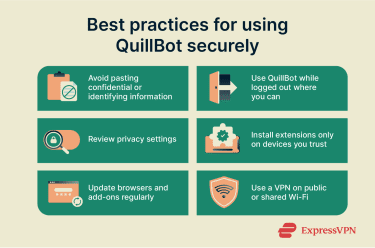
Avoid pasting confidential info QuillBot
Text submitted to QuillBot is processed online. If the content includes names, contact details, or other identifying information, that information becomes part of what is submitted and may be retained or associated with account activity depending on the product and settings.
Use QuillBot while logged out when possible
When QuillBot is used while signed in, activity can be connected to an account (for example, for history or syncing). When it’s used while signed out, there is less account-level linkage by default, although service usage may still be recorded in other ways.
Review your QuillBot privacy settings
QuillBot provides controls related to text input storage and whether text inputs are used to train models powering its AI tools (where available). These settings affect how submitted text is handled beyond real-time processing.
Be careful with browser extensions
Browser extensions can have permissions that allow them to access page content or user input in the browser. Using QuillBot through an extension introduces the extension permission layer in addition to the web service itself.
Learn more: Are Chrome extensions safe? Read our guide to understand how to use them safely.
Keep your browser up to date
Because QuillBot is typically used in a browser, the browser and extension security posture can affect the overall risk surface. Outdated browsers or add-ons can carry unpatched issues that impact general web activity, not only QuillBot use.
FAQ: Common questions about QuillBot safety
Is QuillBot legal to use in schools?
In most cases, the issue is not “legality” in a criminal-law sense, but whether QuillBot use complies with a school, department, course, or instructor’s academic integrity rules. Policies vary widely. Some instructors and institutions ban AI-assisted paraphrasing tools for assignments, while others allow limited use or allow it only with explicit permission or specific constraints.
QuillBot’s own Help Center frames QuillBot as “not considered AI writing” and says it’s not cheating when used as intended, while also emphasizing the need to cite outside sources to avoid plagiarism.
Can QuillBot be detected by Turnitin or AI detectors?
Turnitin is addressed in QuillBot’s Help Center, which states that when QuillBot is used properly, there should be no fear of plagiarism.
Does QuillBot store or sell my data?
QuillBot may store your text inputs depending on your privacy settings, especially if you’re logged in or using the browser extension. You can opt out of input storage and model-training use in your Data and Privacy settings. QuillBot states that it doesn’t sell your personal data or your content.
Is QuillBot safer than ChatGPT or Grammarly?
Each tool has different privacy and security practices, so none can be called strictly “safer.” ChatGPT and Grammarly both specify that they encrypt data in transit and at rest, while QuillBot confirms encryption but does not specify its protocols or at-rest encryption.
QuillBot lets you opt out of storing inputs and model training, which offers some control over data retention, but overall safety depends on how each platform handles your data and what settings you choose. Platforms like ExpressAI take a different approach by processing queries within secure, isolated environments designed to minimize data exposure, which can be helpful for more sensitive use cases.
Should I use a VPN when paraphrasing with QuillBot?
A VPN can help protect your privacy on public or shared Wi-Fi by encrypting your connection and hiding your IP address from the network you’re on. It doesn’t change what QuillBot collects internally or how your inputs are stored, but it can reduce what your internet service provider (ISP) or network administrator can see.
You can also combine a VPN with privacy-focused AI tools like ExpressAI (available as part of the ExpressVPN Pro subscription) to reduce network-level exposure and protect your inputs from being stored, logged, or used for training.
Can using QuillBot get me into trouble?
It can, but only if your school restricts AI tools. You’re responsible for following your school’s rules on paraphrasing or AI help. If you’re unsure what counts as acceptable use, it’s best to check before submitting your work.
What happens to my text after I use QuillBot?
QuillBot may store the text you enter to run its tools or improve its models, but you can turn off input storage and model-training options in your account or extension settings. If you’re logged out or have disabled storage, QuillBot still processes your text, but it may not keep a copy. QuillBot also states that it doesn’t sell your inputs or personal data.
Take the first step to protect yourself online. Try ExpressVPN risk-free.
Get ExpressVPN