How to delete a Tinder account (step-by-step)



Tinder is a convenient app for meeting new people, but not everyone sticks around long-term. Whether you’ve found a match, want to reduce your digital footprint, or simply no longer use the service, knowing how to delete the app properly matters.
This guide explains the difference between uninstalling the app, pausing, and deleting your account, and provides instructions for iOS, Android, and desktop. It also covers what personal data Tinder retains and how to recover your account if you change your mind.
Uninstalling Tinder vs. pausing vs. deleting your account
Uninstalling the app removes it from your device but doesn’t delete your Tinder account. The account can still be accessed on Tinder.com or by reinstalling the app later.
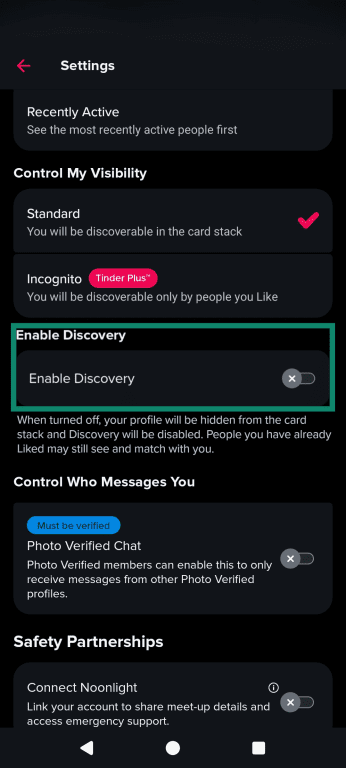
Tinder also lets you pause your dating activities by hiding your profile (turning off Discovery). When Discovery is off, your profile stops appearing in recommendations, and new potential matches can’t be browsed. Existing matches remain available for chat, and people already liked may still match. This can be a better option than deleting your account if you need a break while keeping matches and chats intact.
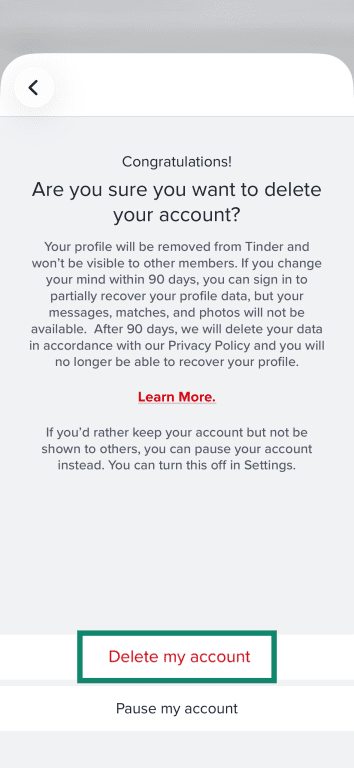
Deleting your account closes it and makes your profile no longer visible to other users. Tinder says account data (including matches, messages, and photos) is deleted as set out in its Privacy Policy, but it may retain certain data for a 90-day safety retention window.
Keep in mind that Tinder may close accounts automatically after 2 years of inactivity.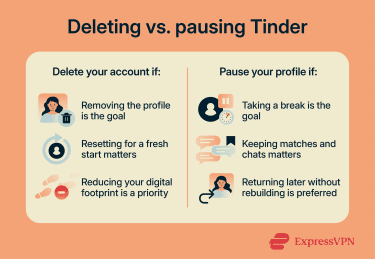
How does Tinder use my data?
Tinder collects the data you provide (account details, profile info, photos, messages, and purchases) and the data it generates as you use the app (logins, features used, interactions, and ad activity). If you use verification features, Tinder may also collect and process face geometry data (and, where offered, ID data).
It also stores device and network data (such as IP address, device type, and operating system) and, if you allow it, location data, which can include precise GPS coordinates. If permission for precise location is declined, Tinder won’t collect precise geolocation, though limiting location permissions may reduce the accuracy of nearby and distance-based features.
Tinder keeps different data for different periods, so deleting an account doesn’t mean everything disappears immediately. After account closure, Tinder keeps data for 3 months (or 1 year if the account was banned) for safety and enforcement purposes. Beyond that, it keeps traffic/log data for 1 year, transaction records for 10 years, and consent records for 5 years. Tinder also says it keeps customer care exchanges for 6 years, and certain customer care records/supporting data for 5 years.
It may also keep a record that an account or subscription existed for 3 years after closure, some profile data for 1 year for litigation purposes, and ban-prevention data for as long as necessary.
Tinder shares data in a few ways. When you add info to your profile, such as photos or hobbies, Tinder shares these details with other users (for example, potential matches will see whatever you write in your bio).
It also shares data with third-party service providers (hosting, analytics, support, payments, marketing, and security) and with advertising partners through cookies, software development kits (SDKs), and similar technologies, including by transforming certain identifiers for ad targeting or exclusion.
Because Tinder operates globally, it may transfer and process your data to other countries, which may have different data-protection laws.
Before you delete: Important things to check
Before you permanently delete your Tinder account, it’s worth taking a few important steps:
- Download your data: Tinder lets you request a copy of your personal data through its account tools. The information provided may vary depending on how Tinder has been used, and downloading it can help you review what’s been retained before your account becomes inaccessible.
- Cancel your subscription: Deleting your Tinder account doesn’t automatically cancel an active subscription; it will continue to renew until you cancel it. If billing was through Tinder.com (or direct card/PayPal on Android), cancel via Manage Payment Account. If billing was through an app store, cancel in the Apple App Store or Google Play. Verify cancellation by checking the subscription status in the relevant billing platform.
- Save your connections (optional): If there are matches you’d like to keep in touch with after deleting your account, consider saving any information you’ll need to continue the conversation elsewhere before you delete Tinder (for example, a preferred contact method or username), since matches and chats won’t be accessible afterward.
Can I recover a deleted Tinder account?
Tinder says a 90-day restore feature is being supported/tested in select markets: if an account is recreated within 90 days, some basic profile details may be restored, but messages, matches, and photos can’t be restored, even within that window.
After 90 days, Tinder states that it purges profile data under its retention rules, and the restore option won’t apply, so continuing typically means creating a new account. Tinder may still keep limited information for legal or compliance obligations (for example, certain transaction records).
Step-by-step: How to permanently delete your Tinder account
Below are instructions for deleting your Tinder account on different devices. Menu labels and button text can vary slightly by app version.
Delete your Tinder account on iPhone (iOS)
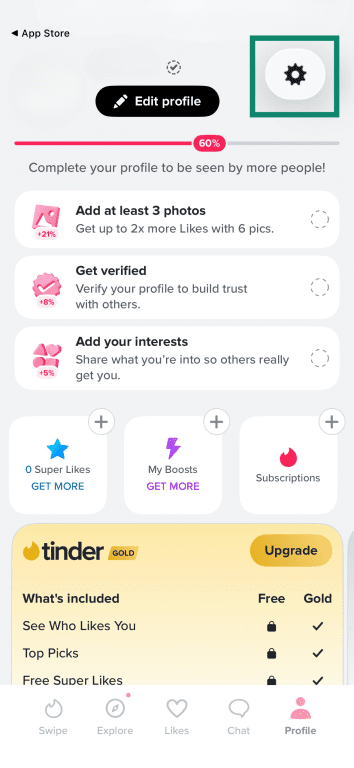
- Open the Tinder app and tap Profile.
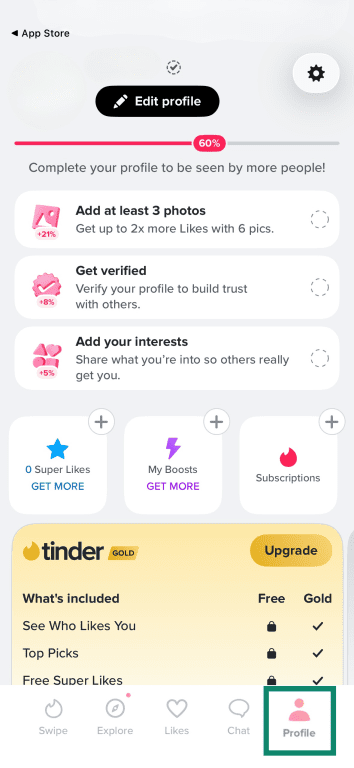
- Open Settings (the gear icon).
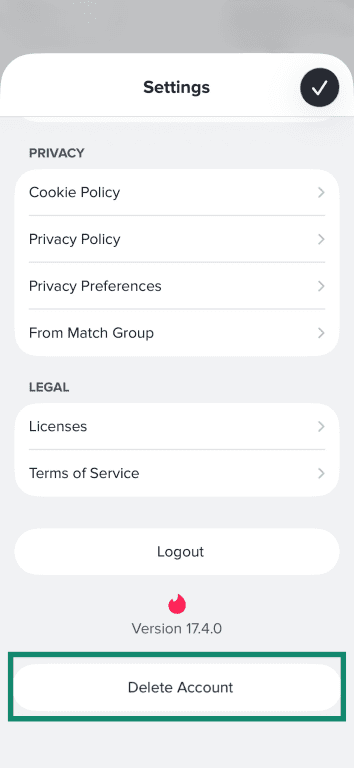
- Scroll down and tap Delete Account.
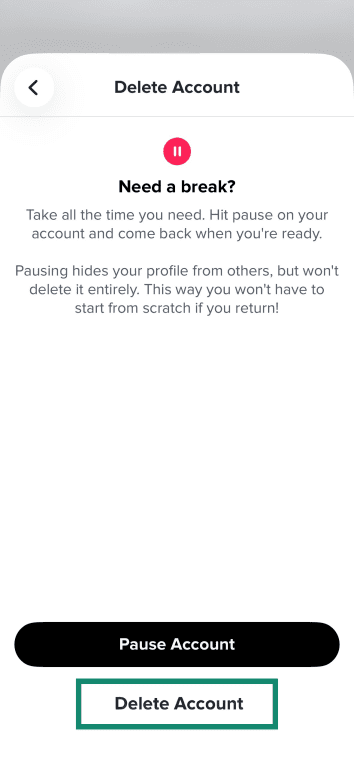
- Tap Delete Account again.
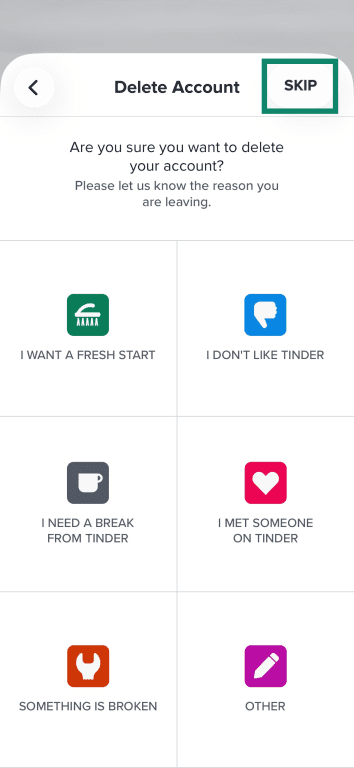
- Select a reason for deletion or tap Skip. You might be prompted to tap Continue to account deletion.
- Tap Delete my account to confirm.
Delete your Tinder account on Android
- Open Tinder on your phone and tap the profile icon.

- Tap the gear icon to access Settings.

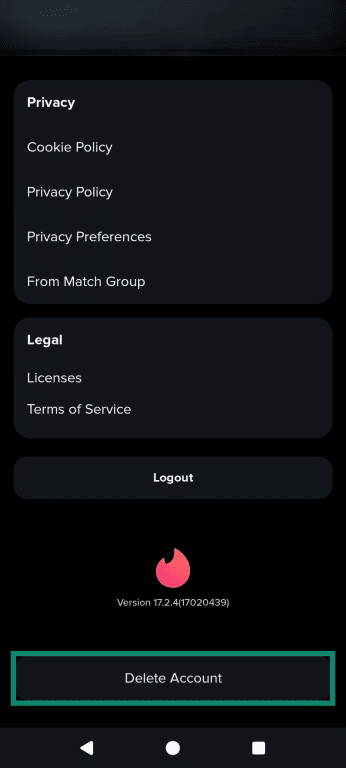
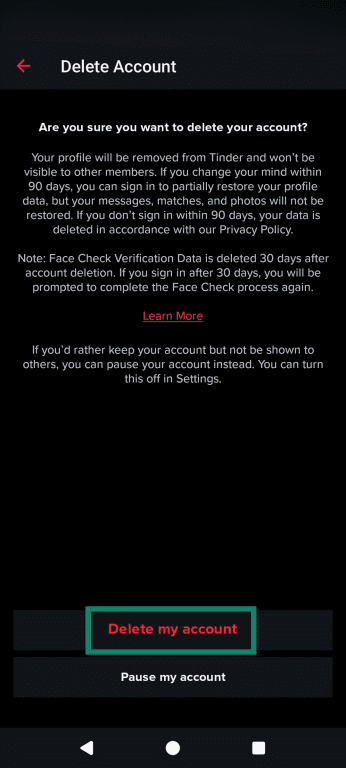
- Scroll to the bottom and tap Delete Account.
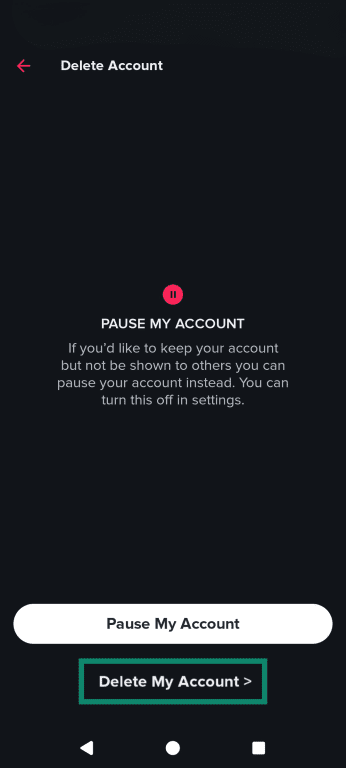
- Choose Delete My Account.
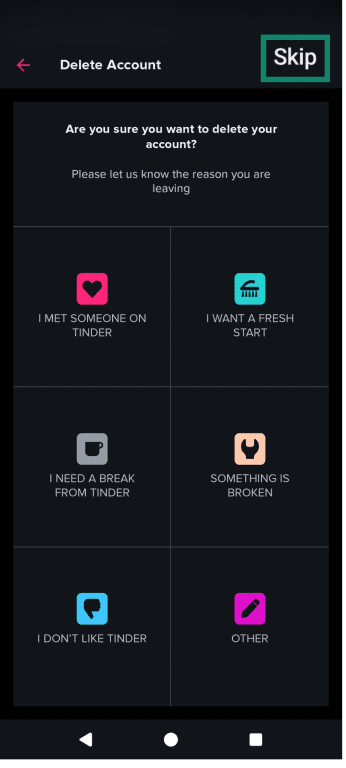
- Select a reason or tap Skip.
- Follow the prompts to confirm deletion and tap Delete my account.
How to delete your Tinder account on a computer
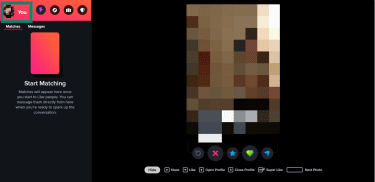
You can also delete your account on Tinder.com (in addition to the mobile app), as long as you can sign in.
- Go to Tinder.com and sign in. Click on your profile icon, then go to Settings.
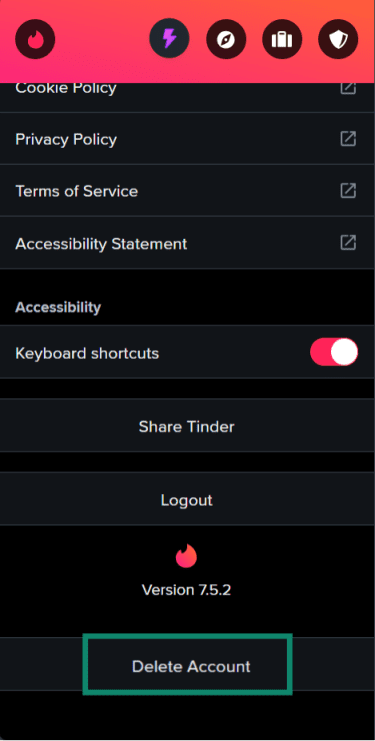
- Scroll down, click on Delete Account, and follow the prompts. You may be asked to select a reason.
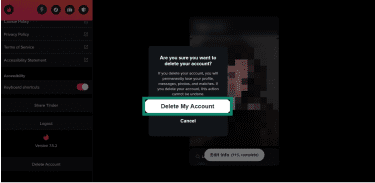
- Click on Delete My Account to confirm.
How to delete a Tinder account without logging in
Sometimes users can’t log in to their accounts due to forgotten login details, an account lockout, or a ban. Deletion requires account access (authentication), so the next step is usually to restore access.
Recover login access
Go to Tinder.com, tap Log In, choose Trouble Logging In?, and follow the prompts to receive a login link, or use the recovery method associated with the account (for example, email). If the account was created with a connected sign-in method (such as Apple, Google, or Facebook), try signing in using the same method.
If Tinder restricts access to your account
Accounts can be banned for violations of Tinder’s Community Guidelines or Terms of Use. If an account is banned, Tinder directs users to the Appeal Center to submit an appeal.
Tinder also offers Photo Verification, which uses a short video selfie. In some situations, the app may prompt for verification as part of continuing or restoring access.
Contact Tinder support
If login recovery doesn't work, use Tinder's support request form and include the account details needed to locate the account (for example, the email/phone tied to the account) and a brief description of the issue.
How to pause your Tinder profile
To pause your profile instead of deleting it, follow the steps below. The menu labels may vary slightly across iOS, Android, and desktop.
- Open Tinder, tap Profile, then tap the gear icon to access Settings.

- Scroll to Enable Discovery and turn it off.
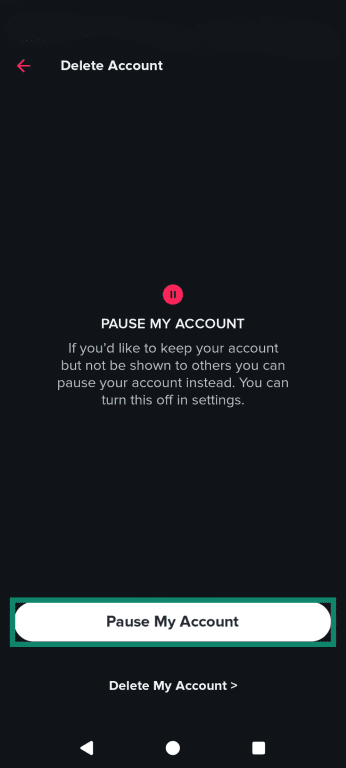
- Tap Pause My Account and confirm your decision.
To resume using the account, go back to Settings and turn Enable Discovery back on so the profile can be shown to new people again.
Troubleshooting common deletion issues
If you’re having trouble deleting your account, try the steps below. For persistent issues, contact Tinder support directly.
- “Delete account” option is missing or not working: First, confirm the account is signed in, then try again. If that doesn't work, make sure your Tinder app is up to date, as outdated versions may not display the correct settings. If the option still doesn’t appear, try signing out and back in or reinstalling the app. Clearing the cache could also resolve display glitches.
- App glitches: Close and reopen the app (or restart the device) and try again. If an error persists, try again later or contact support with any error details.
- Still being charged after deletion: Deleting the account doesn’t cancel a subscription, and subscriptions renew until canceled. Cancel through the same billing method used to purchase (Apple App Store / Google Play / PayPal / Tinder.com). Refund eligibility depends on where the purchase was made, and most in-app purchases are generally nonrefundable unless an exception applies.
FAQ: Common questions about deleting a Tinder account
Can I deactivate my Tinder account temporarily?
Does deleting the Tinder app delete the account?
How long does it take to delete a Tinder account?
Does Tinder delete inactive accounts?
Can I use the same email or phone number again after deleting my Tinder account?
Can others still see my Tinder profile after I delete my account?
Take the first step to protect yourself online. Try ExpressVPN risk-free.
Get ExpressVPN