How to delete a Kik account permanently (step-by-step guide)



Deleting a Kik account is a relatively quick and straightforward process, though there are a couple of important points to keep in mind. Firstly, you can’t delete from the app itself; there’s no “Delete Account” button in the Kik account settings menu. Secondly, Kik offers both account deletion (permanent) and deactivation (temporary). You might want to be aware of the differences between the two before deciding which option is right for you.
This guide covers all you need to know about deleting your Kik account, with clear, step-by-step instructions and alternative messaging platforms you might want to try.
How to permanently delete your Kik account
To delete a Kik account, you have to use a web browser (either on a mobile device or a desktop computer). This process involves entering your details on a specific deletion page before confirming via email.
Note that Kik’s deletion process requires confirming the request via a verification email, so access to the email address linked to the account is needed to complete it. That’s because the deletion process involves a confirmation email, and the account isn’t removed unless you click the link inside that message.
If you no longer have access to the email account associated with Kik, you can reach out to Kik’s support team for assistance. To do this, you can either email support@kik.com or submit a request via the Kik contact form. If you choose the form, select the “Email Used for Account Registration” as the subject. While Kik doesn’t guarantee that an account can be deleted without email verification, support may be able to review your situation and advise on next steps.
Step-by-step deletion instructions
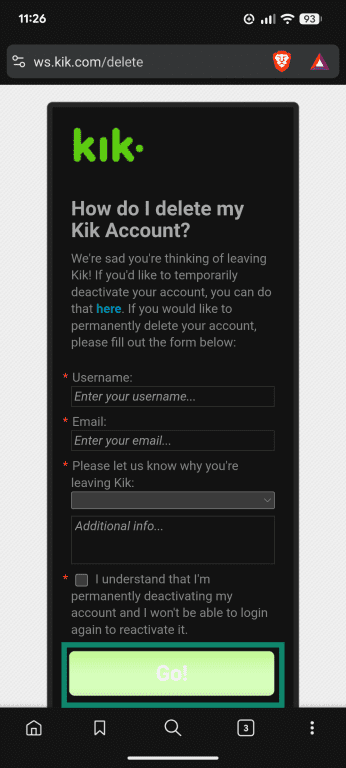
- Visit the official Kik deletion page. Enter your details in the boxes provided, including your username and the email address you used to create the account. You’ll also need to select a reason why you’re deleting (you can provide additional information if you want to, but it’s not necessary). Check the box to confirm you understand what deletion involves, then click or tap the Go button.
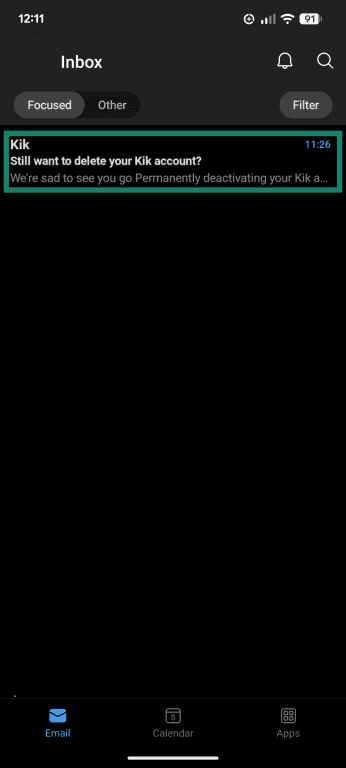
- Check your email and look for a deletion message from Kik. Open it.
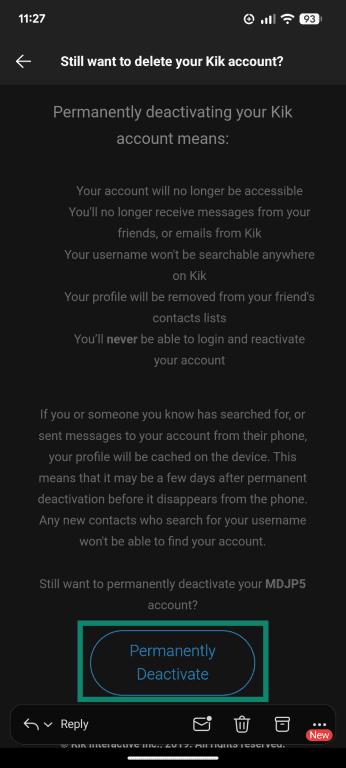
- Scroll to the bottom of the email and click/tap the Permanently Deactivate button to delete your account.
If you'd rather temporarily deactivate/delete your Kik account, you can explore how deactivation differs from deletion, or skip to the step-by-step instructions to deactivate your account.
How to delete your child’s Kik account
If you want to delete your child’s Kik account, you’ll need to know their username and have access to the email address they used when signing up. If you do, you can follow the steps outlined above. Simply enter your child’s details on Kik’s permanent deletion page and confirm the request through the verification email.
If your child created an account without your knowledge or is below Kik’s minimum age requirement (18 years), you can contact Kik at support@kik.com. State that you’re a parent in the subject line of the email, and outline clear reasons why you’re requesting the account’s removal.
What happens after deletion?
- Your account will become inaccessible.
- You’ll stop receiving any messages on Kik or emails from the platform.
- Your username won’t appear when someone searches for it on Kik.
- Your username and profile will no longer appear in the contact lists of people you previously chatted with.
- You won’t be able to sign back in or view any information tied to the account, including contacts or past messages.
How long does Kik take to delete your data?
Kik doesn’t specify how long it will take to delete your data after closing your account. Some profile information may remain temporarily visible on contacts’ devices due to local caching. Kik notes that it can take a few days for this information to disappear from their phone.
It’s also worth noting that Kik’s privacy policy states that some personal data may be retained even after you permanently delete your account.
Can deleted Kik accounts be recovered?
No, there is currently no way to recover a deleted Kik account; the deletion process is permanent. Usernames can’t be reused either. If you want to rejoin Kik, you’ll have to create a new account with a new username.
Deactivation vs. permanent deletion: What’s the difference?
Kik offers both account deactivation and deletion. Note that "delete" also refers to "permanent deactivation," and "deactivation" is also referred to as "temporary delete" throughout Kik's help sections.
What happens when you deactivate Kik?
Deactivation is an option for those who want to take some time off from Kik, without entirely removing themselves from the platform. If you deactivate, you’ll be logged out and stop receiving messages or emails from the app, and users won’t be able to find your username. You also won’t show up on the contact lists of the people you've talked to.
Unlike account deletion, which is permanent, Kik account deactivation can be reversed. You can reactivate your account at any time by signing back into the app. However, Kik’s Terms of Service state that your account may be deleted and the username reclaimed if it remains inactive for at least 3 months.
How to deactivate your Kik account
The process for deactivating and deleting your Kik account is very similar. You’ll need to visit a specific webpage, enter some details, and confirm deactivation.
Steps to temporarily delete your Kik account
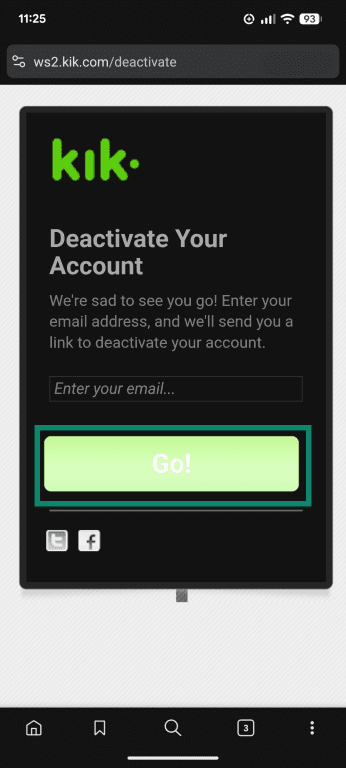
- Visit the official Kik deactivation page. Type the email address you used to create the account in the box provided, then click Go.
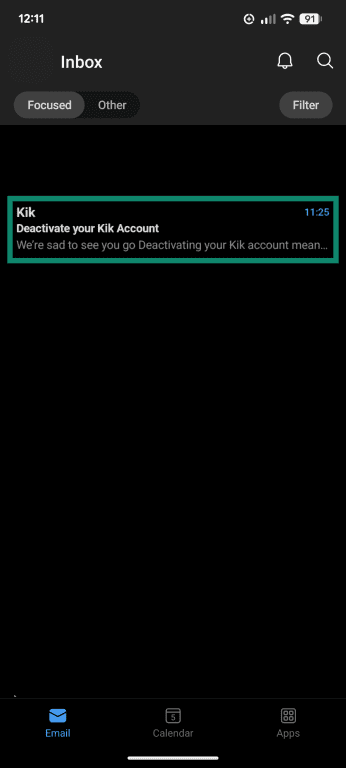
- Open the email account associated with your Kik profile and look for a deactivation message.
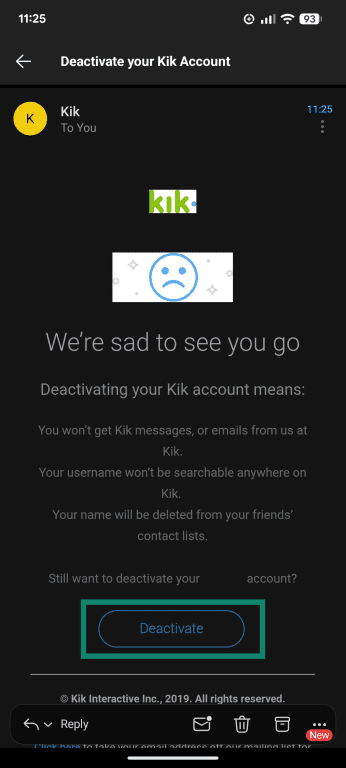
- Once you've opened the email, scroll down and tap or click on the Deactivate button to finalize the process. You should then be redirected to a new page, with a message from Kik confirming your account has been deactivated. You’ll also see a short, optional survey about why you decided to leave the service temporarily.
What is Kik, and why do people delete it?
Kik is a popular instant messaging app available on both Android and iOS. It’s free to use and allows users to send and receive messages, photos, videos, and other kinds of content.
Unlike other messaging apps, Kik is not only used for messaging friends and family, but you can chat with strangers by using "Kik-it" to post a message anonymously, wait for someone to reply, and start a conversation. You then have 15 minutes to either end the chat or add the person as a friend. You can also join Public Groups and chat with other people who share your interests.
Another feature that might make Kik appealing is "Kik Live". A livestreaming feature that lets you broadcast videos to others in real time. Viewers can join streams, interact through chat, send reactions, and follow creators they like.
Is Kik safe to use?
Medialab AI owns the app, and, as such, Kik's Terms of Service reflect those of the company. Kik also publishes its own Community Standards for users to follow.
These documents state that it will terminate accounts and ban users who impersonate another person, post fraudulent content, or content that encourages, promotes, or features child exploitation. More types of content that Kik will not tolerate are listed under "Violent and Criminal Behavior" in Kik's Community Standard documentation. Perpetrators will also be reported to law enforcement if Kik deems it necessary.
Other safety features employed by Kik include:
- Methods for blocking and reporting users.
- A list of resources for users to find help regarding bullying and abuse, mental health, online safety, and more.
- Managing messages. For example, Ignore new chats or Mute New Chats.
- Automatic blurring of media content received from someone new. You need to Tap to Reveal to see the image or text.
- Kik has raised the minimum age requirement to 18, although only UK residents must verify their age. Kik states that accounts belonging to users under 18 may be removed.
That said, Kik does not offer parental control tools, and messages on the platform are not secured with end-to-end encryption (E2EE).
Data retention and privacy
You don’t need to submit much personal information to create a Kik account, just your email address, a username, and your date of birth. However, Kik can still collect various information about you, including, but not limited to:
- Message content
- Contact information
- Who you interact with
- Purchases you've made via the service
- Groups joined and pages viewed
- Details about your device
- Location data
In its privacy policy, Kik notes that it may retain some of this information even after a deletion request. The policy states that this is for legal or business purposes, but it doesn’t detail which data is kept or for how long.
Why users choose to leave Kik
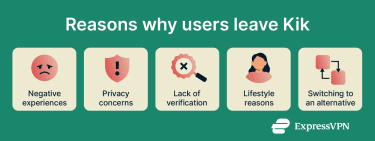 Some of the reasons why people may decide to leave Kik include:
- Negative experiences: As with any messaging app, users may encounter online harassment, spam, or scams. It’s possible to block and report users who violate Kik’s rules, but some users prefer to quit the app altogether.
- Privacy concerns: Kik, like many messaging apps, collects certain types of account and usage information. It also doesn’t require a phone number or extensive identity details during sign-up, so you might not know who you're actually communicating with.
- Lifestyle reasons: Some people decide to take a break from certain apps or reduce their screen time. Or they might even delete Kik as part of a larger plan to remove themselves from the internet entirely.
- Switching to an alternative: Kik’s social-discovery focus doesn’t appeal to everyone. Users who prefer platforms centered on communicating with people they already know often migrate to more private apps instead.
Messaging alternatives to Kik
If you have security or privacy-related concerns about Kik, but still want to chat online, there are plenty of secure messaging alternatives to consider:
- Signal: It’s open source, free to use, and made by a non-profit company. It uses the Signal protocol to provide E2EE on all messages by default, and works on numerous platforms, including Android, iOS, Windows, macOS, and Linux.
- Wire: Another open-source option, Wire also safeguards messages with E2EE, and you can sign up with only an email address for privacy. Unlike Kik, it's not designed for meeting new people but for chatting with known contacts.
- WhatsApp: The most used messaging app globally, WhatsApp is simple to use and secures personal messages and calls with E2EE by default. However, WhatsApp is owned by Meta and does log and share some pieces of user information.
Final tips: Protecting your privacy online
The following tips should help you stay safe and protect your privacy when chatting with others on messaging apps:
- Apps that offer E2EE by default can provide stronger protection for your conversations. This means message content is encrypted so that only the sender and recipient can read it, reducing the risk of third-party or provider access.
- Using a strong password and enabling two-factor authentication (2FA) or multi-factor authentication (MFA) may add extra protection to your accounts.
- Explore the app’s privacy options to manage who can view your profile and who can contact you.
- Reviewing the permissions an app requests can help you choose which ones you’re comfortable enabling.
- It may be helpful to stay mindful when chatting with people you don’t know, especially before sharing personal details or photos.
- A virtual private network (VPN) can help encrypt your internet connection and mask your IP address when using messaging platforms and other online services.
- Looking through an app’s privacy policy can give a clearer picture of what data it collects and how it uses that information.
FAQ: Common questions about Kik
Can I delete my Kik account from the app?
No, it’s not currently possible to delete a Kik account via the mobile app. You have to use a browser and go to the official Kik deletion page, then enter your account details and confirm via email. You can, however, do all of this on your mobile device via your mobile browser.
What happens if I uninstall Kik?
Uninstalling the app removes Kik and your local chat history from your device, but your account itself remains active unless you delete it. It’s worth noting that Kik may delete your account if you don’t use the app for 3+ months.
Does Kik delete inactive accounts?
In its Terms of Service, Kik reserves the right to terminate accounts and reclaim usernames for users who have been inactive for 3 months. So, if you don’t use Kik for three months or more, your account may be deleted automatically, along with your account data.
Can I delete a Kik account without email access?
You need access to the email address used to create your Kik account to deactivate or delete the app. That’s because you need to click a confirmation link in the email to finalize the process. However, you may be able to get an account deleted by contacting the Kik support team, but there's no guarantee.
Can I recover a deleted Kik account?
Kik does not allow recovery of permanently deleted accounts. Usernames cannot be reused, and once deleted, the account cannot be reaccessed. Kik may retain some data as outlined in its privacy policy.
What happens to my messages after deletion?
After deletion, you can no longer access your messages. Kik may retain some account information for legal or business reasons, as described in its privacy policy.
Does deleting Kik delete my messages for others, too?
Deleting your account does not remove messages from other people’s devices. Kik stores chats locally, so any conversations you’ve had may remain on your contacts' devices until they delete them manually.
Take the first step to protect yourself online. Try ExpressVPN risk-free.
Get ExpressVPN