What is eavesdropping in cybersecurity, and how do you prevent it?



Eavesdropping in cybersecurity is when an unauthorized party secretly intercepts digital communications as they travel across a network. Typically, their aim is to collect sensitive information such as login credentials or personal data.
What makes eavesdropping particularly dangerous is its stealthy nature. Unlike attacks that cause obvious disruptions, eavesdropping can occur silently in the background, with no immediate signs that communications are being intercepted.
This guide explains how these attacks work, the warning signs to watch for, and practical ways to reduce the risk of having data intercepted.
How does eavesdropping work?
When you send an email, visit a website, or make a video call, your device breaks the information being transmitted into small packets that travel independently to their destination.
Once the packets arrive, the receiving system reassembles them in the correct order to reconstruct the original information. This packet-based communication is what makes eavesdropping possible when data isn’t properly protected.
In a secure environment, these packets travel through encrypted channels protected by protocols such as Transport Layer Security (TLS).
However, some communications can still occur over unencrypted connections, particularly on legacy systems, misconfigured services, or unsecured public Wi-Fi networks. When packets travel unencrypted, they're transmitted in plaintext, meaning anyone with packet-sniffing software can eavesdrop and read their contents.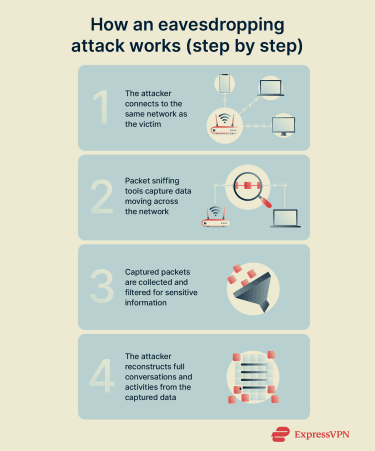
The attack typically follows this sequence. First, the attacker positions themselves on the same network you’re on or along the communication path between you and your intended destination. This could mean connecting to the same Wi-Fi network, compromising a router, or gaining access to network infrastructure.
Next, the attacker activates packet-sniffing tools that allow their device to capture all packets passing through the network, not just those intended for it.
The captured packets are then collected and stored for analysis. Modern eavesdropping tools can process thousands of packets per second, filtering them for valuable information like passwords, session tokens (temporary identifiers that keep users logged into a service), and credit card numbers.
Finally, attackers use protocol analyzers to reconstruct full communication sessions from the captured packets, revealing complete email conversations, file transfers, or browsing sessions.
Why attackers use eavesdropping
Eavesdropping is used by attackers for several reasons. These include:
- Low detection risk: Some forms of eavesdropping leave no immediate trace. The victim's device functions normally, communications go through as expected, and there are no warning signs that someone is listening. This allows attackers to maintain long-term access to sensitive information without raising alarms.
- Minimal technical requirements: Compared to some attacks, eavesdropping is accessible even to less sophisticated attackers. Many packet sniffing and network monitoring tools are freely available and relatively easy to use.
- High-value information gathering: By monitoring communications over time, attackers can harvest a wealth of valuable data, including corporate trade secrets, intellectual property, login credentials, financial information, personal identification details, and confidential business strategies. This information is often used to enable follow-up attacks such as account takeovers, targeted phishing, fraud, corporate espionage, or lateral movement within a network.
Common attack methods
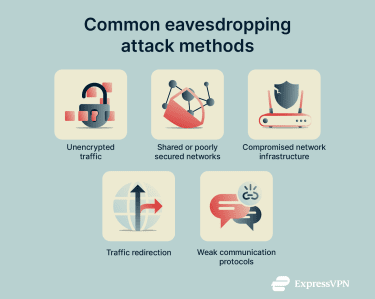
Attackers exploit weaknesses in how data moves across networks in several ways, including:
- Observing unencrypted traffic: If a website or app doesn’t use proper encryption, attackers may be able to view data as it travels between devices.
- Exploiting shared or poorly secured networks: Public hotspots or open networks make it easier for attackers to position themselves where multiple users’ packets are visible.
- Leveraging compromised network infrastructure: Misconfigured or outdated routers and access points can give attackers access to traffic flowing through them.
- Redirecting traffic paths: Manipulating how devices route traffic can expose data to unintended systems controlled by attackers.
- Targeting weak communication protocols: Older or poorly implemented protocols may leak information or fail to protect sensitive data adequately.
Types of eavesdropping attacks
Eavesdropping attacks can either be active or passive. Both involve unauthorized data interception, but they differ significantly in behavior, risk level, and detectability.
Active eavesdropping
Active eavesdropping involves the attacker directly manipulating communications or network infrastructure to intercept data. Instead of simply observing, active eavesdropping requires the attacker to send packets, impersonate systems, or alter the communication flow.
This intervention provides more comprehensive access to information but also creates potential detection opportunities, as active eavesdropping often generates anomalies that security tools can identify. These include unexpected network devices, certificate warnings, unusual traffic patterns, or increased latency.
Some common examples of active eavesdropping include:
Man-in-the-middle (MITM) attacks
In these attacks, the cybercriminal inserts themselves directly into the connection between two parties and acts as an intermediary for all data exchanged. Instead of simply observing data from an external position, messages are routed through the attacker’s system, allowing them to observe, modify, or control the communication flow. The victim believes they're communicating directly with their bank, email provider, or colleague, when in reality every message is being relayed through the attacker.
MITM attacks are prevalent on public Wi-Fi networks. An attacker creates a rogue access point with a legitimate-sounding name like "Hotel_Guest_WiFi." When victims connect, all their internet traffic routes through the attacker's device before reaching the actual internet. The attacker can see every website visited, every form submitted, and every file downloaded.
That said, MITM attacks rely heavily on weak or unprotected connections. Using encrypted HTTPS connections, avoiding unknown Wi-Fi networks, and paying attention to certificate warnings significantly reduces the risk of a successful MITM attack.
ARP spoofing attacks
These attacks manipulate the Address Resolution Protocol (ARP), which networks use to map IP addresses to physical device addresses. By sending fake ARP messages to a network, attackers can associate their device's Media Access Control (MAC) address with the IP address of the network gateway or router.
This causes other devices to send their internet-bound traffic to the attacker's machine rather than to the legitimate router. The attacker captures and analyzes this traffic before forwarding it to the real destination, making the interception invisible to the victim.
DNS hijacking
Domain Name System (DNS) hijacking redirects victims to malicious servers by tampering with DNS responses.
When you enter a web address, your device queries a DNS server to find the corresponding IP address. Attackers who compromise routers or gain control over DNS settings can provide false responses, directing victims to counterfeit websites.
These fake sites are designed to look identical to legitimate ones. Victims who enter credentials on these fake sites hand them directly to the attacker, who now has full access to their accounts.
Session hijacking through active injection
In this type of attack, an attacker inserts their own actions into an active online session. After you sign into a website, it uses a session token, a temporary digital identifier, to recognize that you’re logged in without asking for your password again.
If an attacker intercepts that token, they may be able to send requests that appear to come from you. To the service, these actions look legitimate, while the user may not realize anything is wrong until unusual account activity appears.
SSL/TLS stripping
Secure Sockets Layer / Transport Layer Security (SSL/TLS) stripping attacks exploit the fact that some websites don't enforce encrypted connections. When a victim tries to access an HTTPS site, the attacker intercepts the initial request and establishes two separate connections: an encrypted HTTPS connection with the legitimate server and an unencrypted HTTP connection with the victim.
The attacker decrypts traffic from the server, reads it, then sends it to the victim over the unencrypted connection. From the victim's perspective, they're on an unencrypted site (which some might not notice), while the attacker has access to all transmitted information, including passwords and credit card numbers.
Passive eavesdropping
In these attacks, the cybercriminal simply listens to network traffic without sending any packets, modifying any data, or interacting with the communication in any way. They're purely observers, capturing copies of data as it flows past their monitoring position.
The defining characteristic of passive eavesdropping is that it often leaves no footprint. Since the attacker doesn't alter, inject, or respond to any communications, there are no anomalies to detect. Network performance remains normal, latency doesn't increase, and all communications reach their intended destinations without modification. From the victim's perspective, everything appears to function exactly as it should.
Examples of passive eavesdropping attacks include:
- Packet sniffing on shared networks: When you connect to a shared network, such as public Wi-Fi, your device uses the same network infrastructure as other users. Attackers on that network may use packet-sniffing tools to capture unencrypted traffic from nearby devices. On poorly secured public Wi-Fi, this can allow attackers to monitor traffic from multiple users at once and potentially access information such as login details, browsing activity, or email content sent without encryption.
- Physical network taps: These involve hardware devices installed directly on network cables or infrastructure. An attacker with brief physical access to networking equipment can install a small device that copies all data passing through a particular network segment.
- Monitor mode Wi-Fi capturing: This attack takes advantage of wireless network cards' ability to capture all Wi-Fi traffic in the area, not just traffic addressed to their device. When a wireless adapter is set to monitor mode, it becomes a passive listening device that can capture packets from all nearby Wi-Fi networks simultaneously. Attackers use this technique to collect encrypted traffic for later decryption attempts or to capture unencrypted communications in real time.
Consequences of eavesdropping attacks
When attackers successfully intercept communications, they gain access to sensitive data that can be exploited in several ways. Here are some common outcomes of an eavesdropping attack.
Exposure of sensitive data
One of the most immediate consequences of eavesdropping is the exposure of sensitive data. Through eavesdropping, cybercriminals might gain access to:
- Login credentials for email, cloud storage, banking, or workplace tools.
- Emails, chat messages, and file transfers.
- Medical or financial records.
- Internal business plans, pricing models, or intellectual property.
- Personally identifiable information such as names, addresses, or ID numbers.
- Government and military communications.
This type of data exposure fuels a broad range of privacy risks. For individuals, it can lead to account takeovers and identity theft. For businesses, leaked internal communications can result in compromised operations, damaged relationships, or competitive disadvantage. Cybercriminals can also use this data as a basis for blackmail and digital extortion.
Financial fraud from stolen information
Sensitive financial information intercepted during eavesdropping attacks, such as credit card and banking information, can be directly monetized. Attackers may use stolen details to:
- Access online banking or payment accounts.
- Authorize fraudulent transactions.
- Reroute business payments.
- Apply for loans or credit cards in the victim's name.
- Impersonate company representatives in financial discussions.
- Trick victims into approving unauthorized transfers.
Loss of customer trust
Customers expect the organizations they trust with their information to protect their privacy. When eavesdropping attacks compromise customer data in businesses, the resulting loss of trust can be more devastating than the immediate financial losses.
Consequences often include loss of long-term clients, reputational damage, reduced customer engagement, negative press, and industry scrutiny. The loss of trust is particularly damaging for businesses like healthcare providers, legal firms, financial advisors, and therapists whose entire value proposition relies on confidentiality.
Legal consequences for non-compliance
Many countries enforce strict regulations around how organizations handle and protect personal data. If an eavesdropping attack exposes sensitive information and it’s discovered that the affected organization failed to implement appropriate safeguards, it might face legal or regulatory consequences.
Examples of legal consequences include fines under data protection laws such as the General Data Protection Regulation (GDPR), the Health Insurance Portability and Accountability Act (HIPAA), and the Payment Card Industry Data Security Standard (PCI DSS). Companies might also face mandatory breach notifications, contractual penalties from partners, and lawsuits from customers or employees.
Security risks for critical infrastructure
Eavesdropping attacks targeting critical infrastructure systems pose risks that can threaten public safety and national security. When attackers intercept communications related to power grids, water systems, transportation networks, healthcare facilities, or emergency response procedures, the consequences can be catastrophic.
Potential risks include disruption of essential services, manipulation of industrial control systems, long-term espionage, exposure of national security, and targeted attacks based on intelligence gathered.
How to detect eavesdropping attacks
Detecting eavesdropping attacks is often challenging because many forms of interception leave no visible signs. However, certain behavioral clues, unusual network activity, and dedicated security tools can help you identify when your communication might be monitored.
While no single indicator confirms an attack on its own, noticing several of these warning signs together should prompt a closer look at your device and network security.
Signs of active eavesdropping
Active eavesdropping requires attackers to manipulate communication channels, making it easier to spot than passive attacks. In these cases, the attacker might alter traffic paths, interfere with encrypted sessions, or redirect your connection to an untrusted system. These interventions often produce observable anomalies that can alert attentive users to potential interception.
Here are some warning signs of active manipulation:
- Sudden HTTPS errors or certificate warnings: Attackers attempting to intercept encrypted data may trigger browser alerts about SSL/TLS certificate warnings.
- Unsecured connections appearing where they shouldn’t: Websites that normally load over HTTPS suddenly load in plain HTTP, exposing traffic to observers.
- Frequent disconnections or Wi-Fi drops: Attackers forcing reconnections to compromised access points may cause unstable network behavior.
- Pages redirecting to unexpected login screens: This may indicate an attacker is attempting to gather credentials.
- Duplicate Wi-Fi network names: A fake or rogue access point may be mimicking a legitimate hotspot.
- Unusual lag during secure logins: Extra processing from an attacker-in-the-middle can cause noticeable delays.
- New or modified DNS settings: Browser redirects to unexpected URLs indicate potential DNS hijacking or other active attacks.
- Duplicate IP or MAC address warnings from your device: These indicate that another system is claiming the same network identity.
If you encounter any of these issues regularly, especially on trusted networks, your connection might be compromised.
Signs of passive eavesdropping
Passive eavesdropping is extremely difficult to detect. Attackers observe data without altering it, so most users won’t notice anything out of the ordinary. Still, a few subtle signs may suggest that someone is monitoring traffic in the background. Some possible indicators include:
- Unrecognized devices on the network: Unknown devices connected to your Wi-Fi network may be monitoring broadcast traffic.
- Suspicious requests in router logs: Repeated or unauthorized attempts to query device information or DNS traffic may indicate that someone is gathering metadata.
- Unexplained account access from unfamiliar locations: This might indicate that credentials were captured through eavesdropping.
- Suspicious knowledge of private digital information by unauthorized parties: If someone appears to know details from emails, messaging apps, cloud documents, or online meetings that were never shared publicly, this may indicate that digital communications were intercepted through eavesdropping.
Tools for monitoring network activity
Detecting eavesdropping becomes far easier with dedicated tools and monitoring solutions. You can better identify suspicious traffic patterns, unauthorized devices, certificate anomalies, and other signs of interception. Here are the most common:
- Network intrusion detection systems (IDSs): These monitor network traffic for suspicious patterns and known attack signatures. They generate alerts when they detect traffic patterns consistent with ARP spoofing, DNS hijacking, or other eavesdropping techniques.
- Wireless IDSs: They specifically monitor Wi-Fi networks for rogue access points, evil twin attacks, and unauthorized devices.
- Network protocol analyzers: Tools like Wireshark provide detailed visibility into network communications, allowing security professionals to examine what data is flowing across networks and better detect suspicious activity.
- Endpoint detection and response (EDR) systems: They monitor individual devices for indicators of compromise, including eavesdropping malware.
- Network traffic analysis tools: These systems establish baselines of normal network behavior and alert you when deviations occur.
- DNS monitoring services: They track DNS queries from your network to detect hijacking attempts.
- Log analysis and security information and event management (SIEM) platforms: These systems aggregate security data from multiple sources and correlate events to identify sophisticated attacks that might not be apparent from any single data source.
Using these tools regularly increases the likelihood of catching abnormalities before a larger attack unfolds.
Who faces a higher risk of monitoring? Common scenarios
Certain scenarios significantly increase the risk of eavesdropping, even if the technical signs aren’t obvious. If your environment, activity, or recent experiences align with any of the conditions below, you should assume greater caution and strengthen your security setup.
- You used public Wi-Fi without a virtual private network (VPN): Open hotspots are among the most common environments for interception. A VPN reduces the risk of eavesdropping by encrypting your traffic on these networks.
- You recently clicked a suspicious link or engaged with a phishing message: Attackers may have gained limited access to your network traffic.
- You work in a sensitive industry: If you work in sectors like defense, intelligence, finance, or technology, or if you hold a position with access to valuable information, assume you're a potential target.
- Your organization is undertaking a high-stakes project or negotiation: These situations often attract surveillance or corporate espionage attempts where competitors try to secretly gather confidential business information for strategic advantage.
- Your router, Internet of Things (IoT) devices, or firmware are outdated: Connected devices like smart cameras, speakers, and other network-enabled hardware can become easier to intercept or manipulate when they run outdated software.
- You live or work in a location with many unmanaged Wi-Fi networks: Dense environments make it easier for attackers to hide rogue access points.
- You often travel internationally: Data access and monitoring practices vary by country, and travelers may be subject to different privacy and security standards abroad.
If any of these scenarios describe you, especially alongside the technical warning signs above, it’s wise to assume your communication may be exposed, and you should move onto the preventative measures.
How to prevent eavesdropping
The best way to prevent eavesdropping is to make your communications unreadable if they’re intercepted. This requires a multi-layered approach combining encryption, secure network practices, a trusted VPN (especially for sensitive activities like banking), and continuous monitoring tools to safeguard sensitive information.
Use encryption to protect data in transit
Encryption is one of the most effective defenses against eavesdropping. It transforms your data into unreadable packets that can only be deciphered with the correct decryption key. This means an attacker gains nothing even if they manage to capture your traffic.
Here are some steps you can take to strengthen your encryption:
- Use HTTPS whenever possible: Only enter personal information on websites that show the lock icon in the browser bar. HTTPS ensures that data exchanged with the site is protected by TLS/SSL.
- Choose end-to-end encrypted platforms: Messaging apps like WhatsApp, Signal, and iMessage offer built-in end-to-end encryption (E2EE), while some email and file-sharing services support it when enabled or used with additional security tools.
- Enable encrypted DNS: Many modern browsers and operating systems support encrypted DNS, which can be enabled in privacy or network settings or by choosing a DNS provider that supports DNS over HTTPS (DoH) or DNS over TLS (DoT). This prevents attackers on the network from seeing or tampering with your DNS requests.
- Avoid outdated protocols: Disable older standards like Wired Equivalent Privacy (WEP), Wi-Fi Protected Access (WPA), or SSL 2.0/3.0 in your router, device, or network security settings. Use modern protocols such as Wi-Fi Protected Access 3 (WPA3) and TLS 1.3, which offer stronger protection.
- Use encrypted communication tools for business: Secure Voice over Internet Protocol (VoIP) services, encrypted conference tools, and protected document-sharing channels reduce the risk of corporate data leakage.
While encryption alone cannot prevent all forms of interception, it renders most captured data useless.
Strengthen network security settings
Weak or misconfigured networks create easy opportunities for attackers to intercept communication. Securing your home, work, and public Wi-Fi environments significantly reduces the chances of someone placing themselves between your device and the internet. Here’s how you can do that.
- Set a strong Wi-Fi password: Using a reliable password manager can make it easier to generate and securely store a long, unique Wi-Fi password. Use a WPA3 network security key if available, or WPA2 at minimum.
- Avoid default passwords: Change default passwords on all network equipment, including routers, access points, and network switches, immediately after installation. You can do this through their web-based admin interface or device settings.
- Update router firmware regularly: Check for and install firmware updates through your router’s admin interface or companion app, as outdated firmware may contain vulnerabilities that expose your network to interception.
- Disable unnecessary features: Options like Wi-Fi Protected Setup (WPS), Universal Plug and Play (UPnP), and remote management can make it easier for attackers to gain entry. Turn them off in your router’s admin or network security settings.
- Segment your network: Create separate Wi-Fi networks or virtual local area networks (VLANs) in your router or access point settings for IoT devices, guest access, and work devices. This helps prevent a compromised device from reaching more sensitive parts of your network.
- Monitor connected devices: Regularly review the list of connected devices in your router’s admin dashboard or companion app, and disconnect or block any devices you don’t recognize.
- Enable firewall protection: Turn on the built-in firewall in your router’s security settings, and ensure device firewalls (such as those on your computer or phone) are enabled in their system security settings to block unauthorized network connections.
These measures strengthen your network’s integrity and make it harder for attackers to position themselves where they can observe your communication.
Enable a VPN for secure and private connections
VPNs create encrypted tunnels for all your internet traffic, better protecting your communications from eavesdropping. They are particularly valuable when using untrusted networks, such as public Wi-Fi in coffee shops, airports, hotels, and conferences. These networks are shared by many users and are easier for attackers to monitor or manipulate, increasing the risk of traffic interception without encryption.
Some VPNs, including ExpressVPN, let you automatically connect whenever you join an untrusted Wi-Fi network, so your traffic is encrypted by default on public hotspots.
Use security tools for real-time protection
While encryption and strong network settings reduce your exposure, additional security tools help detect suspicious behavior and block attackers in real time. These tools can alert you to anomalies, prevent unauthorized access, and stop intrusions before sensitive data is exposed.
Here are some tools you can use:
- IDSs: These tools analyze network traffic and flag unusual patterns that may indicate interception or manipulation.
- Firewalls with advanced filtering: Modern firewalls can detect suspicious inbound or outbound requests and stop unauthorized communication attempts.
- Secure endpoint protection: Updated antivirus and anti-malware tools help prevent attackers from compromising your device and accessing your local traffic.
- Encrypted DNS and secure DNS resolvers: These prevent attackers from tracking your browsing habits or redirecting DNS queries.
- Combining these tools with a VPN and strong encryption creates a layered defense that minimizes the chance of successful eavesdropping, whether the attacker is passively observing or actively manipulating your communication.
FAQ: Common questions about eavesdropping in cybersecurity
What is the difference between sniffing and eavesdropping?
Sniffing is the act of capturing data packets as they move through a network. It describes the technical process of collecting the information.
Eavesdropping, on the other hand, refers to the broader attack in which a malicious actor uses captured traffic to monitor private communication. In other words, sniffing is one of the techniques used in an eavesdropping attack.
What are the risks of passive attacks?
Passive attacks are dangerous because they leave no visible signs. Attackers can silently gather login credentials, sensitive messages, business communications, browsing habits, and personal data without detection. They can then use this information for identity theft, fraud, targeted phishing, or long-term surveillance. Because victims often don’t realize the attack occurred, they may continue using compromised networks for extended periods.
Can eavesdropping be detected?
Eavesdropping can be difficult to detect, but not impossible. Passive attacks usually leave no traces, but unfamiliar connected devices, unexplained account access from unfamiliar locations, or router log anomalies may hint that something is wrong.
Active eavesdropping attacks are easier to spot and may trigger certificate warnings, redirects to strange login pages, unstable Wi-Fi connections, or sudden changes in Domain Name System (DNS) settings. Security tools like network scanners, intrusion detection systems (IDSs), and security information and event management (SIEM) platforms can also help identify suspicious activity.
How can I protect my data?
To protect your data from eavesdropping, you need to implement multiple security layers that work together to secure your communications. The most effective protections include using strong encryption, securing your Wi-Fi network with modern protocols and strong passwords, keeping routers and devices updated, and using a reputable VPN to encrypt all traffic.
Does a VPN protect against eavesdropping?
Yes. A VPN encrypts all data traveling between your device and the VPN server, making it unreadable to anyone who tries to intercept it. This includes malicious actors on public Wi-Fi, untrusted networks, and even your internet service provider (ISP). A VPN also hides your IP address, reduces metadata exposure, and prevents Domain Name System (DNS) leaks, helping ensure attackers can’t easily monitor or profile your online activity.
Can HTTPS protect against eavesdropping?
Yes. HTTPS encrypts the communication between your browser and the website you’re visiting, preventing attackers from reading the content of your traffic, such as passwords or messages. However, HTTPS doesn’t encrypt everything. Metadata, such as the domains you visit, may still be visible, and HTTPS cannot protect you from compromised Wi-Fi networks or malicious routing paths. Pairing HTTPS with a VPN offers significantly stronger protection.
Is eavesdropping the same as man-in-the-middle?
Not exactly. Eavesdropping refers to monitoring communication, either silently (passive) or by interacting with it (active). A man-in-the-middle (MITM) attack is a type of active eavesdropping where the attacker positions themselves between two parties and relays their communication. MITM attacks allow the attacker to modify, redirect, or capture data in real time. In short, all MITM attacks are a form of eavesdropping, but not all eavesdropping attacks involve MITM.
Take the first step to protect yourself online. Try ExpressVPN risk-free.
Get ExpressVPN