What is unified threat management (UTM)?


Network security often relies on several separate tools. Organizations may use one system to control traffic, another to scan files, and others to monitor activity or filter web access. Not only does this provide extra work for IT teams, but it can make important alerts harder to notice. Unified threat management (UTM) was developed as an alternative to this fragmented setup.
In this guide, we explain what UTM is, the protections it brings together, its benefits and limitations, how it compares with other firewall models, and what to consider when deploying it.
Please note: The term UTM is commonly used to refer both to the security approach and to the system that delivers it.
How does a UTM work?
A unified threat manager (UTM) is a single security solution that groups several essential network protections into one system.
Instead of relying on separate products for firewall rules, intrusion prevention, malware scanning, and web filtering, a UTM brings these functions together. It allows security tools to be configured and monitored through a shared interface.
This consolidation also helps teams apply consistent cybersecurity policies across the network.
Key components of UTM
The exact features vary by vendor, but most UTM solutions include the components below.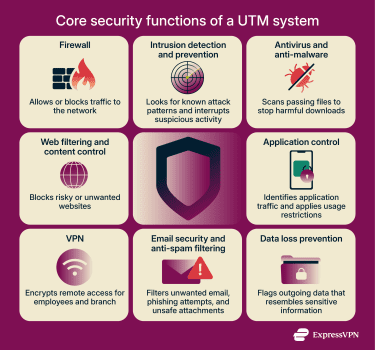
Firewall capabilities
Most UTMs include a firewall. Its main job is to prevent unauthorized connections from reaching the network. It keeps track of ongoing traffic and decides whether new requests should be allowed or blocked. These decisions are based on factors such as the source or destination IP address, the type of service involved, or the part of the network the request is coming from.
Intrusion detection and prevention systems (IDS/IPS)
IDS and IPS look beyond basic access rules and examine the traffic that’s already been allowed through the firewall. While the firewall controls who can connect, IDS and IPS focus on how that connection behaves and whether it shows signs of an attack.
These systems compare traffic with known cyberattack techniques. Red flags might include scans that probe for weaknesses, attempts to exploit software bugs, or behavior that doesn’t match how a protocol is normally used.
In a UTM, this inspection happens as data packets move through the device, so suspicious activity can be flagged or blocked before it reaches internal systems. Vendors update IDS and IPS signatures and behavioral rules regularly to cover newly discovered vulnerabilities and attack methods. These updates give UTMs broad protection against threats.
Antivirus and anti-malware
Many UTMs include antivirus or anti-malware scanning to help block harmful files before they reach user devices.
Because UTMs sit at the network gateway, they can inspect files as they pass through and compare them against signature databases of known threats. This lets the device stop malicious downloads at the perimeter rather than relying on endpoint tools to catch them later.
Web filtering and content control
Web filtering lets organizations control which types of websites users on their network can visit. UTMs check requested URLs against large classification databases and block sites associated with malware, phishing, or other unwanted content.
Administrators can tailor these rules by user group or device type. Many UTMs also flag attempts to visit newly registered or suspicious domains, which can be used for attacks.
Application control
Some UTMs can identify specific apps that are being used on the network. This is called app awareness, and it works by combining multiple clues to recognize app signatures. Signatures can include traffic patterns and behaviors, metadata, associated domains, and even the type of device being used.
App awareness gives administrators more precise control than web filtering alone. For example, an organization might want to block streaming services on its network to prevent employees from taking up too much bandwidth in the office. However, blocking all streaming traffic might interfere with video conferencing apps, which also stream data in real-time.
A UTM that can identify specific apps could allow traffic from Zoom, while blocking traffic from streaming platforms. It can also allow peer-to-peer (P2P) file-sharing between colleagues, while blocking torrent sites that might contain malicious files.
This helps organizations manage bandwidth, prevent the use of unapproved tools, and keep work traffic separate from applications that create risk or distraction.
Virtual private network (VPN) support
Many UTMs include business VPN features so remote employees or branch locations can securely connect to the organization’s internal network. They usually support well-known standards such as Internet Protocol Security (IPsec) and Secure Sockets Layer (SSL), which encrypt employee traffic to protect it while it travels over the internet.
Administrators choose how users are authenticated, set the encryption level, and decide which parts of the network those users can reach. With these pieces built in, there’s no need to run a separate VPN appliance for routine remote access.
Email security and anti-spam filtering
Some UTMs include filters that screen email before it reaches users. These filters look at who the message came from, whether the content resembles a phishing attempt, and whether the attachments match file types often used to spread malware.
By removing many of these messages at the server level, the UTM helps reduce the number of risky emails that appear in users’ inboxes.
Data loss prevention
UTMs might also include basic checks on outgoing traffic. They scan for information that appears sensitive, such as certain document types or recognizable data patterns. If the system detects something it thinks shouldn’t be sent out, it raises an alert.
These features are meant to catch accidental sharing or uploads, giving administrators a basic safeguard against unintentional data exposure.
Benefits of UTM solutions
Since UTMs combine several protections, it changes how teams handle routine security tasks. Here’s how it benefits organizations: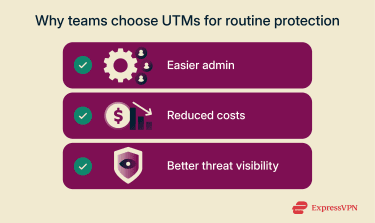
Simplified security administration
When security is spread across different products, administrators have to sign into several consoles to manage tools and set or change rules. With a UTM, the main controls sit in one interface. Firewall rules and web access policies are adjusted from the same place, which saves time and workload.
Lower operational costs with all-in-one security
Separate tools usually mean separate licenses, support contracts, and, in many cases, appliances. A UTM covers several jobs in a single product, so there are fewer things to buy and fewer platforms to keep under maintenance. For many smaller organizations, that ends up cheaper than running a stack of individual security devices.
Centralized visibility
Investigating an issue is harder when logs are stored in different places. With a UTM, most day-to-day events (blocked traffic, detected malware, web filtering actions, VPN sessions) are recorded on the same box and shown in one dashboard. That makes it quicker to reconstruct security events, and gives auditors or internal reviewers a single place to pull the evidence they need.
Challenges and limitations of UTM
A UTM could simplify a lot of day-to-day security work, but it isn’t a perfect fit for every network. Here are some of the limitations of UTMs:
Performance bottlenecks and scalability constraints
A UTM processes multiple security functions on the traffic that passes through it, and each feature draws on the device’s CPU and memory. Enabling several protections at once can increase the processing load, which may lead to performance bottlenecks if the hardware is not sized appropriately.
Under heavy traffic conditions, this can slow a network down. As a result, UTMs don’t always scale well in environments with very high traffic or strict separation between teams and systems.
Some vendors offer higher-capacity models, but in large networks, these usually sit alongside other security layers rather than replacing them. This gives teams the flexibility they need while keeping heavy workloads off a single device.
Single point of failure
Because a UTM concentrates so many functions on one device or cluster, its availability matters more than that of a singular security product. If the UTM goes down and there’s no backup in place, the impact is wider than just losing a firewall or a web filter. Remote access, malware scanning, and other protections that depend on it can all be affected at once.
Even when the hardware stays up, a misconfiguration or faulty update on a UTM can have broad consequences. A rule pushed in error might block important services for every site that relies on the device.
To reduce this risk, many organizations run UTMs in pairs so one can take over if the other fails. They also test rule changes on a small group of systems before applying them more broadly, and keep clear processes for approving and tracking updates.
Vendor lock-in
Consolidating several security functions into one UTM platform makes the environment more dependent on a single vendor’s technology. When tools all share the same license bundle, policy framework, and management console, it becomes harder to move away later.
Switching to a different vendor usually means rebuilding those policies in a new interface, retraining staff, and re-establishing any integrations with other tools. Vendor lock-in exists with most security platforms, but it can be more pronounced with UTMs because so many protections sit on one product.
UTMs vs. other security solutions
Some of the tools that are compared with UTM have very different design goals, so it’s important to understand how they differ.
UTMs vs. next-generation firewalls (NGFW)
UTMs and NGFWs share some features, but they’re built with different priorities.
NGFWs focus on deeper inspection and higher throughput. They can recognise applications with more accuracy and can tell what action a user is taking inside that application. For example, they can allow video calls inside a collaboration tool while blocking file transfers in that same tool.
UTMs are designed for simpler day-to-day operation. They provide broad coverage but don’t aim for the same inspection depth or scalability as high-end NGFW platforms. The gap becomes more noticeable in environments with fast connections, many users, or complex policy requirements.
Teams that want several protections in one system with less day-to-day tuning often choose UTM. Networks that need precise application behavior, higher throughput, or more consistent inspection at scale usually choose NGFWs.
UTMs vs. traditional firewalls
Traditional firewalls focus on deciding which connections can pass and which must be blocked. They enforce traffic rules with very little processing overhead. That’s why they’re still used on links that carry large amounts of traffic or in places where security teams only need basic access control.
Traditional firewalls remain a good fit when the network doesn’t need the extra layers of security that come with a UTM system. They’re also efficient when high throughput is more important than running several inspection engines on the same device.
Deployment options for UTM solutions
UTMs can be installed in different ways depending on the size of the network, how much control the organization wants, and where its users and applications are located. Most deployments follow one of the two models below.
On-premise vs. cloud-based UTM
Some vendors offer cloud-delivered security platforms that provide many of the same protections as physical UTM appliances. In these setups, traffic is sent to the provider for filtering and threat checks.
This is usually done either through a VPN tunnel from the network or through a lightweight app installed on each user’s device. The provider runs the filtering and malware checks on its own systems, while the organization signs in to a console to set policies and review activity.
Choosing the right fit for your organization
The decision usually comes down to where users work, how much traffic needs to be inspected, and how much operational control the organization wants.
Smaller offices often choose on-premise UTM appliances because they provide several protections in one device and don’t require complex routing. Organizations with many remote or widely distributed users often pair an on-premise UTM with a cloud-delivered security service, since cloud inspection can follow users even when they’re not connected to the office network.
Some networks use a mix: an on-premise UTM for the main site and a cloud-delivered security platform for remote or roaming users. The right choice depends on capacity needs, budget, update requirements, and how much the organization wants to maintain in-house versus offloading to a provider.
Implementation best practices for UTM
A UTM works best when it fits cleanly into a network that is already in place. Careful planning reduces performance issues, configuration gaps, and unexpected interruptions once the system is active.
Integration with existing infrastructure
Before adding a UTM to a network, teams usually check how traffic currently moves between office devices, branch locations, and the internet. This helps identify the best point for inspection so the UTM can actually see the traffic it’s supposed to protect.
In most setups, this point is the connection between the internal network and the router that leads to the internet, or the entry point of a branch office.
Some organizations already use dedicated tools for email security, device protection, or intrusion prevention. These stay in place because they offer deeper or more specialized coverage in those areas.
In these setups, the UTM handles broad network-edge filtering while the existing tools continue doing the higher-precision checks they were chosen for.
Policy configuration best practices
Many of a UTM system’s protections rely on rules that determine what the system allows or blocks. Clear, well-tested policies help avoid outages and reduce troubleshooting later.
A practical way to configure these policies is to follow a staged approach:
- Start with a baseline that reflects the organization’s normal traffic patterns and security requirements.
- Add more specific rules gradually for sensitive systems or departments with unique needs.
- Review and refine policies whenever traffic patterns, user needs, or threats shift. Keep rules aligned with the latest intrusion-prevention and malware updates.
Keeping a record of rule changes and the reasons behind them also helps during audits and makes it easier for new team members to understand earlier decisions.
FAQ: Common questions about UTM
What is the difference between a UTM and an NGFW?
A unified threat manager (UTM) combines several protections in one system and is designed for broad, easy-to-manage security. A next-generation firewall (NGFW) focuses on deeper inspection and higher throughput, with more precise application control. Networks choose NGFWs when they need that level of inspection or expect large traffic volumes that a UTM is not built to handle.
Is UTM enough for enterprise-grade protection?
Unified threat management (UTM) covers many core protections, but large enterprises often layer it with more specialized tools that offer deeper scanning or higher capacity. It can sit within an enterprise setup, but it isn’t necessarily the only layer. The choice depends on traffic volume and regulatory needs.
Do unified threat managers (UTMs) replace a standalone antivirus?
No. A UTM can scan files as they move across the network, but it doesn’t monitor activity on a user’s device after the file is downloaded. Endpoint antivirus tools help to catch threats that appear after a file is opened.
Is a unified threat manager (UTM) suitable for small businesses?
Yes. It reduces the effort of managing several separate tools and provides broad protection in one system. This is why UTMs are widely used in small and mid-sized environments.
Can a unified threat manager (UTM) be used with cloud-based infrastructure?
Yes, UTMs can inspect traffic that goes to or from cloud services when that traffic passes through the UTM appliance. If users connect directly to cloud apps from outside the network, they may need a cloud-delivered security service instead.
How does unified threat management (UTM) impact network performance?
UTMs analyze traffic as it passes through them, so performance depends on how much inspection is enabled. Tasks like malware scanning or intrusion-prevention require more processing. If the UTM appliance doesn’t have enough capacity for the amount of traffic it’s inspecting, it can slow down throughput or add latency when the network is busy.
What are common mistakes when implementing UTM?
Rushing deployment without testing new rules is one of the most common issues. Another is overlapping features with existing tools, which can cause inconsistent behavior. Clear policies and staged rollout usually prevent these problems.
Take the first step to protect yourself online. Try ExpressVPN risk-free.
Get ExpressVPN