What is DevSecOps? Securing software development from the start


Although software development has become more agile, security is still sometimes treated as a late-stage checkpoint: introduced near release, or after deployment, when timelines are tight. When issues surface late, they tend to be more disruptive and costly to address, and teams may feel pressure to defer fixes.
This guide covers what Development, Security, and Operations (DevSecOps) means, how it works, and why it matters for application security.
What is DevSecOps?
DevSecOps brings development, security, and operations together by integrating security practices into every stage of software delivery, with teams collaborating closely and sharing responsibility.
It’s most common in fast-paced environments like Software-as-a-Service (SaaS) platforms, cloud applications, and mobile apps, where teams deploy updates daily or even hourly. In these settings, relying mainly on traditional end-stage security reviews can become a bottleneck, increasing the risk that issues in code, configuration, or dependencies aren’t caught early.
DevSecOps vs. DevOps
| DevOps | DevSecOps | |
| Function | Speed and reliable delivery | Speed, reliability, and security |
| Team collaboration | Development and operations | Development, security, and operations |
| Role of security | Often treated as a separate or later-stage gate | Integrated throughout the process |
| Responsibility for security | Mainly led by security specialists, with varying levels of shared ownership | Shared across teams |
| Impact on development speed | Emphasized speed without sacrificing reliability | Aims to add security controls with minimal friction to delivery |
Development Operations (DevOps) focuses on improving speed and reliability through close collaboration between development and operations teams, automation, and continuous delivery. However, security is often reviewed after development work is complete.
DevSecOps builds on this foundation by integrating security into core workflows. Instead of relying mainly on late-stage reviews, security checks become part of day-to-day processes. This way, it aims to reduce risk without unnecessarily slowing releases.
How DevSecOps works across the development cycle
Here are the key software delivery stages where security practices apply, from planning and design to deployment and monitoring.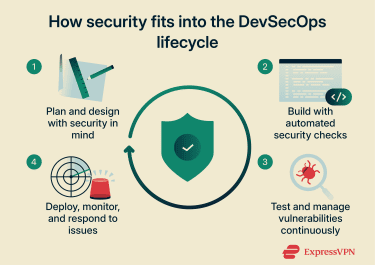
Planning and secure design
Many security risks stem from early design decisions. During planning, teams assess how an application will handle data, communicate with other services, and control access.
This kind of security work is often described as a “shift left” approach, which supports secure-by-design thinking. Addressing risks at this stage prevents design flaws that are difficult to fix later. For example, mapping how sensitive data flows through an application before writing code can reveal unnecessary exposure or problematic trust assumptions.
Development and automated code security
Automated security checks run in the continuous integration/continuous delivery (CI/CD) pipeline, which is the automated process that builds and tests code as developers make changes. Each time developers commit code, these checks apply consistent rules across all changes. Every commit undergoes the same security scans, regardless of who wrote the code or when it was submitted.
The scans flag flawed code patterns or known vulnerabilities before the code merges into the main codebase. While these checks catch most issues early, some may slip through, which is why additional security testing is still needed later in the cycle.
Pre-release testing and vulnerability management
DevSecOps also treats security testing as an ongoing activity rather than a one-time checkpoint, which is often referred to as continuous security. Teams use multiple approaches to catch different vulnerability types:
- Static application security testing (SAST): Analyzes source code for unsafe patterns.
- Dynamic application security testing (DAST): Tests running applications for unexpected behavior.
- Dependency scans: Check third-party libraries for known vulnerabilities.
However, identifying issues is only part of the process. Vulnerability management helps teams track findings, assess their impact, and prioritize what needs to be fixed before release. For example, a CI build may fail automatically when a dependency scan detects a vulnerable library. Teams then address the problem before it reaches production.
Post-release monitoring and incident response
Teams release updates frequently, and some issues are only discovered (or become exploitable) under real-world conditions that pre-release testing didn't anticipate.
Monitoring tools track application behavior, configuration changes, and unusual activity in production. This helps teams detect problems early rather than rely on periodic reviews or user reports. When monitoring tools flag a problem, incident response processes help teams quickly investigate, contain the threat, and prevent escalation.
How DevSecOps improves application security
DevSecOps changes how software is built and how well it stays protected once deployed.
Reducing security vulnerabilities earlier
DevSecOps aims to catch issues closer to where they originate, instead of right before release or after deployment. Addressing risks earlier is often less disruptive because changes are smaller and more contained.
This incremental approach can reduce repetitive, manual review by embedding checks into everyday workflows. Instead, teams can prioritize reviews of new code, recent modifications, and how changes interact, while still supporting periodic assessments when needed.
The same checks and standards apply every time code changes, rather than relying on one-off reviews or rushed patches. This creates more consistent security across releases.
Minimizing attack surfaces
DevSecOps reduces risk by limiting what an application exposes in the first place. When security informs design and configuration decisions, systems can end up with fewer open services, unnecessary components, and overly broad permissions.
This can include restricting which applications are allowed to run (application allowlisting) and tightening which services can communicate. A smaller attack surface leaves attackers with fewer entry points as systems grow more complex.
Improving response to security threats
DevSecOps also improves incident response. Continuous monitoring and clear response processes support faster detection and containment. This matters especially for systems that work with connected devices, where vulnerabilities often surface only after deployment, when software interacts with real devices, data, and network conditions.
Lessons from incidents feed back into development to strengthen future releases.
Where corporate VPNs fit into DevSecOps
Corporate virtual private networks (VPNs) don’t replace DevSecOps practices, but they can support secure development workflows, especially when teams work across different locations.
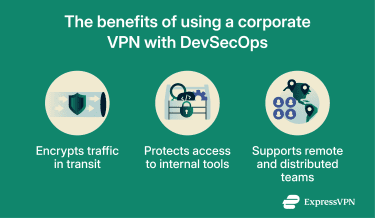 Corporate VPNs encrypt traffic between VPN endpoints (such as a device and a corporate gateway), which can help protect sensitive data in transit on untrusted networks. This can matter in development and deployment workflows that involve access to internal tools from remote or shared networks, such as source control systems or CI/CD services.
Remote access also expands the attack surface, which is why VPNs are typically paired with controls like multi-factor authentication (MFA), device posture checks, and least-privilege access.
Why a VPN doesn’t replace DevSecOps
A corporate VPN secures network connections but doesn’t address risks inside the development process itself. It can’t identify code flaws, detect vulnerable dependencies, or prevent configuration errors introduced during development.
DevSecOps focuses on securing the entire software lifecycle. VPNs work best alongside these practices to protect access to systems and data.
Challenges of adopting DevSecOps
DevSecOps offers clear benefits, but adopting it isn’t always straightforward.
Integrating security into existing workflows
Many teams already have established DevOps workflows. Integrating security changes into when and how work happens can surface real friction between roles.
- For development teams, security can feel like a constant “no,” adding barriers and additional work.
- For project or scrum managers, security input might feel like repeated objections that threaten scope and deadlines.
- For security teams, the job can feel like continuous oversight to prevent avoidable mistakes from reaching production.
This tension isn’t necessarily a failure of collaboration; it’s often a predictable outcome of different incentives and accountabilities. Making expectations explicit and embedding security into normal workflows, with shared responsibility, can reduce friction and support a more cohesive delivery process.
Balancing speed and security
DevSecOps is often misunderstood as a trade-off between speed and safety. In practice, the challenge comes from poorly tuned security checks and unclear policies. If pipelines fail too often or flag low-risk issues, teams may start to ignore alerts or bypass controls to keep releases moving.
Maintaining balance requires deciding which issues should block releases and which can be fixed on a defined timeline. Otherwise, security efforts can disrupt development without meaningfully reducing risk.
Managing complexity at scale
As applications grow, so do the number of environments, services, and dependencies involved. DevSecOps can introduce additional checks across these layers, potentially increasing the volume of findings to review.
At scale, the main challenge is managing issues consistently rather than simply finding them. Teams need visibility across systems and a clear way to track and resolve issues without losing focus on what matters most.
Best practices for DevSecOps
Successful DevSecOps depends on clear, repeatable practices that align security with everyday development work, such as:
- Embed security in planning and design: Address security requirements while features and architectures are still flexible, when changes are easier and less disruptive.
- Treat security as a shared responsibility: Developers, security teams, and operations all play a role. Clear ownership prevents security from becoming a late-stage handoff.
- Automate security checks in CI/CD pipelines: Automation reduces manual bottlenecks and consistently applies controls across code changes, catching common issues early with minimal friction.
- Test continuously throughout development: Regular testing helps surface new issues as code, dependencies, and configurations evolve.
- Prioritize vulnerabilities by impact: Not every finding needs the same response. Effective DevSecOps focuses on impact and risk, not just volume.
- Monitor applications and infrastructure continuously: Visibility into live environments helps teams detect issues that only appear after deployment.
- Learn from incidents: Security incidents and near misses provide insight that can strengthen future design, testing, and deployment decisions.
Together, these practices help teams implement DevSecOps to improve security without undermining efficiency.
FAQ: Common questions about DevSecOps
Is DevSecOps a cybersecurity practice?
Development, Security, and Operations (DevSecOps) isn’t a single, standalone security practice. It’s a development approach that integrates security into the planning, building, testing, and operation of software. Instead of relying mainly on perimeter defenses or one-time assessments, DevSecOps helps teams address security risks as they emerge throughout the software delivery lifecycle, alongside other security measures.
How is DevSecOps different from traditional security approaches?
Traditional security approaches like Development Operations (DevOps) often assess applications for security issues late in development or after deployment, when fixes are more disruptive. DevSecOps handles security early and continuously across the software delivery lifecycle.
Does DevSecOps slow down development?
Development, Security, and Operations (DevSecOps) can slow teams down if security checks are poorly implemented or generate excessive noise. When done well, it can make processes more efficient by reducing late-stage rework, avoiding rushed fixes, and catching security issues when changes are easier to manage.
Can small teams adopt DevSecOps?
Yes. Small teams can adopt Development, Security, and Operations (DevSecOps) by focusing on shared responsibility and a limited set of automated checks. DevSecOps can work well with lightweight roles and tooling, as long as ownership is clear and the basics are consistently applied. Many teams start with basic automation and expand their practices as their applications grow.
Is DevSecOps relevant outside of cloud environments?
Yes. Development, Security, and Operations (DevSecOps) is applicable to any software development environment, especially in teams using Development Operations (DevOps)-style workflows. The approach doesn't require large dedicated security teams to get started, but it does require clear ownership and practical security practices integrated into daily work.
Do developers need a VPN for DevSecOps?
Developers don’t need a VPN to practice Development, Security, and Operations (DevSecOps). However, corporate VPNs can support secure development by protecting access to internal systems and encrypting data in transit between VPN endpoints, especially for remote or distributed teams using shared or untrusted networks. VPNs complement DevSecOps by securing connections, while DevSecOps focuses on securing the software lifecycle itself.
Take the first step to protect yourself online. Try ExpressVPN risk-free.
Get ExpressVPN