Credit card authorization: The complete guide you need


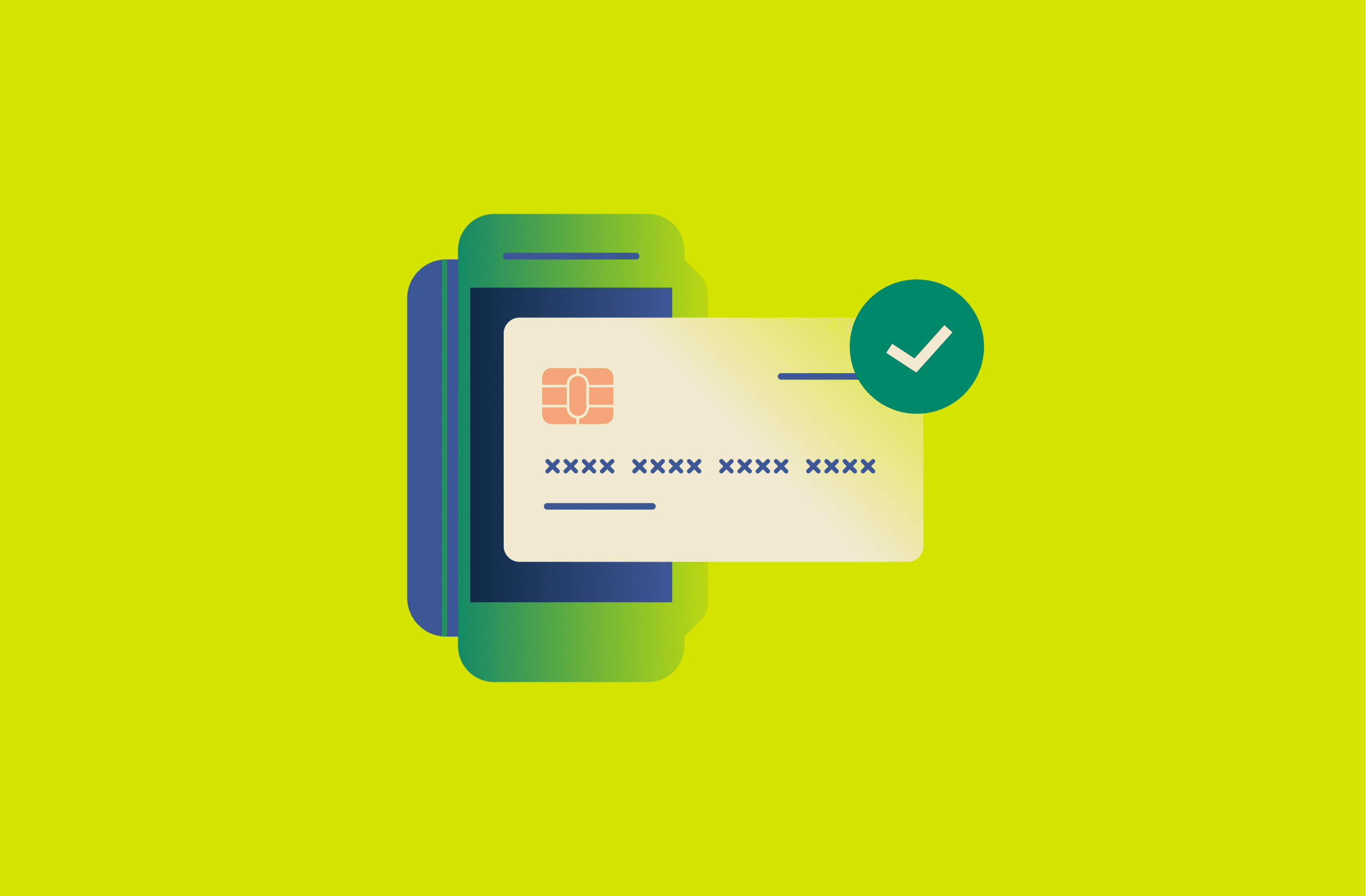
Credit card authorization is the step that decides whether a card payment can go through. That decision affects more than whether a purchase works: it acts as an early security checkpoint, helping stop unauthorized charges, limit fraud, and confirm that the card is valid.
As payments increasingly happen inside apps, each transaction has implications for privacy, data exposure, and account protection. This guide explains how payment authorization works and why it sometimes fails.
How credit card authorization works
When you pay with a credit card, your payment request travels through a chain of systems in just a couple of seconds. The goal is to answer one question: “Should we approve this purchase right now?” Understanding this flow helps explain holds, declines, and where privacy risks can appear if any system mishandles data.
The steps of authorization
When you make a credit card transaction, authorization happens in a flurry of digital communication between several parties. Here’s how it unfolds:
- Customer initiates the payment: The checkout system collects the transaction details and prepares an authorization request.
- Merchant sends the request to its processor: The merchant routes the authorization request through its payment processor or gateway.
- The card network routes it to the issuer: The card network identifies the card’s issuing bank and forwards the authorization request to that specific bank through controlled infrastructure.
- The issuer evaluates the transaction: The issuing bank checks account status, available credit, and fraud signals, then decides whether to approve or decline.
- The approval/decline response returns to the merchant: The decision travels back through the network and processor to the merchant in seconds.
- The merchant completes the transaction: If approved, the merchant receives an authorization code and the issuer places a temporary hold. If declined, the transaction stops.
What happens after authorization
Once authorization is granted, the payment moves into capture and settlement. Capture happens when the merchant confirms the final transaction amount and submits it for processing. Settlement follows capture and involves moving funds through the payment system and posting the transaction to the cardholder’s account.
After settlement, the payment generates records that are retained across several systems. While the transaction is no longer being evaluated in real time, its data continues to exist for operational, security, and regulatory purposes. The type of data stored and where it is held depends on the merchant, processor, network, and issuing bank.
What data is retained
Transaction records typically include non-sensitive details such as the transaction amount and currency, date and time, and merchant identifiers. Limited card-related identifiers, such as masked numbers or tokenized references, may also be retained to support reconciliation, refunds, and disputes.
Highly sensitive authentication data, including security codes and full track data, isn’t retained after authorization under the Payment Card Industry Data Security Standard (PCI DSS), an industry security standard required by major card networks. As a result, post-authorization records rely on transformed or partial identifiers rather than raw payment credentials.
Where the data is held
Transaction data isn’t stored in a single location. Instead, it is retained across different participants in the payment ecosystem, each holding records related to their specific role:
- Merchants maintain purchase records associated with orders, fulfillment, and customer support.
- Payment processors and acquiring institutions retain transaction data required for clearing, settlement, and reporting.
- Issuing banks store authorization and settlement records as part of the cardholder’s account history.
How sensitive information is represented
After authorization, payment systems avoid storing or displaying reusable card data wherever possible. If a primary account number (PAN) must be retained, PCI DSS requires it to be protected. In practice, that often means the PAN is masked when displayed, with only a limited portion visible, and full access allowed only when there is a legitimate business need.
Tokenization is another common approach in modern checkout flows. Instead of passing the full card number through internal systems, a token acts as a stand-in identifier, so leaked logs or databases don’t automatically become usable card data.
Addressing common authorization issues
Authorization failures are a normal part of card payment systems. A declined transaction doesn’t necessarily indicate fraud, insufficient funds, or an error by the cardholder. In many cases, it reflects how issuers balance security, financial controls, and system reliability in real time.
Why does authorization fail?
Authorization failures usually happen for three reasons: the bank flags risk, the account can’t cover the charge, or something breaks in the payment flow.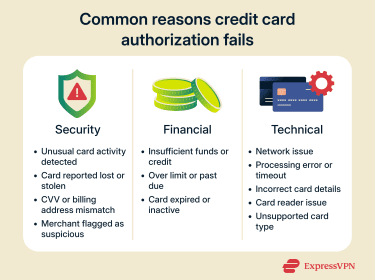
Security reasons
Banks decline transactions when fraud controls detect risk. Financial institutions don’t typically disclose the specific criteria they use to identify a potentially risky transaction, but triggers may include a sudden high-value charge, a purchase in a new location, or unusual spending behavior for that account.
Declines can also happen when the card status blocks authorization. If the card was reported lost or stolen, or the user froze it in their banking app, the issuer will typically reject new attempts until the status changes.
Finally, issuers run “proof-of-possession” checks to filter stolen-card fraud. If the Card Verification Value (CVV) or Address Verification Service (AVS) fails, the issuer may decline because the details don’t match what’s on file.
Financial reasons
Many declines are simple account and balance rules. If the card doesn’t have enough available credit or balance to cover the charge, the issuer can decline it.
Issuers may also decline when the account is restricted; for example, over limit, past due, or temporarily blocked under internal rules. Expired or deactivated cards are another common cause. If the expiry date has passed or the account is closed, issuers return declines that map to “expired card” or similar outcomes.
One important security note: scammers frequently weaponize “card declined” alerts to lure people into phishing pages. If you get an email saying there is an issue with your card, the safest move is to check the official banking app or call the number on the back of the card, not a link in a text or email.
Technical reasons
Authorization depends on multiple systems working in sequence: the merchant gateway or processor, the card network, and the issuer. If any link in that chain is down or slow, the request may time out before it gets a clean approval or decline.
Bad or incomplete transaction data can also trigger failures. Incorrect card numbers, expiration dates, or CVVs often return “invalid” responses. In-person payments may fail due to chip read errors, terminal issues, or forced fallback behavior when the chip can’t be read reliably.
Finally, some declines are configuration or routing problems. A merchant may not accept a specific card type or network, or the terminal may not support the transaction as submitted.
What to do if your authorization is declined?
By taking the following steps, you can often quickly identify whether the issue is on your end (an insufficient balance or a data entry error) or on the bank’s side (a fraud block):
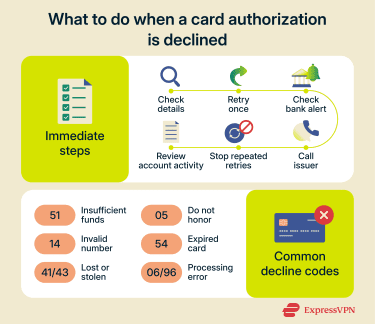
- Double-check your input: If you’re online or at an ATM, ensure you’ve entered the correct card number, expiration date, CVV, and billing ZIP code. A simple typo can trigger a decline, so rule that out first.
- Try again or use a different method: A one-time glitch can cause a decline, so retrying the transaction may resolve it. If it still doesn’t work and you need the purchase immediately, consider using a backup card or payment method.
- Look for any alerts from your bank: Many banks will send a text, email, or notification if they decline a transaction for security reasons. For example, you might get a fraud alert. Responding to confirm that it was you will often free up the card to be used on a retry.
- Contact your card issuer: If you can’t figure out why it was declined, flip your card over and call the customer service number. The bank can tell you the reason (insufficient funds, suspected fraud, etc.) and what to do next.
- Avoid repeated retries in quick succession: If a transaction is declined, don’t retry it repeatedly within a short period. Multiple rapid declines can trigger additional fraud flags or even a temporary lock.
- Check your account status: Log into your banking app or account portal and see if there are any notices. Also, check your available balance and recent transactions. If you see charges you don’t recognize, that could explain a decline (fraudulent charges might have maxed out your credit or triggered a freeze).
Understanding decline codes
When a card is declined, the transaction usually includes a decline code (also called a response code). You won’t always see it on a screen, as many terminals and websites just show “Transaction declined,” but receipts, support screens, or bank messages sometimes include the code. Here are the most common decline codes and what they mean:
- Insufficient funds (code 51): Means the issuer can’t approve the charge because there isn’t enough available balance or credit.
- Do Not Honor (code 05): A generic issuer decline. Banks often use this when they don’t want to share the reason (commonly risk/fraud or account restrictions). The only real fix is contacting the bank.
- Invalid account number (code 14): The card number doesn’t pass validation or doesn’t match an active account. This can be a typo, an old card, or a closed account.
- Expired card (code 54): The card is past its expiration date. You’ll need to use your replacement card or update the saved payment details.
- Lost/stolen card (codes 41 or 43): The issuer has flagged the card as lost or stolen and will block new authorizations. If it’s your card, you’ll need to call the bank.
- Processor error (code 06 or 96): A technical failure in the processing chain rather than a “true” decline. Retrying later or using another method usually works.
Exploring card authorization holds
If you’ve ever looked at your credit card or bank statement and seen a “pending” charge that later disappeared or changed amount, you’ve encountered an authorization hold.
A hold temporarily reserves funds on your card after approval, reducing your available credit or balance so the same money can’t be spent twice. At this point, the issuer has only set the amount aside; the merchant still has to capture the payment for it to become final. Holds are common in situations where the final amount isn’t known upfront, like hotels, car rentals, gas stations, and restaurants.
For merchants, holds help reduce risk. They confirm the card can cover the purchase and lower the chance of loss when the final charge settles. They also give the merchant room to adjust the final amount (for example, adding incidentals or tips) without restarting the entire payment flow.
How long can a credit card authorization hold last?
The duration of a hold can vary depending on the card network rules, the type of transaction, and the financial institution’s policies. In many cases, a hold expires within about a week if the merchant doesn’t capture the transaction. Some holds clear faster, such as small verification authorizations, while travel-related purchases like hotels and car rentals may keep holds active longer because the final amount often isn’t known at checkout.
The security of card authorization forms
Payment form security is a major focus for both fraud prevention and compliance, as even a secure authorization process can be compromised by an insecure checkout page, which could expose card data.
These risks exist at the point where payment details are collected, whether that happens through an online checkout page or a manual authorization form. That’s why it’s important to know what to look for when shopping online or giving a merchant access to your payment details.
Is a credit card authorization form safe?
A credit card authorization form can be safe, but only if the business collecting the information secures the full path from collection to payment processing. The biggest risks aren’t usually the form fields themselves. They come from what surrounds them, including:
- Malicious scripts injected into the checkout page (web skimming).
- Insecure third-party plugins and marketing tags.
- Misconfigured storage, where card details end up in logs, analytics tools, or support systems.
- Weak access controls that let attackers or insiders pull stored payment data.
A strong security posture means the form should send payment data directly to a trusted processor and avoid exposing raw card details to the merchant’s systems whenever possible.
Red flags to watch out for and best practises
- They ask you to send it by email, attachment, or fax: Sensitive details could be exposed if a mailbox is compromised, misaddressed, forwarded, or stored insecurely. Fax can create similar problems because documents may sit in shared queues or get handled by multiple people.
- They say they’ll store your CVV for later: CVV is considered sensitive authentication data and shouldn’t be retained after authorization.
- They can’t explain handling: If they can’t tell you where it’s stored, who can access it, and when it’s deleted/destroyed, that may mean weak controls.
- The form collects more than it needs: The more sensitive data included, the more damage a leak can cause.
To protect your payment information, it’s best to provide only what’s required, always use the most secure transmission method they offer, and if the request feels odd, verify it through official contact details (not a reply-to email or a link in the message).
Fraud prevention checks and measures
Securing the form prevents card data from leaking, but it doesn’t stop criminals from using stolen details elsewhere. To reduce fraud, authorization flows also rely on verification signals collected at checkout and evaluated during authorization. Common controls include:
- AVS: AVS is when the merchant asks for your billing address (often just the ZIP code, sometimes the street number) and sends that to the issuer for verification. The issuer replies if it’s a full match, a partial match, or no match. Merchants can decide to decline or review transactions where the address doesn’t match.
- 3-D Secure: This is an additional authentication step for online purchases. You’ve likely encountered it as a one-time password (OTP) from your bank or a pop-up asking you to verify. The merchant’s site sends the transaction details to your bank (such as device information, purchase details, etc.), and the bank’s system decides if the risk is low (in which case, it silently approves) or high (in which case, it “challenges” you to authenticate).
- Machine learning (ML) and transaction scoring: Behind the scenes, issuers use ML algorithms to score each authorization for fraud likelihood. Based on the system’s risk assessment, they might auto-decline or auto-approve.
- Tokenization and digital wallets: Using payment methods like Apple Pay, Google Pay, or other digital wallets adds security. These methods tokenize your card, meaning the device sends a unique token (a random number) instead of your card number for each transaction. This prevents many forms of data theft; even if a hacker intercepts the token, it’s useless to them beyond that single transaction.
- Biometric payments and advanced ID: These tie a unique physical identifier to the payment. While convenient, biometric payments come with their own privacy risks: you can’t change your fingerprint like you can a password if compromised. Regulation and caution are needed as biometrics become part of payment authentication.
FAQ: Common questions about credit card authorization
How long can a credit card authorization hold last?
A credit card authorization hold can last from a few days up to about a week, depending on the card network, the issuing bank, and the merchant. Some sectors, such as hotels, car rentals, and fuel stations, often place longer authorization holds because the final charge amount may change. If the merchant does not complete the transaction in time, the authorization usually expires automatically, and the held funds are released.
What does “authorized” mean on a credit card?
“Authorized” means the card issuer has approved the transaction amount and temporarily set those funds aside. It confirms that the card is valid, the account is in good standing, and enough credit or balance is available. An authorized transaction is not yet final. It becomes a completed charge only after the merchant settles it.
Is a credit card authorization form safe?
A credit card authorization form can be safe, but only if it is handled correctly. Risks increase when forms are stored insecurely, sent by email without encryption, or kept longer than necessary. Safer practices include using secure payment gateways, limiting access to the data, masking card numbers, and avoiding long-term storage of full card details.
How can I dispute a credit card authorization charge?
If an authorization appears incorrect or suspicious, start by contacting the merchant to clarify the charge. If the issue is not resolved, contact the card issuer and request a dispute. Issuers can investigate, reverse unauthorized charges, or remove lingering authorization holds, especially if the transaction was never completed.
How to prevent credit card authorization issues in e-commerce?
Merchants can reduce authorization problems by using reliable payment gateways, validating customer details, supporting modern security checks, and clearly communicating billing information. For shoppers, keeping card details up to date, avoiding suspicious websites, and using trusted payment methods can lower the chance of declined or flagged transactions.
Take the first step to protect yourself online. Try ExpressVPN risk-free.
Get ExpressVPN